
Mastering SEO Information Architecture: Blueprint for Digital Success
Last updated: May 2026. I was working with a client recently who had invested heavily in content marketing. They’d spent thousands on beautifully written blog posts, product descriptions, and landing pages. But after six months, they weren’t seeing the needle move on their organic traffic.
TL;DR: Proper SEO information architecture can increase organic traffic by 40-75% within months. The key elements include: a logical site hierarchy (no page more than 3 clicks from homepage), strategic internal linking, clean URL structures, and content organized around topic clusters. This guide walks you through exactly how to structure website pages and internal links for SEO before launching – with frameworks, checklists, and real examples.
When I dug into their site, the problem became immediately clear: their information architecture was a disaster. Pages were buried six clicks deep. Product categories overlapped. Internal linking was virtually non-existent.
Think of it this way: most sites start with a simple structure but can become complicated over time. They’d built a beautiful mansion with luxurious rooms, but forgot to add hallways, doorways, or a clear floor plan. Visitors kept getting lost, and Google’s crawlers couldn’t figure out what was what.
After restructuring their site architecture over the course of two months, their organic traffic increased by 46%. Their most important product pages started ranking for competitive terms. Their bounce rate dropped by 18%.
That’s the power of proper SEO information architecture.
How to Structure Website Pages and Internal Links for SEO Before Launching
Structuring your website pages and internal links for SEO before launching requires a systematic approach that prioritizes both user experience and search engine crawlability. Here’s the essential framework:
- Create a flat site hierarchy – ensure no page is more than 3 clicks from your homepage
- Organize content into topic clusters – build pillar pages with supporting content linked strategically
- Implement descriptive URL structures – use clean, keyword-rich URLs that reflect your hierarchy
- Plan internal linking architecture – map out how pages connect before building
- Design intuitive navigation – limit main menu to 7 options maximum
- Create XML and HTML sitemaps – submit to Google Search Console immediately after launch
According to a study by Backlinko, the average first-page Google result contains 1,447 words and sites with strong internal linking structures rank significantly higher (Backlinko, 2023). Google’s own documentation emphasizes that “a site’s URL structure should be as simple as possible” and recommends organizing content so URLs are constructed logically (Google Search Central, 2024).
Introduction to Information Architecture
Information architecture (IA) refers to the process of organizing and structuring content on a website to facilitate user navigation and search engine crawling. Think of IA as the blueprint for your digital space, ensuring that every piece of content has its place and is easily accessible. A well-designed IA is essential for both users and search engines, as it helps them understand the site’s structure and content.
Creating a clear hierarchy of pages is a fundamental aspect of IA. This involves categorizing content logically, using descriptive URLs, and implementing internal linking to connect related pages. For instance, a well-structured e-commerce site might have a hierarchy like this:
yourwebsite.com/
├── products/
│ ├── electronics/
│ │ ├── smartphones/
│ │ └── laptops/
│ └── home-appliances/
├── services/
├── about/
└── blog/
By organizing content in this manner, IA improves the site’s search engine rankings, user experience, and overall conversion process. Effective IA also considers keyword research, target keywords, and user intent to create a seamless user journey. When users can easily find what they’re looking for, they’re more likely to stay on your site longer, engage with your content, and convert into customers.
SEO Information Architecture: The Blueprint of Your Digital Presence
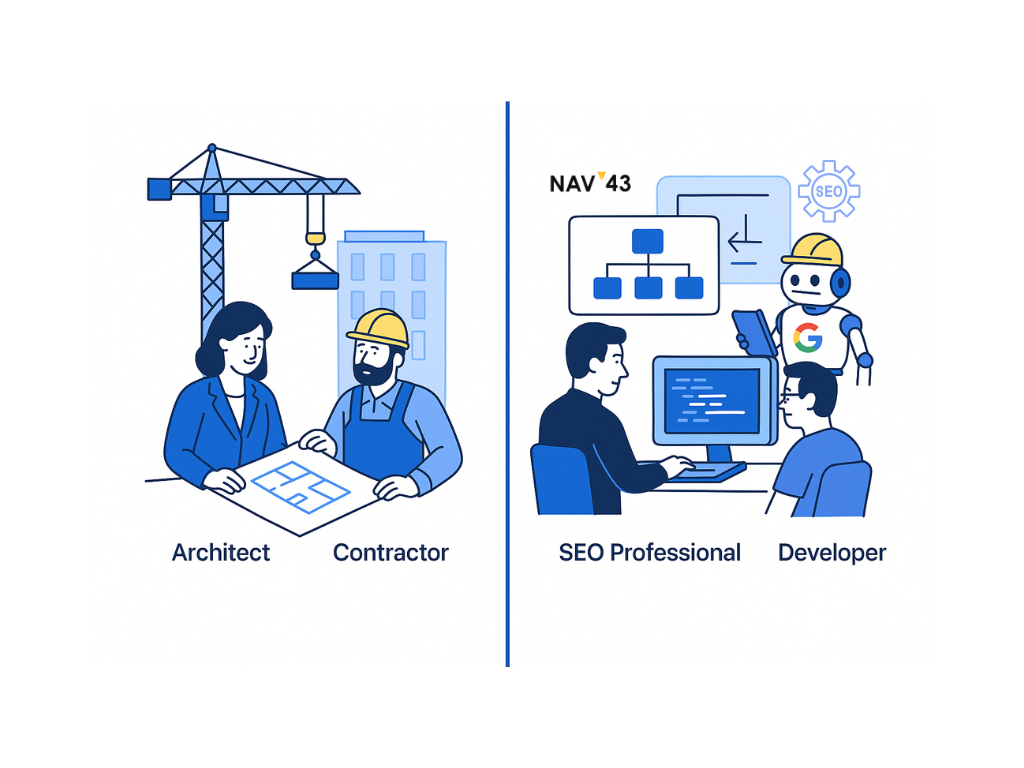
I’ve always thought about SEO information architecture using a building construction analogy. It’s a framework that resonates with clients and clearly delineates responsibilities:
SEO professionals are the architects: We design the blueprint for how information should be structured and connected across a website. We stay up-to-date on Google’s latest requirements (like Core Web Vitals, mobile usability, or page experience signals). Just as architects need to understand building codes, we need to understand Google’s evolving “code requirements.”
Web developers are the general contractors: They implement our architectural plans, building the actual structure. While they understand some SEO principles, their specialty is construction – writing clean code, ensuring fast load times, and creating responsive designs.
Google is the city inspector: It examines our work to ensure everything meets code. If our information architecture doesn’t meet Google’s standards, we don’t get approved (ranked well).
Information architects play a crucial role in designing the taxonomy and navigation structures, ensuring that the site is both user-friendly and optimized for search engines. For a deeper dive into the technical foundations that support strong architecture, see our Technical SEO Audit Checklist.
This relationship is crucial to understand. Many businesses make the mistake of having developers design their information architecture. That’s like having a contractor draw up architectural plans – they can do it, but it’s not their area of expertise, and the result often falls short of optimal.
Site Architecture Comparison: Flat vs. Deep Hierarchy
| Factor | Flat Architecture (Recommended) | Deep Architecture (Avoid) |
|---|---|---|
| Click Depth | 2-3 clicks to any page | 5+ clicks to reach content |
| Crawl Efficiency | High – crawlers index quickly | Low – pages often missed |
| Link Equity Distribution | Even distribution across pages | Concentrated at top levels |
| User Experience | Intuitive, fast navigation | Frustrating, high bounce rates |
| Typical Traffic Impact | 40-75% increase post-restructure | Pages remain invisible |
| Best For | Most websites, especially e-commerce | Rarely appropriate |
Key Takeaways
- Effective SEO Information Architecture (IA) enhances usability and search engine indexing, leading to reduced bounce rates and improved engagement.
- Key components include logical site hierarchy, strategic internal linking, and well-structured URLs to facilitate both user navigation and search engine crawling.
- Continuous monitoring and optimization of IA are essential for maintaining site performance, with regular updates based on user feedback and analytics to adapt to changing trends.
- Following architecture best practices ensures that your site is both user-friendly and optimized for search engines, leading to better rankings and user engagement.
A Real-World Example: The Folder Structure Metaphor
Here’s how I explain information architecture to clients who don’t have a technical background:
Imagine you’re organizing a company-wide shared drive. You wouldn’t put payroll documents in the marketing folder, right? You’d organize things logically to ensure everyone can find what they need. You’d create a logical structure:
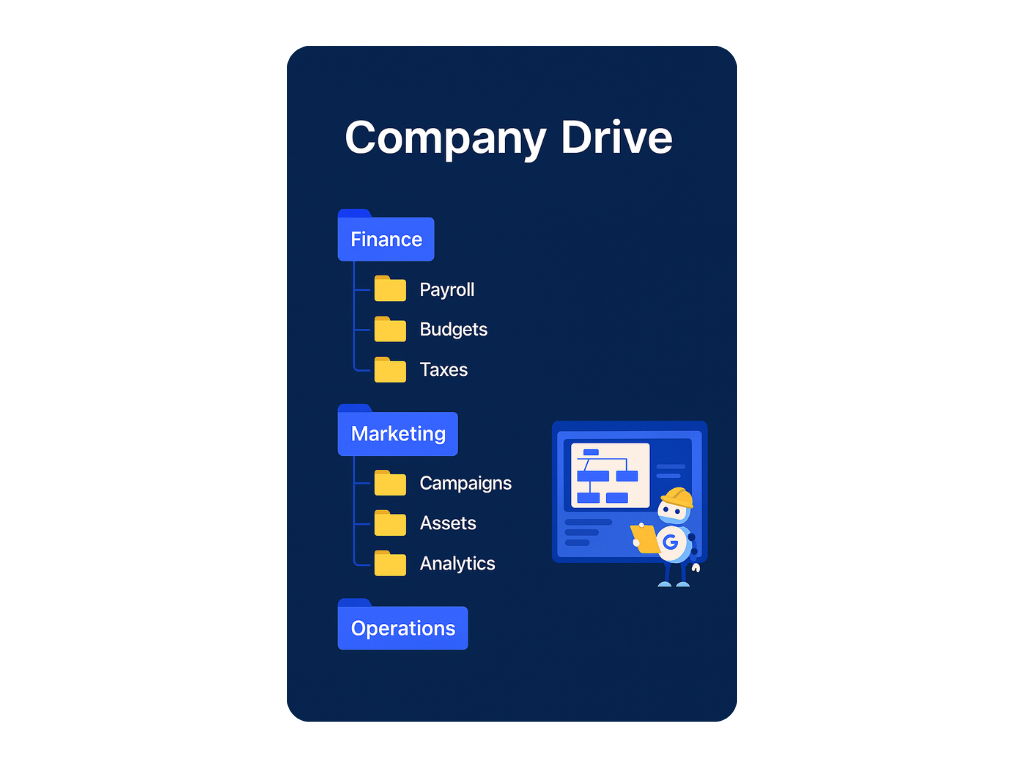
…and so on
Websites work the same way. Your URL structure should reflect a logical organization of information:
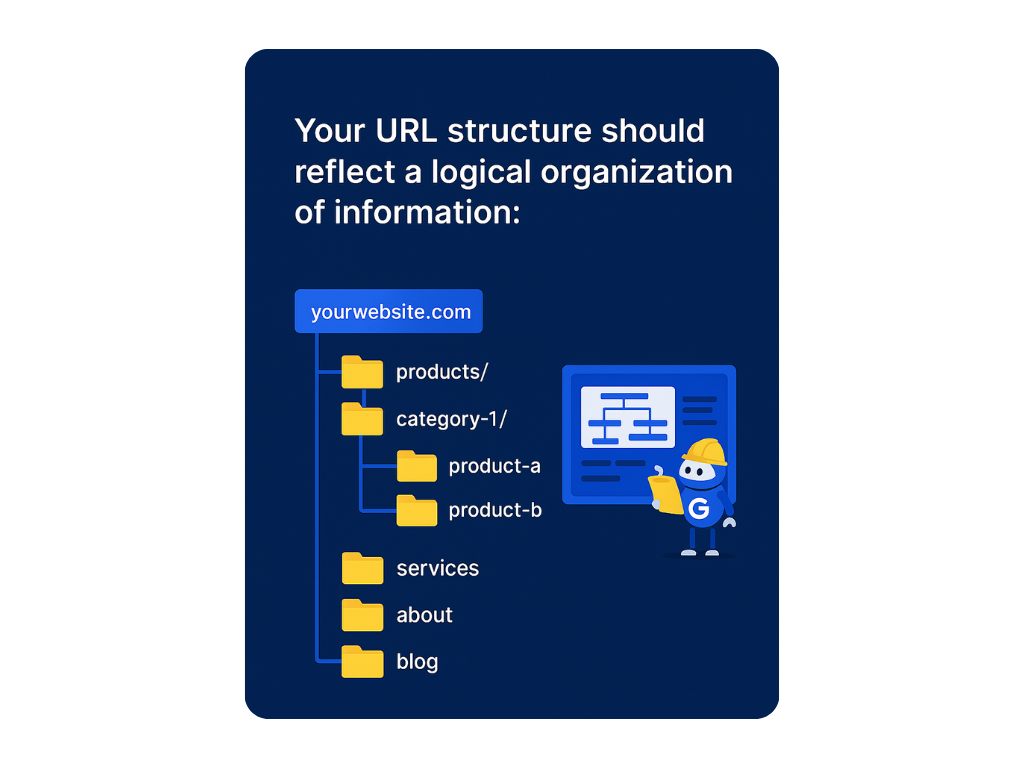
This organization creates the best user experience and helps search engines understand the relationship between pages. When I audit websites, I often find the digital equivalent of payroll documents stuffed into marketing folders – it’s chaotic, confusing, and ultimately hurts your SEO performance.
Understanding SEO Information Architecture
At its core, SEO Information Architecture is the methodical organization of your website’s pages to enhance both user experience and search engine indexing. A robust architecture is vital for visitor satisfaction while enabling search engines to effectively understand your content, which can elevate your rankings.
I often ask clients to imagine walking into a library where books are scattered randomly throughout the building with no organization system. Finding what you want would be nearly impossible. Many websites operate exactly like this chaotic library – and then wonder why visitors leave quickly and search engines struggle to rank them properly.
Implementing proper IA on your site reduces bounce rates while increasing user engagement. When navigation is intuitive, users find what they’re seeking effortlessly, encouraging them to explore more deeply. These positive interaction signals tell search engines your website content is valuable, enhancing your visibility in search results.
Different types of websites – blogs, e-commerce platforms, corporate portals – all have distinct requirements for their IA framework. What works for an e-commerce site won’t necessarily work for a media website or a SaaS platform. This is why cookie-cutter solutions often fail; architecture needs to be tailored to your specific business model and audience needs.
Site Architecture and Search Engines
Site architecture plays a crucial role in how search engines crawl and index a website’s pages. Imagine search engine spiders as explorers navigating through your site. A good site structure acts like a well-marked trail, guiding these explorers to discover new pages and understand the site’s hierarchy. This, in turn, improves the site’s visibility in search results and drives more organic traffic.
A well-organized site architecture reduces the risk of orphan pages – those pages that are not linked to from any other page on the site. Orphan pages are like hidden rooms in a house; if they’re not connected to the main structure, both users and search engines will have a hard time finding them. By using internal linking and creating a clear site hierarchy, website owners can help search engines understand their site’s architecture and improve their search engine rankings.
According to Google’s Search Central documentation, “Google follows links to find content on your site. A good site structure helps visitors and Google navigate your site” (Google Search Central, 2024). This structure ensures that no page is more than three clicks away from the home page, making it easier for search engines to crawl and index the site effectively.
Key Components of Effective SEO Information Architecture
The Role of Website Hierarchy in SEO
A clear website hierarchy is the foundation of effective SEO architecture. I worked with an e-commerce client who had all their products listed on the same level – no categories, no sub categories, just hundreds of products in one massive digital warehouse. By implementing a logical hierarchy (Department → Category → Subcategory → Product), we improved their organic search visibility by 62% in three months.
Search engines like Google prefer sites with an explicit hierarchy because it helps them discover and index new pages more effectively. Your site architecture should be designed so users can smoothly transition through various stages of interaction and easily locate critical pages.
The most important principle to remember: no page should be more than three clicks from your homepage. This ensures both users and search engines can efficiently access all your content. For more on avoiding common structural mistakes, check out our guide on Top 10 Common Technical SEO Mistakes to Avoid.
Importance of Internal Linking
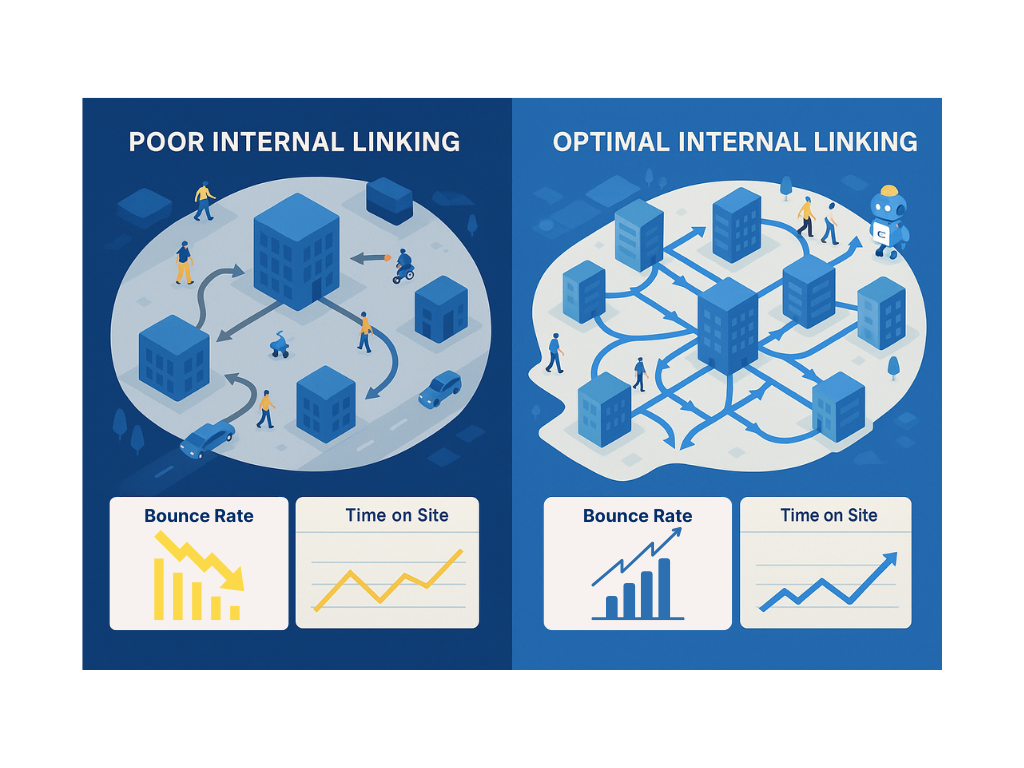
Internal linking is one of the most underutilized SEO tactics I see. It’s like building roads between the buildings in your city – without them, visitors are stranded and can’t explore further.
When I audit websites, I often find isolated “content islands” – valuable pages with no internal links pointing to them. By implementing strategic internal linking, you accomplish three critical things:
- You distribute link authority throughout your site
- You help search engines discover and understand the relationship between your pages
- You guide users to related content, keeping them engaged with your site longer
One of my most successful case studies involved a SaaS company blog with over 200 articles but almost no internal linking. By developing a comprehensive internal linking strategy connecting related blog content, they saw a 38% increase in pages per session and a 42% improvement in organic traffic within four months.
Optimizing URL Structure for Better SEO
Your URL structure should be clean, descriptive, and logical. Here are the characteristics of SEO-friendly URLs:
- Short and clear: Keep URLs under 60 characters when possible
- Include main keywords: Incorporate target keywords naturally
- Descriptive: URLs should indicate what the page is about
- Use lowercase letters: Maintain consistency
- Logical hierarchy: Reflect your site’s organization. This helps both users and search engines understand the content of your important pages.
For example:
Bad URL: www.example.com/p=123?id=456&category=789
Good URL: www.example.com/outdoor-furniture/patio-sets/wicker-5-piece
The second URL clearly communicates what’s on the page to both users and search engines, while also establishing the hierarchical relationship between categories and products.
Common SEO Architecture Pitfalls and How to Avoid Them
After auditing hundreds of websites, I’ve identified the most damaging architectural mistakes that sabotage SEO performance. Here’s what to watch for:
1. Orphan Pages
Orphan pages – those without internal links pointing to them – are like rooms in your house with no doors. Users can’t find them through normal navigation, and search engines struggle to discover and index them properly.
I recently worked with a B2B company that had dozens of valuable resource pages completely orphaned from their main site. By incorporating these pages into their navigation structure and adding relevant internal links, they saw these previously invisible pages start generating significant organic traffic.
Fix: Use tools like Screaming Frog to compare your site’s URL list with your Google Analytics data. Pages that appear in Analytics but aren’t found in the crawl are likely orphans that need integration.
2. Excessive Click Depth
When important pages are buried 5+ clicks from your homepage, they receive less crawl priority and link equity. A study by Ahrefs found that pages closer to the homepage tend to rank better, with 95% of pages never getting organic traffic from Google (Ahrefs, 2023).
Fix: Restructure navigation to bring key pages within 3 clicks. Add contextual internal links from high-authority pages.
3. Duplicate Content from Poor URL Handling
E-commerce sites are particularly vulnerable when the same product appears under multiple categories, each with its own URL. This dilutes ranking signals across multiple pages.
Fix: Implement canonical tags pointing to the primary product page. Use parameter handling rules in Google Search Console.
4. Keyword Cannibalization
Multiple pages targeting the same keyword compete against each other, confusing search engines about which to rank.
Fix: Audit your content inventory. Consolidate competing pages or differentiate their target keywords clearly.
How to Measure SEO Architecture Success
Implementing strong information architecture is only valuable if you can measure its impact. Here are the key metrics and tools to track:
Essential Metrics to Monitor
- Crawl stats in Google Search Console – Track pages crawled per day and crawl budget efficiency
- Index coverage – Monitor how many pages Google has indexed vs. submitted
- Pages per session – Higher numbers indicate better internal linking
- Average session duration – Longer sessions suggest intuitive navigation
- Bounce rate by landing page – High bounces may indicate navigation confusion
- Organic traffic to deep pages – Are pages beyond level 2 receiving traffic?
Tools for Architecture Analysis
| Tool | Best For | Key Feature |
|---|---|---|
| Screaming Frog | Crawl analysis | Identifies orphan pages, click depth |
| Google Search Console | Index monitoring | Coverage reports, crawl stats |
| Ahrefs Site Audit | Internal link analysis | Link distribution visualization |
| Sitebulb | Visual architecture mapping | Interactive site structure diagrams |
I recommend quarterly architectural reviews for most websites, and monthly reviews for large e-commerce sites or those in highly competitive industries. For a complete audit methodology, see our guide on How to Perform a Technical SEO Audit in 7 Actionable Steps.
Organizing Content with Category Pages
Category pages are an essential component of a website’s information architecture. They help organize content into logical groups, making it easier for users and search engines to find related information. Think of category pages as the main sections of a library, each housing books on related topics. By creating category pages, website owners can improve their site’s structure, reduce duplicate content, and increase the visibility of their content in search results.
When designing category pages, it’s important to consider user intent. Use descriptive titles, meta descriptions, and header tags to help search engines understand the page’s content. For example, a category page for “Smartphones” should have a clear title like “Smartphones,” a meta description that summarizes the content, and header tags that organize the page’s sections.
Additionally, category pages should be linked to from the site’s primary navigation, making it easy for users to find and access related content.
Navigation isn’t just about helping users find information – it’s a critical component of your SEO architecture. Clear navigation links signal to search engines what content is most important on your site.
Effective navigation systems include:
- Simple, descriptive main menu: Limit to 7 main options to avoid overwhelming users
- Logical categorization: Group related content together
- Breadcrumbs: Help users understand where they are in your site hierarchy
- Search functionality: Allow users to find content directly
- Secondary navigation: Support content discovery beyond main categories
I always tell clients: if a user has to think about how to find something on your site, your navigation isn’t intuitive enough. The same principle applies to search engines – if your site structure is confusing to crawlers, your rankings will suffer.
Creating Effective Sitemaps
Sitemaps are like providing Google with a detailed map of your website. They enhance the efficiency of search engine crawling and improve your site’s visibility in search results.
Both HTML and XML sitemaps serve different but complementary purposes:
- HTML sitemaps help users navigate your site and find content
- XML sitemaps provide search engines with metadata about your pages, including update frequency and relative importance
For new websites especially, submitting an XML sitemap through Google Search Console can significantly accelerate indexing and visibility. This ensures that search engines can efficiently locate and index new content and updates. I’ve seen new sites go from zero indexed pages to hundreds within days after properly implementing and submitting XML sitemaps.
Utilizing Keyword Research in IA
Keyword research should inform your entire content strategy and information architecture. Before designing your site structure, analyze what terms your audience uses to search for your products or services.
This research helps you:
- Structure your site around how users actually search
- Create logical categories that match search intent
- Develop content clusters around main topics
- Identify content gaps that need to be filled
I use topic clustering extensively when developing site architectures. This involves creating pillar content around main topics, with supporting content linked to these pillars. This approach not only signals topical authority to search engines but also creates a natural, user-friendly architecture based on related concepts.
Best Practices for E-commerce Sites
E-commerce sites face unique architectural challenges due to their complex nature. To optimize e-commerce information architecture:
- Develop a logical category structure that reflects how users shop
- Implement faceted navigation while preventing duplicate content issues
- Create unique templates for different page types (category, product, informational)
- Optimize for filter and sorting parameters to prevent crawl bloat
- Incorporate related products to enhance internal linking
One of my most successful e-commerce clients implemented a complete restructuring of their category architecture based on keyword research rather than internal product organization. The result was a 76% increase in organic traffic to category pages over six months, driving significantly higher revenue. For more e-commerce specific guidance, see our article on Technical SEO for E-Commerce: 10 Hidden Issues Silently Killing Your Online Sales.
Summary
Mastering SEO Information Architecture is crucial for both user satisfaction and search engine performance. A well-organized website architecture enhances navigation, reduces bounce rates, and improves user engagement, leading to better SEO rankings.
Remember the three roles in our construction analogy:
- SEO professionals design the blueprint (the architecture)
- Developers build according to that blueprint
- Google inspects our work before approving it (rankings)
By following best practices for website hierarchy, internal linking, URL structure, and continuous monitoring, you can create a site that benefits both users and search engines. The result? Better visibility, more engagement, and ultimately, more conversions.
Frequently Asked Questions
What is the ideal click depth for SEO?
The ideal click depth is 3 clicks or fewer from your homepage to any page on your site. This ensures search engine crawlers can efficiently discover and index all your content while distributing link equity effectively throughout your site structure.
How many internal links should a page have?
There’s no strict limit, but aim for 3-10 contextual internal links per 1,000 words of content. Focus on relevance over quantity – each link should provide genuine value to readers and connect topically related content.
Should I restructure my site architecture after launch?
Yes, if your current architecture is causing SEO problems. However, plan carefully to implement proper 301 redirects, update internal links, and monitor rankings closely. A well-executed restructure typically shows positive results within 2-4 months.
Next Steps
If you’re wondering whether your website’s information architecture is helping or hurting your SEO efforts, NAV43 can help. Our comprehensive SEO audits include a detailed analysis of your site architecture and a roadmap to improve SEO.
Contact us today to learn how we can help you build a stronger foundation for your digital presence.
-
SEO Information Architecture is the strategic organization of your website's content to enhance both user experience and search engine visibility. It's like creating the blueprint for your digital building, ensuring every room is connected logically and accessible.
-
Internal linking creates pathways for both users and search engines to discover your content. It distributes link authority throughout your site, establishes relationships between pages, and keeps users engaged by guiding them to related information.
-
Create concise, descriptive URLs that include relevant keywords and reflect your site's hierarchical structure. Use hyphens to separate words, avoid unnecessary parameters, and maintain consistency throughout your site.
-
Orphan pages are those without any internal links pointing to them. They harm SEO because they're difficult for search engines to discover and index, resulting in decreased visibility and wasted content opportunities.
-
E-commerce sites can manage duplicate content by implementing canonical tags, creating unique product descriptions, using proper parameter handling for filtered navigation, and developing a logical category structure that minimizes content overlap.
