HubSpot Attribution Reporting: What to Track for Pipeline, Not Just Leads
Marketers waste 26% of their budget on ineffective channels (HubSpot State of Marketing Report, 2025-2026). That’s not a data problem. It’s a measurement problem.
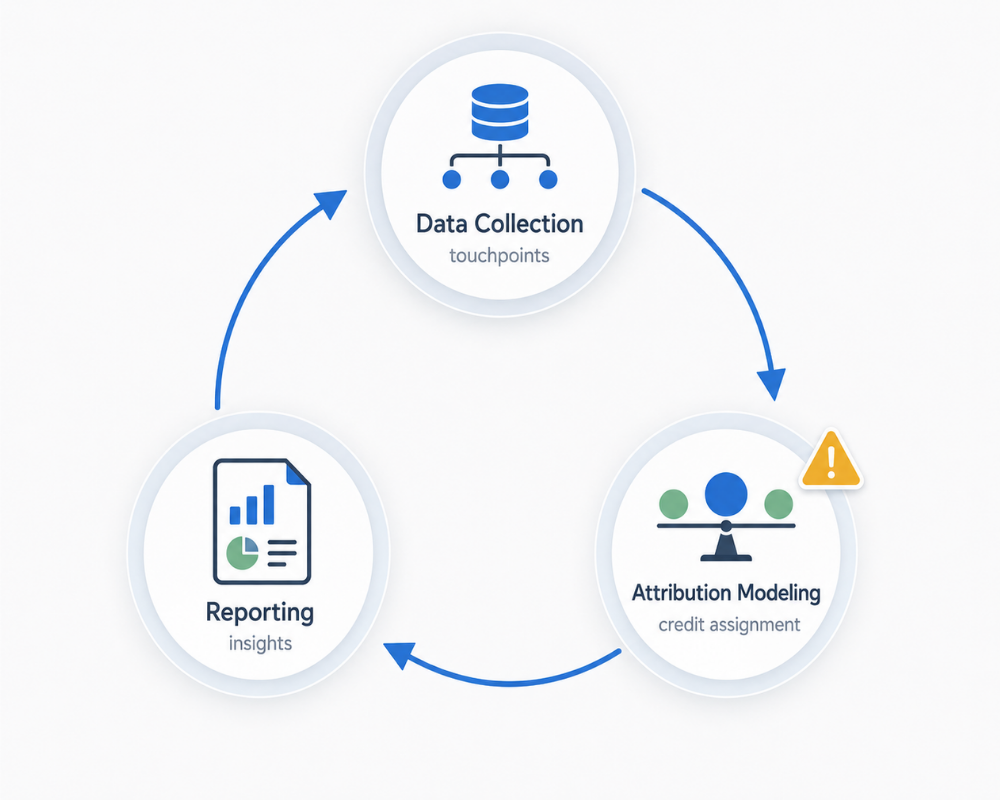
I was reviewing attribution reports with a B2B client last quarter who couldn’t understand why their “successful” marketing wasn’t translating to revenue. They had the dashboards. They had the leads. They even had a dedicated marketing ops person running weekly reports. The problem? Every single report focused on contact-create attribution, where leads came from, while their CFO kept asking a fundamentally different question: “Which channels are actually driving pipeline?”
Only 21% of B2B marketers are confident in their attribution (Forrester 2025 B2B Attribution Study). The other 79% are either guessing or measuring the wrong things entirely. Most HubSpot users are running HubSpot attribution reporting that impresses marketing but means nothing to the CFO. This article fixes that.
Here’s what we’re covering: the three types of attribution reports HubSpot actually offers (most content only mentions one), why pipeline attribution beats lead attribution every time, which attribution models fit your sales cycle, and the exact steps to build reports that prove marketing’s contribution to revenue, not just lead volume.
We’ve rebuilt attribution frameworks for B2B clients whose marketing “worked” on paper but couldn’t prove a dollar of influenced revenue. The shift from lead-sourced to pipeline-influenced to revenue-attributed isn’t just a reporting upgrade. It’s a career-defining move for marketing leaders who want a seat at the revenue table.
What Is HubSpot Attribution Reporting? (And Why Most Teams Use It Wrong)
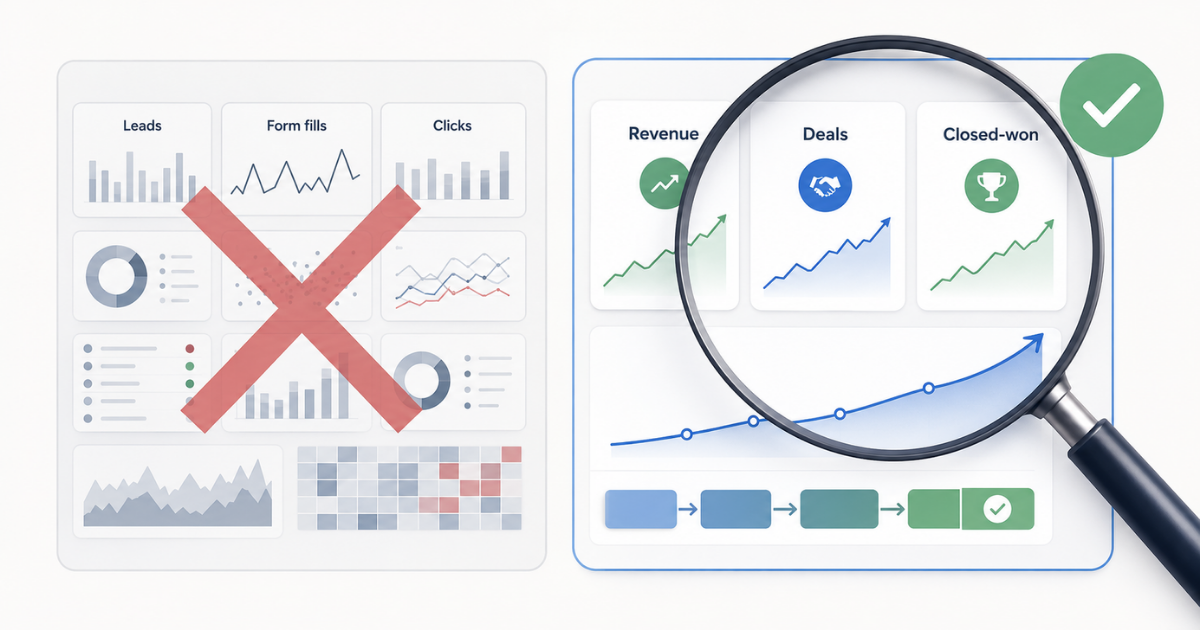
HubSpot attribution reporting is the system that credits marketing interactions with business outcomes. It answers the question: “Which touchpoints contributed to this result?” But here’s what most HubSpot users miss: there are three distinct report types, and stopping at the first one is like measuring restaurant success by counting how many people walked through the door.
The Three Report Types HubSpot Offers:
- Contact-create attribution: Which touchpoints created new contacts (top-of-funnel)? This tells you where leads come from.
- Deal-create attribution: Which touchpoints influenced deal creation (mid-funnel). This reveals what touched prospects before they became opportunities.
- Revenue attribution: Which touchpoints contributed to closed-won revenue (bottom-funnel)? This shows what actually drove money in the door.
HubSpot’s CRM market share climbed to 35% in 2025 (RevPartners/HubSpot Financial Reports 2025), yet the vast majority of users only use contact-create reports. It’s the default. It’s what most tutorials cover. And it’s fundamentally insufficient for proving marketing ROI.
So what is the purpose of creating contact attribution reports in HubSpot? It’s to understand lead sources, which channels, campaigns, and content assets are generating new contacts in your database. This is valuable information for top-of-funnel optimization. But it tells you nothing about which channels produce quality leads that convert to pipeline and revenue.
Here’s the critical distinction: contact-create attribution measures volume. Deal creation and revenue attribution measure value. Marketing teams that only track the former optimize for the wrong outcomes and wonder why finance questions their budget requests.
Important note: Deal-create and revenue attribution require Marketing Hub Enterprise. If you’re on a lower tier, you’re limited to contact-create reports, which means you’re structurally unable to prove pipeline contribution within HubSpot’s native reporting.
The Three Layers of HubSpot Attribution
| Layer | Question Answered | Funnel Stage |
|---|---|---|
| Contact-Create | “Where did this person come from?” | Top-of-funnel |
| Deal-Create | “What touched them before they became an opportunity?” | Mid-funnel |
| Revenue | “What influenced actual closed-won deals?” | Bottom-funnel |
The progression matters. Contact-create tells you about awareness. Deal-create tells you about influence. Revenue tells you about business impact. Most marketing teams stop at awareness and wonder why they can’t get budget increases.
Why Pipeline Attribution Beats Lead Attribution (The CFO Perspective)
The Disconnect Between Marketing Metrics and Business Outcomes
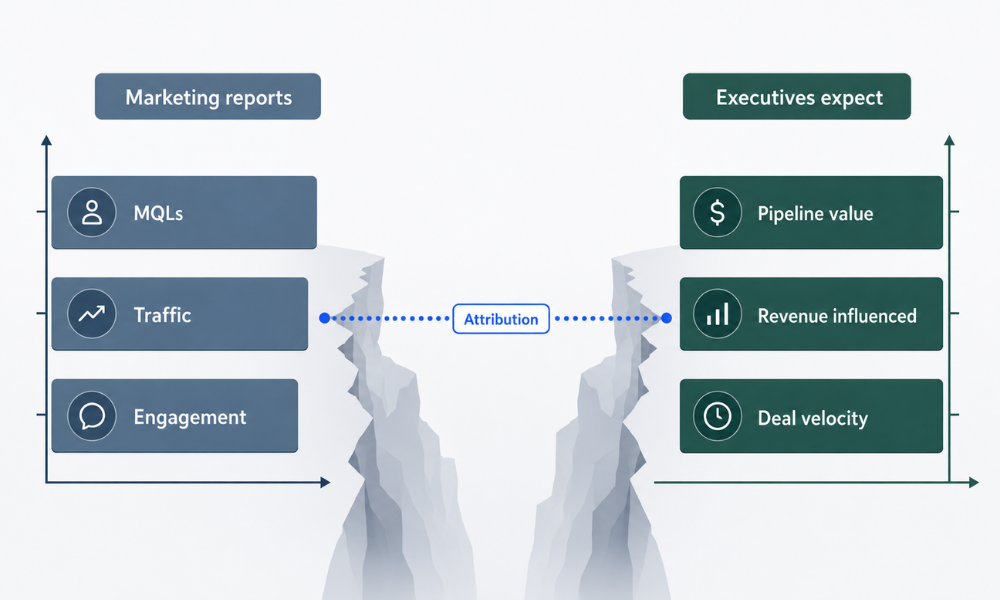
Marketing celebrates MQLs and lead volume. Finance cares about the pipeline and revenue. This disconnect isn’t new, but it’s gotten worse as marketing budgets face increased scrutiny.
Here’s the reality: 59% of CMOs report insufficient budget to execute their strategy (Gartner 2025 CMO Spend Survey). Attribution that proves ROI isn’t just a nice-to-have; it’s the path to budget defense and strategic investment.
Let me paint you a scenario that plays out in boardrooms constantly:
Channel A generates 500 leads at $20/lead. Channel B generates 100 leads at $100/lead. Contact-create attribution favors Channel A, five times the leads at one-fifth the cost. Clear winner, right?
But what if Channel B’s leads close at 25% while Channel A’s close at 2%? Channel A produces 10 customers. Channel B produces 25 customers. If your average deal size is $50,000, Channel A generated $500,000 in revenue for $10,000 in spend. Channel B generated $1,250,000 for $10,000 in spend. Channel B is 2.5x more valuable, but contact-create attribution would have you cut its budget.
This is why understanding what a reporting statement is, and what HubSpot actually means, matters. It’s the lens you apply to your data. The wrong lens produces the wrong decisions.
The Pipeline Influence Shift
B2B journeys involve 8-15 touchpoints on average before close (Aexus 2025 Analysis). The average B2B software transaction involves up to 266 touchpoints, yet click-tracking captures less than 0.5% of that activity (Channel99, 2026).
This means that single-touch attribution, which credits one interaction, misses 99.5% of the buying journey (Demand Gen Report / Channel99 2026). Pipeline attribution measures which channels influenced deals, not just contacts. It captures the middle of the funnel where most buying decisions actually happen.
We’ve seen clients cut budget from their highest-lead-volume channel and increase pipeline by reallocating to channels that produce closeable opportunities. The data was always there. They just weren’t measuring it.
What Finance Actually Wants From Marketing
The CFO question is simple: “For every dollar we spend on marketing, how much pipeline and revenue does it generate?”
Contact-create attribution cannot answer this question. It can tell you cost-per-lead, but a $20 lead that never closes is infinitely more expensive than a $200 lead that becomes a $100,000 customer.
Revenue attribution answers the question directly. It shows which marketing investments contributed to closed-won deals, with actual dollar values attached.
Organizations that align sales, marketing, and customer success under a unified RevOps model achieve 36% more revenue growth (Forrester, 2025). Attribution is the measurement layer that enables this alignment. When marketing and sales are looking at the same pipeline and revenue numbers, the arguments about “lead quality” disappear.
HubSpot Attribution Models Explained: Which One Fits Your Sales Cycle
HubSpot offers multiple HubSpot attribution models, and choosing the wrong one distorts your data. The model determines how credit gets distributed across touchpoints. Here’s how to select the right one for your business.
Single-Touch Models (When They Make Sense)
First-touch attribution credits the first interaction entirely. It answers: “What initially brought this person to us?”
Best for: Understanding awareness channels, evaluating top-of-funnel campaigns, and analyzing brand discovery patterns.
Last-touch attribution credits the final interaction before conversion entirely. It answers: “What closed the deal?”
Best for: Identifying deal accelerators, evaluating conversion-focused campaigns, and short sales cycles under 30 days.
The limitation: B2B sales cycles averaging 4-6 months make single-touch models fundamentally insufficient. They’re useful for tactical questions but misleading for strategic budget allocation.
Multi-Touch Models (The B2B Standard)
75% of companies now use multi-touch attribution to measure marketing performance (Ruler Analytics, 2025). Here’s why and how each model works:
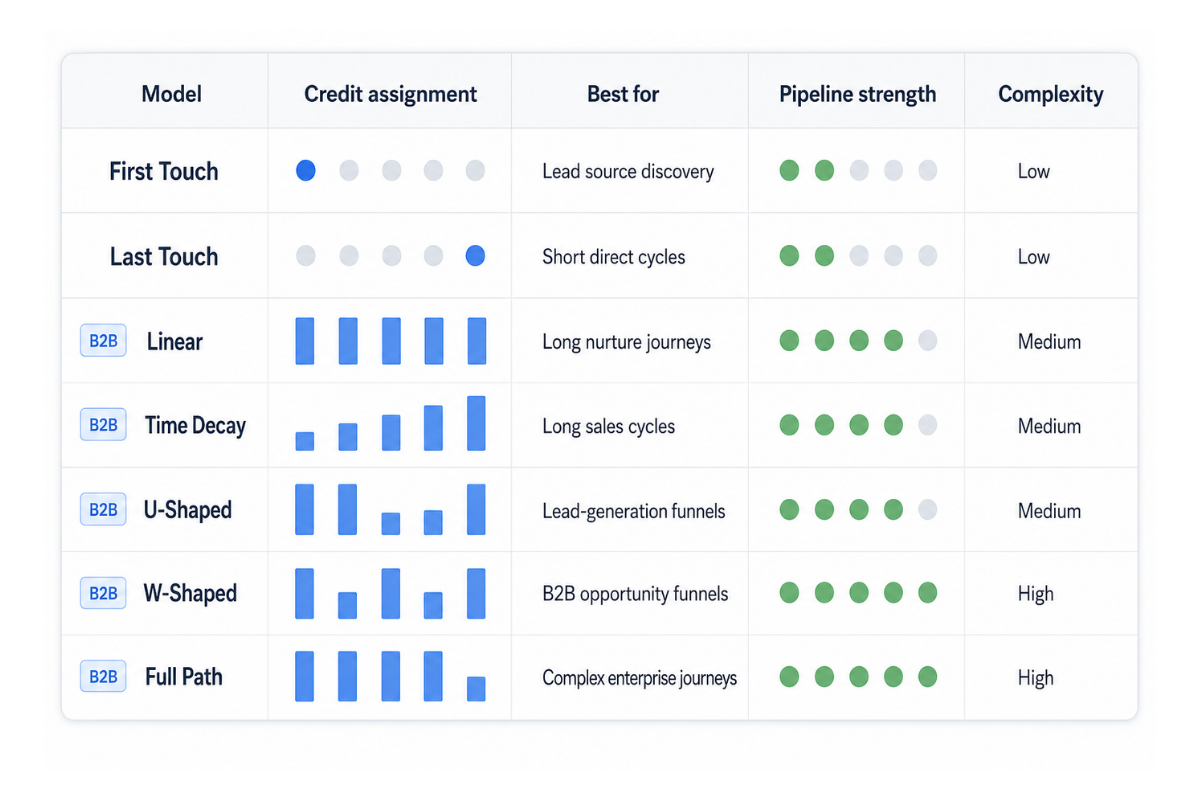
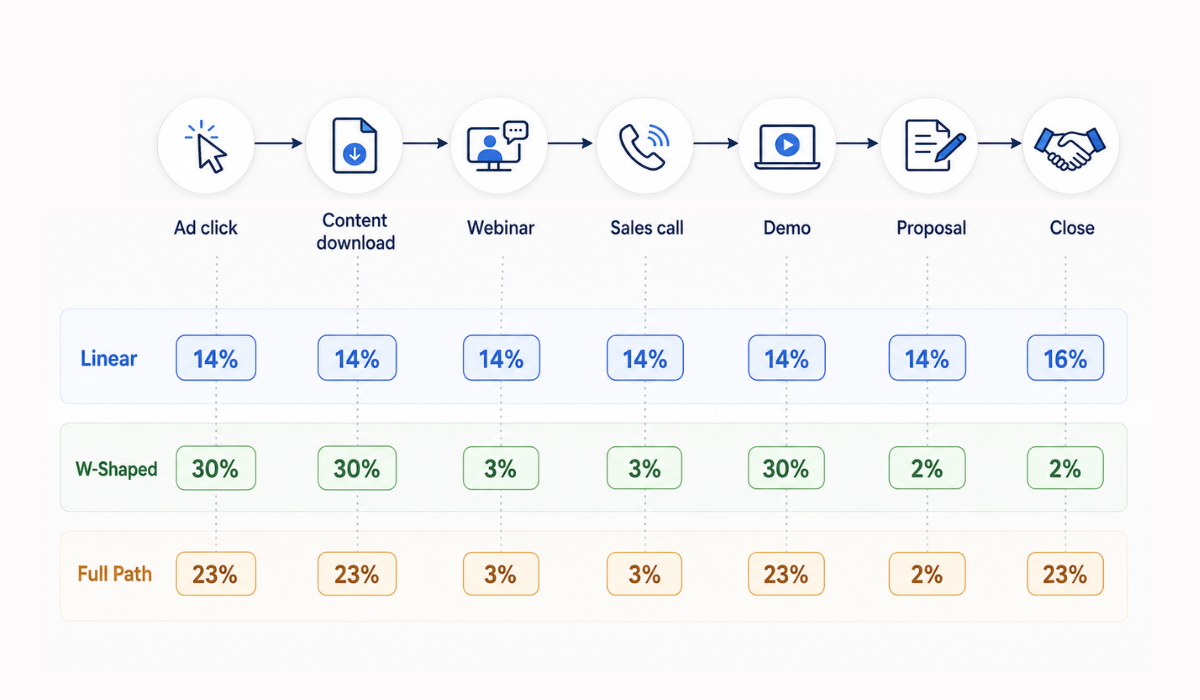
Linear attribution distributes credit equally across all touchpoints. If a deal had 10 touchpoints, each gets 10%.
Best for: Seeing the complete journey, valuing every interaction, and understanding content consumption patterns.
U-shaped attribution gives 40% to the first touch, 40% to the lead-creation touch, and distributes 20% across everything in between.
Best for: Balancing acquisition and conversion credit, valuing both brand awareness and lead capture.
W-shaped attribution assigns 30% to first touch, 30% to lead creation, 30% to deal creation, and 10% across the remaining touchpoints.
NAV43 recommendation for B2B: This model recognizes three critical moments: initial engagement, lead conversion, and opportunity creation. It aligns with how B2B funnels actually work.
Full-path attribution adds a fourth major touchpoint to the close. It distributes 22.5% to each of four key moments (first touch, lead create, deal create, close) with the remaining credit distributed across other touchpoints.
Best for: Long enterprise sales cycles (180+ days), complex buying processes, detailed pipeline analysis.
Time-decay attribution weights credit toward more recent touchpoints. Interactions closer to conversion get more credit than early awareness touches.
Best for: Fast-moving cycles, evaluating recent campaigns, businesses where recency indicates influence.
Selecting the Right Model for Pipeline Tracking
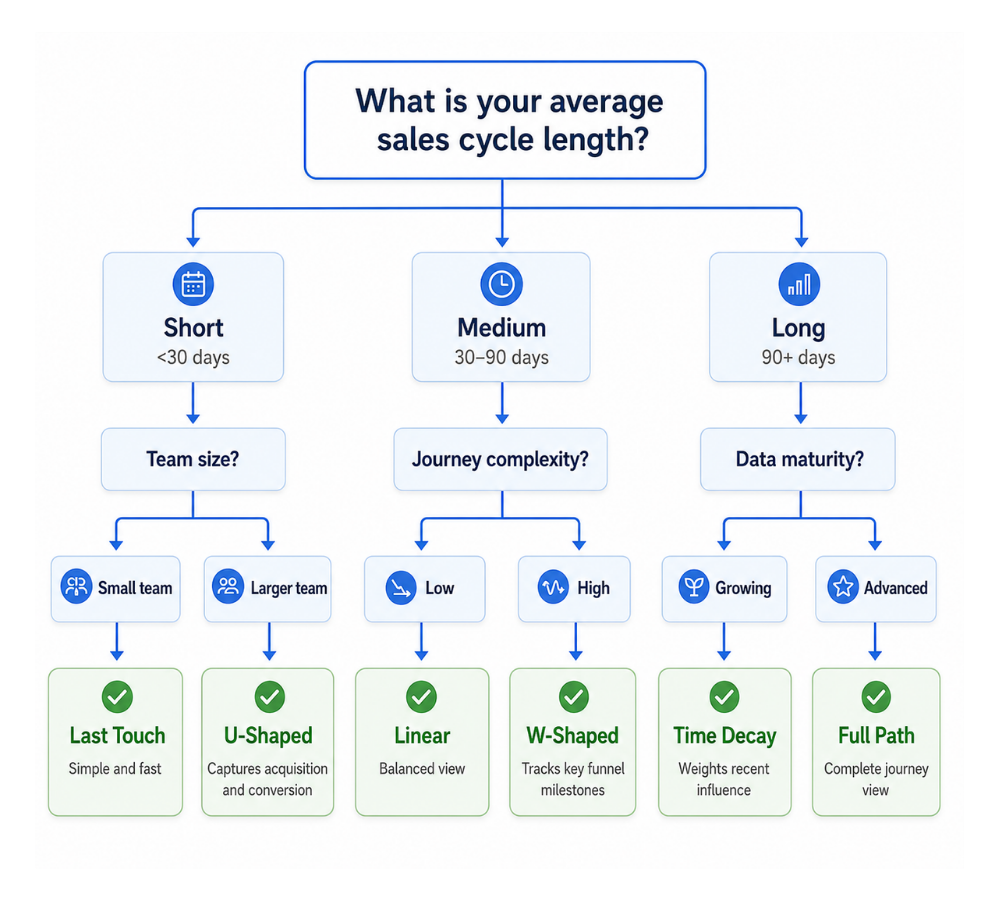
Match your model to your sales cycle length and decision complexity:
| Model | Best For | Sales Cycle | Credit Distribution |
|---|---|---|---|
| First-touch | Awareness analysis | Any | 100% to first |
| Last-touch | Conversion analysis | Short (<30 days) | 100% to last |
| Linear | Journey visibility | Medium | Equal across all |
| U-shaped | Balanced acquisition | Medium | 40/40/20 |
| W-shaped | B2B with milestones | Long (60-180 days) | 30/30/30/10 |
| Full-path | Enterprise sales | Long (180+ days) | 22.5% to four key moments |
| Time-decay | Recent-action focus | Fast-moving | Weighted toward recent |
The key insight: The model matters less than consistently using deal-create and revenue attribution, not just contact-create. Any multi-touch model applied to revenue data beats a perfect model applied only to lead data.
Building Pipeline-Focused Attribution Reports in HubSpot (Step-by-Step)
Prerequisites: Data Hygiene That Makes or Breaks Attribution
Before you build a single report, you need clean data. This isn’t optional, it’s foundational.
Critical setup: Deal-contact associations must be complete. Every deal needs at least one associated contact. Without this connection, HubSpot cannot trace marketing touchpoints to business outcomes.
Industry data suggests 20-35% of leads have missing source values in typical HubSpot portals. This breaks pipeline attribution entirely. You can’t attribute what you can’t connect.
Requirements for valid attribution:
– Closed-won deals must have accurate close dates and amounts
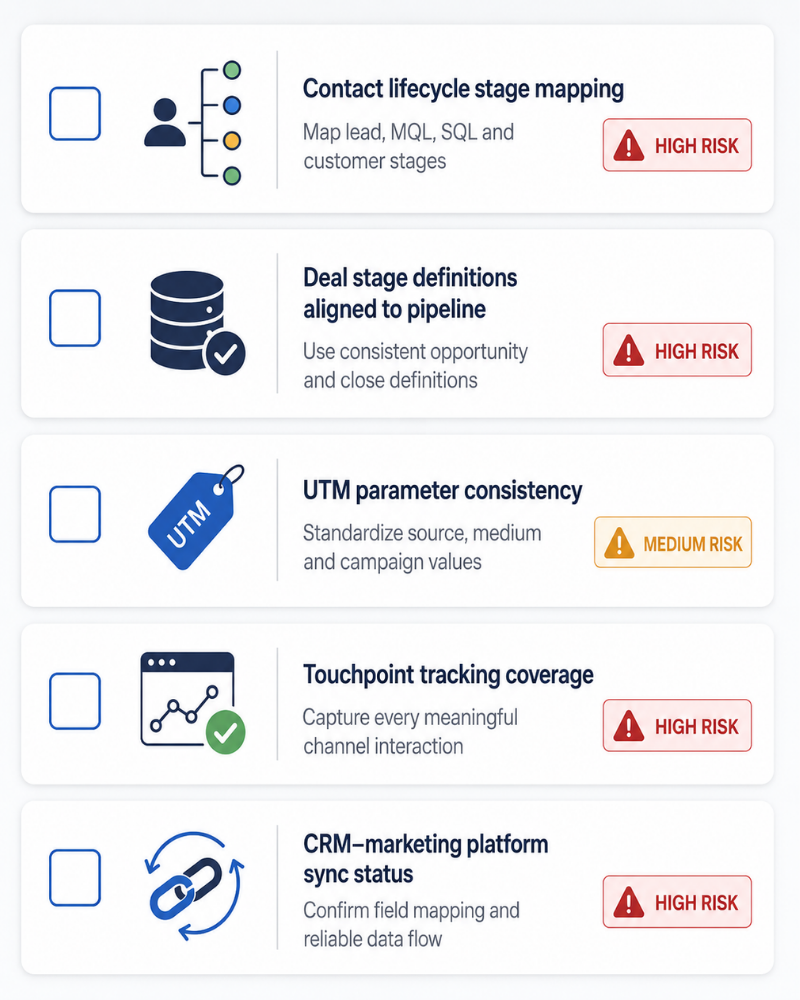
– Lifecycle stage mapping must be consistent (Lead → MQL → SQL → Opportunity → Customer)
– UTM parameters must be captured across all campaigns
– Offline touchpoints need custom event configuration
NAV43 tip: Run a data audit before building attribution reports. We’ve seen clients get meaningless data because 40% of their deals had no associated contacts. The reports looked sophisticated. The insights were worthless.
Attribution Data Hygiene Audit Checklist
- [ ] All deals have at least one associated contact
- [ ] Original source and latest source fields populated on contacts
- [ ] UTM parameters captured consistently across campaigns
- [ ] Lifecycle stages mapped to deal stages
- [ ] Closed-won deals have accurate revenue amounts
- [ ] Deal close dates reflect actual close, not system date
- [ ] Custom properties for offline touchpoints configured
- [ ] Sales team trained on mandatory contact association
- [ ] Weekly audit report scheduled to catch gaps
Creating Deal-Create Attribution Reports
This is where pipeline tracking begins. Deal-create attribution shows which touchpoints influenced opportunity creation, not just lead capture.
Step-by-step process:
- Navigate to Reports > Analytics Tools > Attribution
- Select report type: Deal-create attribution
- Choose your attribution model (W-shaped recommended for B2B)
- Set date range aligned to at least 1.5x your average sales cycle length
- Filter by deal pipeline if running multiple pipelines
- Segment by asset type (forms, emails, meetings, pages) to identify which content influences deals
What to look for: Channels that punch above their weight in deal-create vs. contact-create. If paid social generates 30% of contacts but only 10% of deal-create credit, that’s a signal. If organic search generates 15% of contacts but 35% of deal-create credit, you’ve found a winner.
Creating Revenue Attribution Reports
Revenue attribution answers the ultimate question: which touchpoints contributed to actual closed-won revenue?
Step-by-step process:
- Same navigation: Reports > Analytics Tools > Attribution
- Select report type: Revenue attribution
- Apply the same attribution model used for deal creation (consistency matters)
- Critical filter: Closed-won deals only
- Segment by time period to identify seasonal or campaign patterns
- Segment by content type to identify high-converting assets
The money question this answers: “Which touchpoints appear most frequently in the journey of deals that actually closed?”
Run this report quarterly at a minimum. Compare quarter-over-quarter to identify which channels consistently drive revenue vs. those producing temporary spikes.
Connecting Offline Touchpoints (The Competitive Advantage)
Here’s what most attribution content completely ignores: offline touchpoints. Events, in-person meetings, phone calls, and trade shows, these interactions matter but are invisible to standard attribution.
HubSpot solution: Custom Behavioral Events API
Practical setup:
– Use HubSpot’s Custom Events to log trade show badge scans
– Connect sales meeting data through calendar integrations
– Import event attendance via Zoom, Eventbrite, or manual upload
– Track phone conversations through call logging
For one client, trade shows looked like a waste in terms of contact-create reports, high cost, low lead volume. But once we connected offline touchpoints, trade shows emerged as the #2 revenue-attributed channel. The leads were fewer but dramatically better qualified.
This is the competitive advantage most marketing teams don’t have. If you’re only measuring digital touchpoints, you’re measuring less than half the B2B buying journey. For more on building complete marketing systems, explore our guide to HubSpot automations for B2B.
Account-Based Attribution: Moving Beyond Contact-Level Measurement
Why Contact Attribution Fails for B2B Buying Committees
B2B purchasing decisions involve an average of 6-10 stakeholders. Contact-create attribution credits whoever filled out the form first, often an intern or researcher doing vendor screening.
The actual decision-maker, the VP, Director, or C-level executive, may have seen 5 ads, read 3 blog posts, and attended a webinar. But they never filled out a form. In contact-level attribution, they’re invisible.
Result: You cut the budget from channels influencing decision-makers because they didn’t create contacts. The channel that convinced the CFO to approve the purchase gets zero credit because the marketing coordinator submitted the demo request.
This is why account-based attribution matters for any B2B company selling to buying committees.
Setting Up Account-Level Attribution in HubSpot
Instead of contacts as the attribution anchor, use Company records.
Set up requirements:
– Associate all contacts to their company record (automatic via email domain, manual for edge cases)
– Build custom reports that aggregate touchpoints across all contacts at an account
– Use HubSpot’s ABM tools: target accounts dashboard, company scoring, buying role tracking
Report configuration:
– Create reports filtered by the target account list to see attribution for high-value prospects specifically
– Aggregate touchpoint data at the company level, not contact level
– Track engagement from multiple stakeholders within the same account
Measuring Account Engagement Across Stakeholders
Key metric: Touchpoint density per account before deal creation.
Compare accounts with 10+ touchpoints across 3+ contacts vs. single-contact engagement. The former closed at dramatically higher rates. This is the data that proves ABM works.
The NAV43 Account Attribution Framework:
- Identify target account list (100-500 accounts for most mid-market B2B)
- Track all contact engagement aggregated to the company level
- Score accounts using the formula: Touchpoints × Unique contacts engaged × Content depth
- Run revenue attribution filtered to target accounts only
- Compare cost-per-influenced-account across channels
This framework predicts the close rate better than any single-contact metric. When three people at an account have each engaged with your content multiple times, that account is ready for sales engagement. When one person fills out one form, they’re not.
Connect revenue attribution to this account-level view: Which accounts show the most diverse engagement before closing? What’s the minimum threshold of account engagement that correlates with closed-won outcomes? These questions drive strategic ABM investment. For deeper integration tactics, see our guide on LinkedIn and HubSpot lead syncing.
Pipeline Velocity: The Attribution Metric Most Teams Miss
Beyond Sourcing Measuring Deal Acceleration
Standard attribution answers: “What sourced this deal?”
Better question: “What accelerated this deal through the pipeline?”
Pipeline velocity = (# of Opportunities × Win Rate × Average Deal Size) / Sales Cycle Length
This formula reveals that shortening sales cycles has the same revenue impact as increasing lead volume, often with lower investment required.
Attribution insight most teams miss: Which channels and content reduce sales cycle length, not just create leads?
A channel might produce moderate lead volume but dramatically accelerate deals through the pipeline. That’s a velocity channel, and it’s often undervalued because contact-create attribution doesn’t capture acceleration.
Identifying Deal Accelerators in HubSpot
Process for finding velocity channels:
- Pull deal-create attribution for deals with shorter-than-average sales cycles
- Compare touchpoint patterns between fast-close and slow-close deals
- Look for: specific content consumed, engagement channels, sequence participation
- Identify which touchpoints appear more frequently in fast-close deals
Example from our work: We found that, for one client, prospects who attended a webinar closed 23 days faster on average than those who didn’t. Lead volume from webinars was modest. But the velocity impact made webinars a critical pipeline channel, something contact-create attribution completely missed.
For B2B companies with long sales cycles, velocity optimization often produces faster results than lead volume optimization. For strategies to efficiently nurture leads through the pipeline, explore our HubSpot sales nurturing guide.
Attributing Influence vs. Attribution Source
Deals may be “sourced” by paid ads but “accelerated” by case studies and demos. Multi-touch models capture this; first/last touch obscures it.
NAV43 recommendation: Run parallel reports:
– One for source attribution (contact-create) “What brought them in?”
– One for influence attribution (deal-create) “What moved them forward?”
– One for close attribution (revenue) “What sealed the deal?”
These three questions have three different answers. A comprehensive attribution strategy answers all of them.
Common Pitfalls in HubSpot Attribution Reporting (And How to Avoid Them)
1. Only Using Contact-Create Reports
Problem: The vast majority of HubSpot users never build deal-create or revenue attribution reports. They optimize for lead volume while wondering why the pipeline doesn’t grow.
Fix: Set up all three report types. Compare them monthly. If a channel looks great in contact-create but poor in revenue attribution, investigate before increasing investment.
2. Missing Deal-Contact Associations
Problem: Deals without associated contacts show as “unattributed” even with complete marketing data. If 40% of your deals have no contact associations, 40% of your revenue is invisible to attribution.
Fix: Implement mandatory deal-contact association in your sales process. Run weekly audit reports to catch gaps. Train the sales team on why this matters; it’s not busywork, it’s measurement infrastructure.
3. Ignoring Offline Touchpoints
Problem: Events, phone calls, and in-person meetings are invisible to standard digital attribution. For B2B companies, these often represent the highest-value touchpoints.
Fix: Implement Custom Behavioral Events for offline interactions. Connect event platforms, call tracking, and meeting data to HubSpot.
4. Choosing the Wrong Attribution Model
Problem: First- or last-touch attribution on 6-month enterprise sales cycles distorts data. Single-touch models on complex B2B journeys credit the wrong interactions.
Fix: Match model to cycle length. W-shaped or Full-path for B2B with clear funnel stages. Review and adjust model selection annually as your sales process evolves.
5. Reporting on Wrong Time Windows
Problem: An attribution window shorter than the sales cycle misses touchpoints. If your average deal takes 120 days to close but you’re running 30-day attribution, you’re missing 75% of the journey.
Fix: Set attribution lookback window to at least 1.5x your average sales cycle. For 90-day sales cycles, use a 135-day minimum lookback.
6. Measuring Lead Volume Instead of Pipeline Contribution
Problem: Optimizing for MQLs that don’t become opportunities. Celebrating lead volume while the pipeline stagnates.
Fix: Switch primary KPI to marketing-influenced pipeline, not lead count. Make revenue attribution the board-level metric; contact creation the tactical metric.
7. No Baseline or Comparison
Problem: Attribution reports without context. “Organic generated 40% of revenue” means nothing without comparison.
Fix: Always compare period-over-period, channel-vs-channel, and campaign-vs-campaign. Trends matter more than absolute numbers.
Pitfall Diagnosis Matrix
| Symptom | Likely Pitfall | Fix |
|---|---|---|
| Lots of leads, no attributed revenue | Missing deal-contact associations | Audit and mandate associations |
| Top lead channel ≠ top revenue channel | Only using contact-create | Build revenue attribution reports |
| Events show poor ROI | Offline touchpoints not tracked | Implement Custom Events API |
| Attribution data seems random | Wrong time window | Extend lookback to 1.5x sales cycle |
| Can’t answer CFO questions | Measuring leads, not pipeline | Switch to revenue attribution KPIs |
Making Attribution Actionable: From Reports to Decisions
Reports that don’t drive decisions are expensive dashboards. Here’s how to turn attribution insights into budget allocation and strategic planning.
Quarterly Attribution Review Process
Month 1: Data validation
– Run data hygiene audit
– Verify deal-contact associations above 95%
– Confirm offline touchpoints are being tracked
– Validate revenue amounts on closed-won deals
Month 2: Analysis
– Pull all three attribution report types
– Compare contact-create to revenue attribution by channel
– Identify velocity channels (deal with acceleration)
– Calculate cost-per-influenced-revenue by channel
Month 3: Action
– Reallocate budget based on revenue attribution, not lead volume
– Increase investment in velocity channels
– Test reduced spend on high-lead-volume, low-revenue channels
– Document hypotheses for next quarter validation
Building the CFO Deck
Finance doesn’t want to see MQL trends. Here’s what to present:
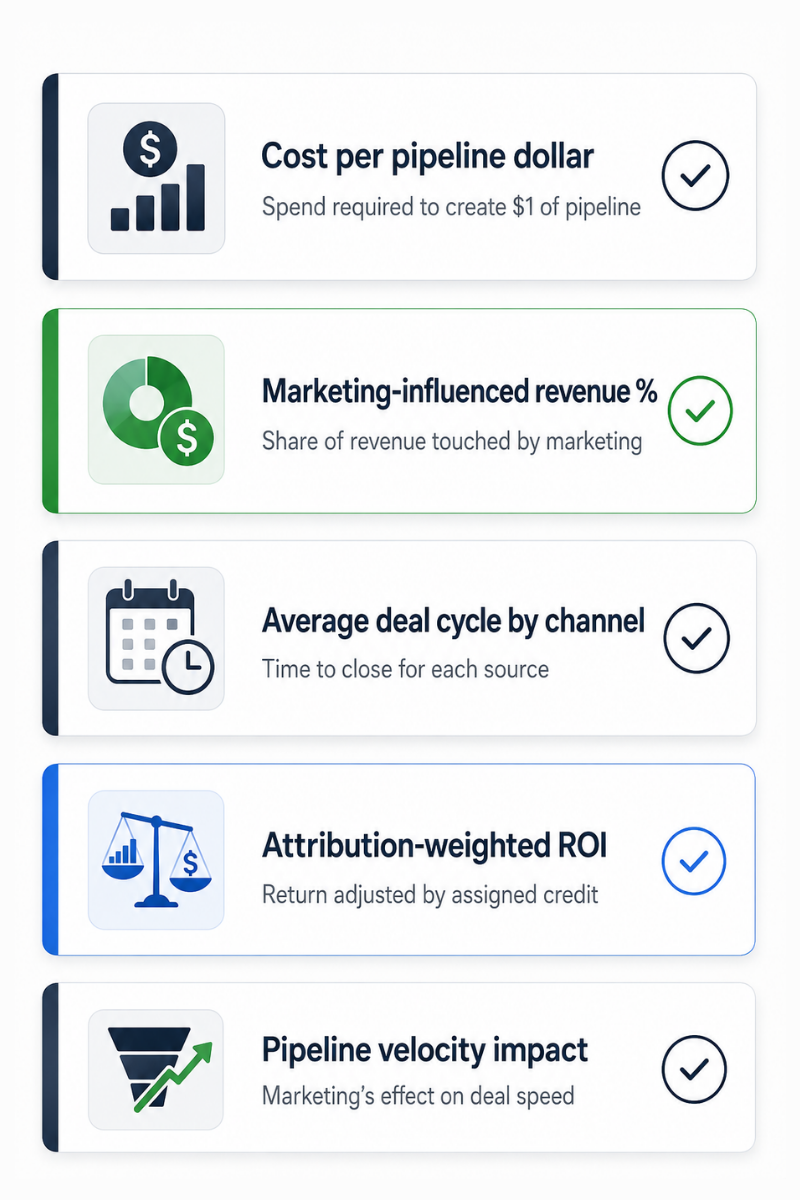
- Marketing-influenced pipeline: Total pipeline value with marketing touchpoints in the journey
- Marketing-attributed revenue: Closed-won revenue with marketing credit by model
- Cost per revenue dollar: Marketing spend divided by attributed revenue
- Channel efficiency ranking: Revenue attribution divided by channel spend
- Quarter-over-quarter trend: Are we getting more efficient or less?
This deck answers the CFO question directly: “For every dollar we spend on marketing, how much revenue does it generate?” For a framework on building complete measurement systems, explore how to measure AI SEO and visibility.
Attribution Governance
Attribution systems break without governance. Establish:
- Monthly data audits: Catch association gaps before they compound
- Quarterly model review: Confirm attribution model still fits sales process
- Annual strategy alignment: Ensure attribution metrics match business objectives
- Clear ownership: Someone must be responsible for attribution accuracy
Multi-touch attribution adoption is at 47% in 2026, up from 31% in 2023 (Digital Applied / Forrester, 2026). The companies driving this growth aren’t just installing attribution tools; they’re building governance systems that ensure data quality over time.
The Future of HubSpot Attribution: What’s Coming
Attribution is evolving rapidly. Here’s what forward-thinking teams should prepare for:
AI-powered attribution modeling 81% of marketing technology leaders are either piloting or have already implemented AI agents in their organizations (Gartner, 2025). Expect HubSpot to introduce AI-assisted model selection and automated insight generation.
Multi-touch and marketing mix model reconciliation. The emerging best practice is to run MTA (multi-touch attribution) for tactical channel decisions and MMM (marketing mix modeling) for strategic budget allocation, then reconcile with AI assistance.
Privacy-first attribution, cookie deprecation, and consent requirements are shifting attribution toward first-party data strategies and server-side tracking. Build your attribution on HubSpot’s CRM data rather than third-party tracking.
Account-level attribution standardization. As B2B moves further toward account-based strategies, expect attribution tools to default to company-level measurement rather than contact-level.
The multi-touch attribution market is estimated at $2.43 billion in 2025, expected to reach $4.61 billion by 2030, with a 13.64% CAGR (Research and Markets, 2025). Investment in attribution technology is accelerating because the companies that use it well gain a significant competitive advantage.
Conclusion: Key Takeaways
The stakes couldn’t be higher. Attribution across multiple marketing channels can provide efficiency gains of 15-30% (ZoomInfo via Ruler Analytics, 2025). That’s the difference between budget cuts and budget increases. Between defending marketing’s value and proving it.
Here’s what matters:
- Contact-create attribution tells you where leads come from; revenue attribution tells you what drives business outcomes. Stop optimizing for the former and wondering why you can’t prove ROI.
- HubSpot offers three attribution report types, but most users only leverage one. Deal-create and revenue attribution require Marketing Hub Enterprise but deliver the insights finance actually cares about.
- Multi-touch attribution models are the B2B standard. 75% of companies use them. Match your model to your sales cycle, W-shaped for most B2B, with clear funnel milestones.
- Data hygiene makes or breaks attribution accuracy. If your deals don’t have associated contacts, your revenue attribution is meaningless. Audit before you report.
- Account-based attribution captures buying committee dynamics. Contact-level measurement misses executives who influence decisions but don’t complete forms.
- Pipeline velocity is the attribution metric most teams miss. Channels that accelerate deals often matter more than channels that generate leads.
Next Steps
If you’re using HubSpot but not running revenue attribution reports: This is your highest-priority fix. Build the report this week. Compare it to your contact-create data. The gaps will show you where to reallocate the budget.
If your data hygiene is questionable, run an audit before building new reports. Check deal-contact associations, source field completion, and UTM consistency. Fix the foundation before building the house.
If you’re presenting to finance, rebuild your deck around a marketing-influenced pipeline and cost-per-revenue-dollar. Stop leading with MQL trends. Start leading with business impact.
If you’re not sure where to start: Get a diagnostic. Understanding your current attribution setup, what’s working, what’s missing, and what’s broken is the prerequisite for improvement.
Get Your Free Growth Plan. We’ll audit your HubSpot attribution setup and identify the gaps between what you’re measuring and what you should be measuring.
The companies winning budget battles aren’t generating more leads. They’re proving which marketing drives revenue. Attribution that tracks pipeline not just contacts is how you get there.
