Performance Max Asset Group Strategy for Lead Generation: The Architecture That Actually Drives Qualified Leads
Seventy-nine percent of marketing leads never convert to sales. Let that sink in. Performance Max can either make this problem dramatically worse or solve it entirely. The difference comes down to one thing: how you architect your asset groups.
Over 1 million advertisers globally now use Performance Max campaigns (Google, April 2025), and for many, PMax drives 45% of their total Google Ads conversions (Digital Applied, 2026). The campaign type has become impossible to ignore. PMax adoption jumped from 60% of surveyed advertisers in 2024 to 71% in 2025 (Involve Digital, 2025). It’s no longer optional for serious paid media programs.
But here’s the central tension for lead generation advertisers: PMax is designed to optimize for conversions. For e-commerce, that means purchases. The math is straightforward. For lead gen, “conversions” typically mean form fills, and form fills are not revenue. A form fill from a job seeker costs the same to acquire as one from a decision-maker with a $50,000 budget. PMax doesn’t know the difference unless you teach it.
The advertisers winning with PMax for lead gen aren’t using better creative or bigger budgets. They’re using a better asset group architecture and teaching Google what a qualified lead actually looks like through offline conversion tracking.
This article covers the foundational framework for PMax lead generation success: asset group architecture principles, the offline conversion tracking workflow that separates winners from losers, practical setup guidance, and an honest budget reality check. We’ve rebuilt PMax campaigns for B2B clients who were paying $800+ per SQL and brought them under $400, not by spending more, but by restructuring asset groups and feeding Google the right conversion signals.
What Is an Asset Group in Performance Max (And Why Architecture Matters More Than Assets)
The Asset Group Defined
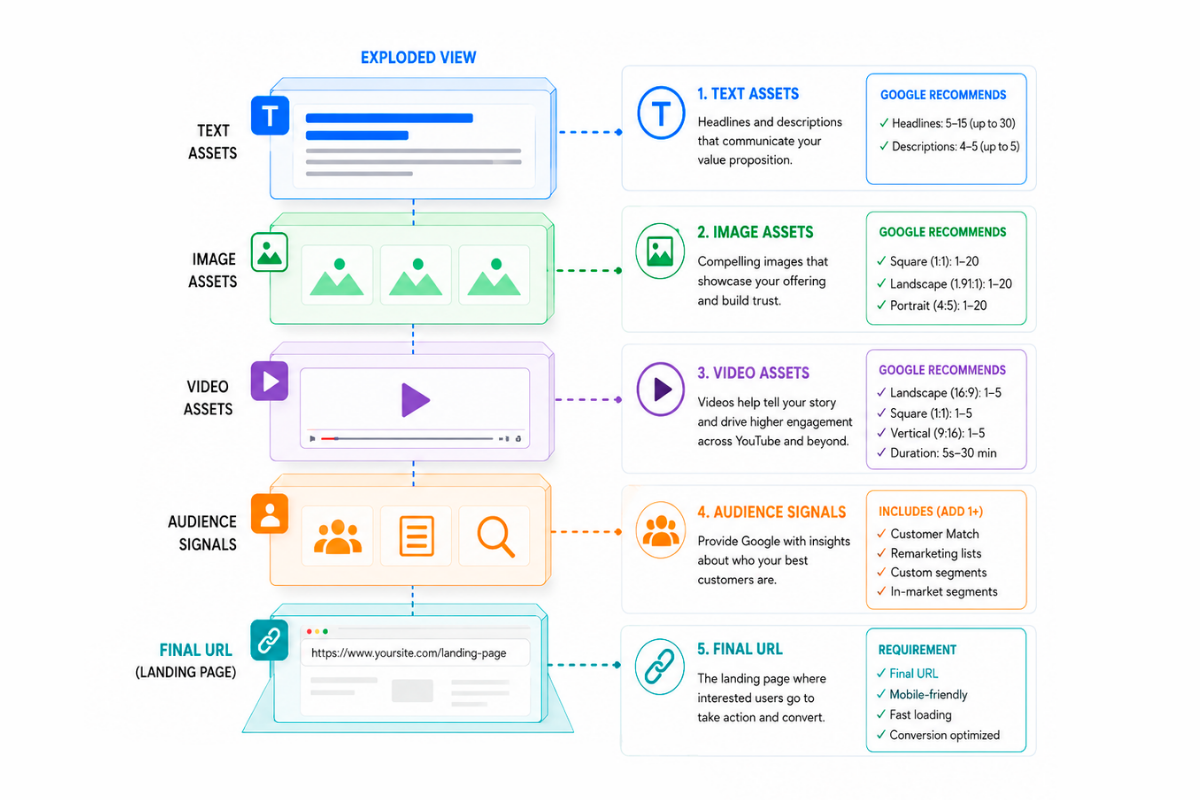
An asset group is a collection of creative assets, headlines, descriptions, images, and videos paired with audience signals and a final URL that Performance Max uses to generate ads across all Google properties. Think of it as the building block of your PMax campaign.
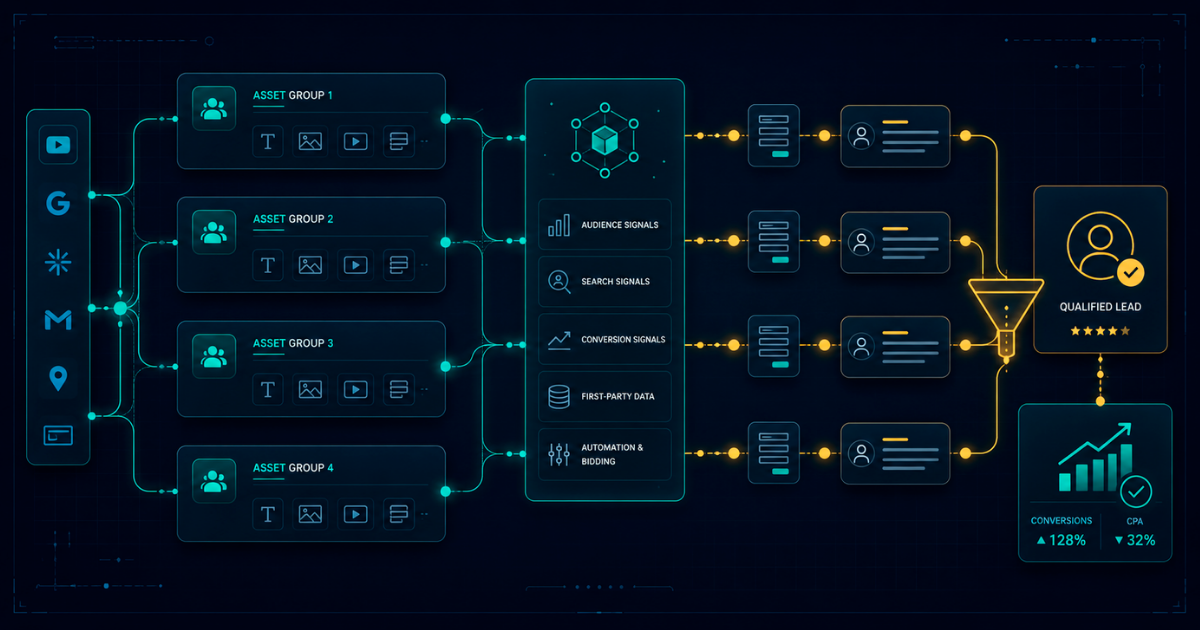
One PMax campaign can contain multiple asset groups, each targeting different audiences or stages of the buyer journey. Google’s algorithm mixes and matches your assets to create thousands of ad combinations, serving them across Search, Display, YouTube, Gmail, Discover, and Maps based on where it predicts conversions will happen.
The video upload limit increased to 15 per asset group in January 2026, showing Google’s continued investment in asset group flexibility. But here’s the misconception most advertisers have: they think asset groups are just “ad groups with more stuff.” They’re not. Asset groups are strategic targeting units.
Why Architecture Beats Assets
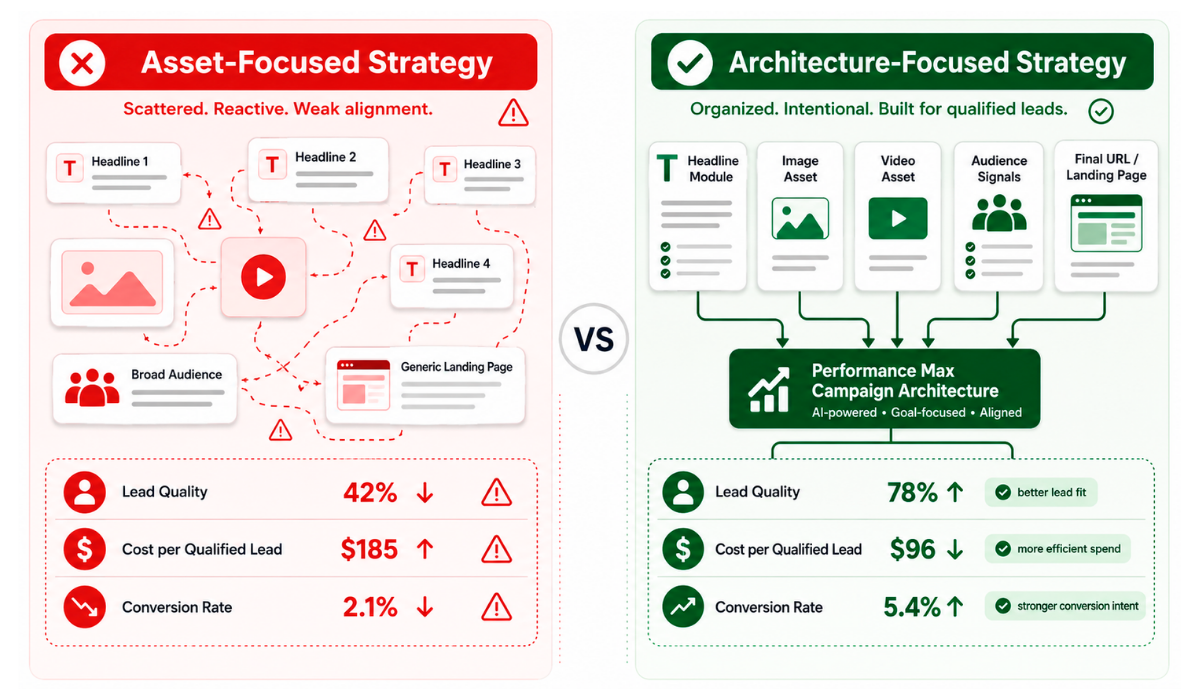
Here’s the NAV43 position on this: asset group architecture, how you structure and segment your groups, determines performance more than individual asset quality.
The architecture problem is simple. Most lead gen advertisers dump everything into one asset group and let PMax figure it out. All services, all audiences, all landing pages, one giant bucket. This optimizes for volume, not quality. Google’s algorithm finds the cheapest path to a conversion, which, in lead gen, usually means the lowest-intent audience filling out a form for the wrong reasons.
Manually created videos outperform Google auto-generated videos by 25-40% in Performance Max campaigns (groas.ai, 2026). But even great assets fail inside poor architecture. A brilliant video served to the wrong audience at the wrong stage of the funnel is still a wasted impression.
The NAV43 Asset Group Architecture Principle: One asset group = one audience intent = one conversion path. If your asset group is trying to serve multiple intents, PMax will optimize for the cheapest one, which is rarely your best lead.
How Performance Max Actually Targets (The Algorithm Explained for Lead Gen)
The Targeting Mechanism
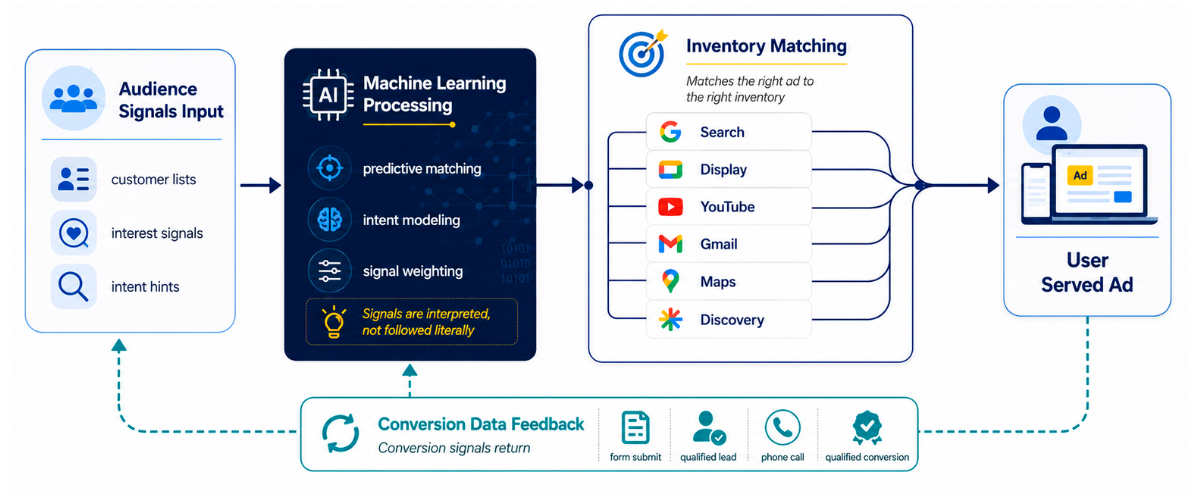
How does Performance Max target? This is one of the most common questions we hear, and the answer matters enormously for lead generation strategy.
PMax uses three targeting inputs working together:
- Audience signals you provide custom segments, remarketing lists, and demographic targeting
- Search themes you configure keyword-like inputs that guide Search placements
- Google’s machine learning, based on your conversion data, Google expands beyond your signals to find similar users
Critical distinction: audience signals are “suggestions,” not hard targeting. PMax will go beyond them if it finds users to convert elsewhere. This is fundamentally different from traditional Search or Display campaigns, where you control exactly who sees your ads.
Performance Max now includes search term insights and a “usefulness” indicator for search themes (2025 update). Advertisers can finally see which themes actually drive results, rather than guessing.
The Lead Gen Targeting Problem
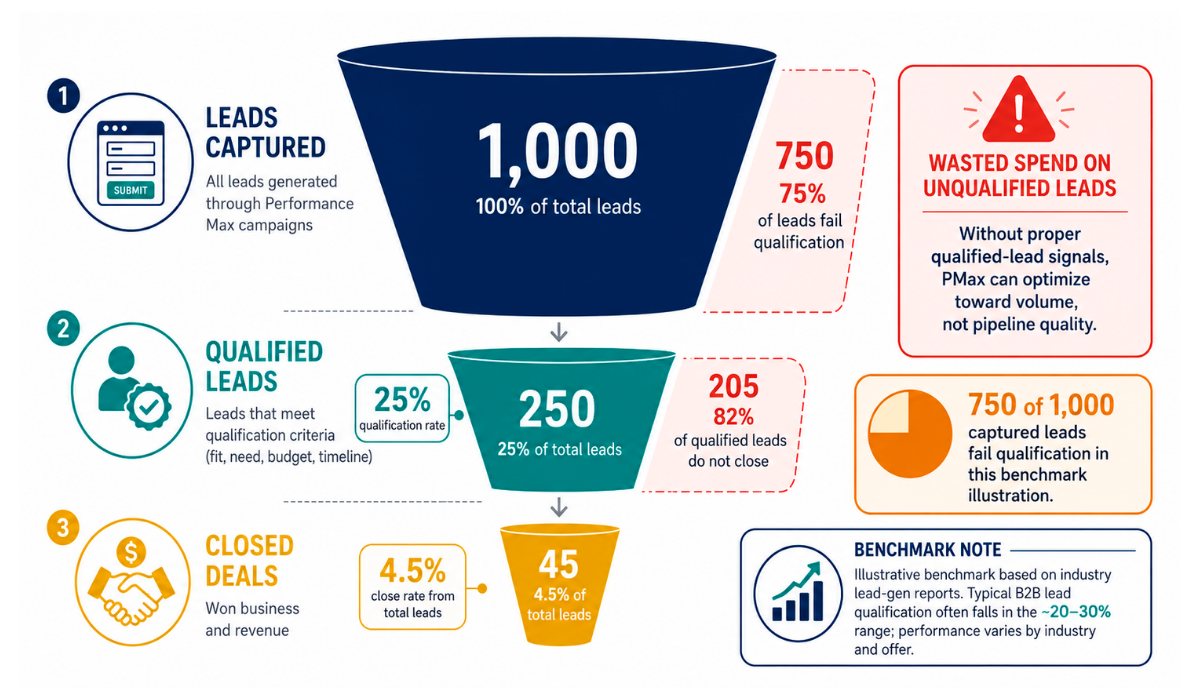
This matters for lead gen because PMax optimizes for whatever conversion you tell it to. If that’s “form fill,” it will find the cheapest form fills available across Google’s entire network.
The quality gap is real. Cheap form fills often come from low-intent audiences, job seekers, competitors, students researching papers, or even bot traffic. B2B SaaS median cost per SQL is $800-$2,500 in 2026 (GrowthSpree, 2026). The gap between cost-per-lead and cost-per-SQL is where most PMax lead gen campaigns fail.
The solution isn’t better targeting inputs. It’s better conversion signals. When you teach Google what a qualified lead looks like through offline conversion tracking, the algorithm’s behavior shifts entirely.
The New Transparency Tools
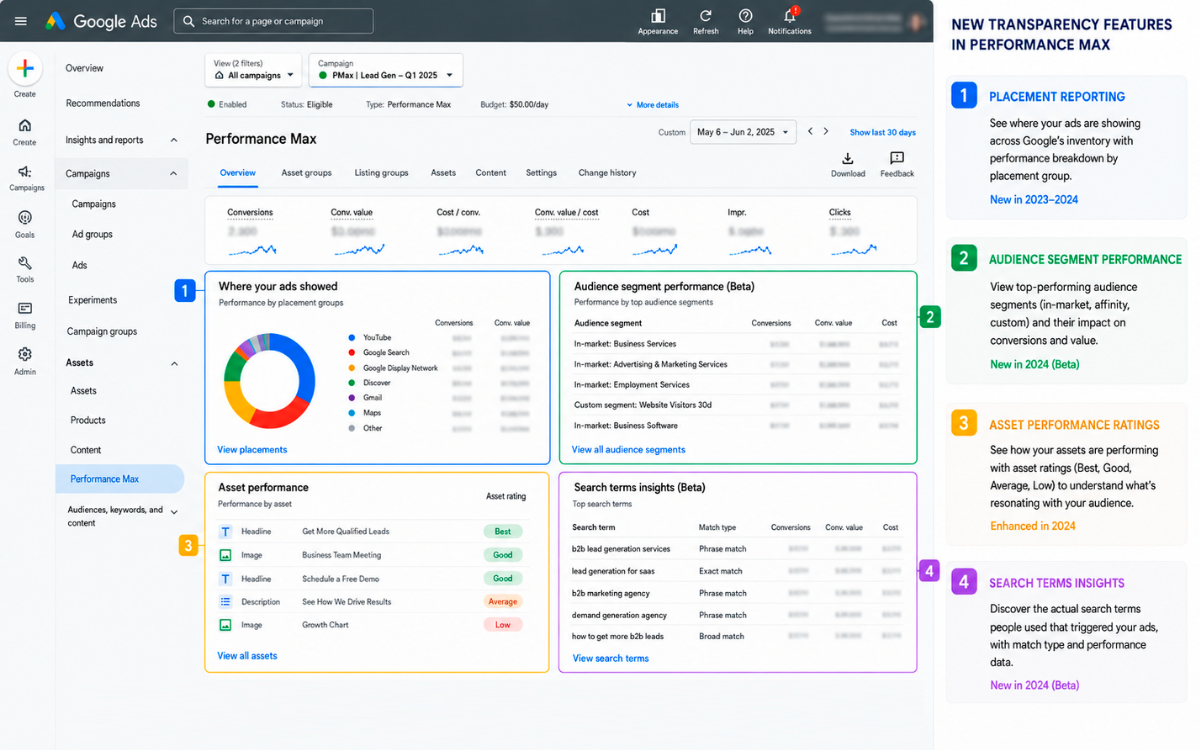
PMax is no longer the “black box” it was at launch. 2025-2026 updates introduced:
- Campaign-level negative keywords up to 1,000 per campaign
- Channel performance reporting: see which placements drive results
- Asset-level reporting impressions, clicks, and conversions per asset
- Search term insights: Finally, see what queries trigger your ads
Advertisers who master these controls have a structural advantage. Use channel reporting to see where leads are coming from. Use search term insights to add negative keywords. Use asset-level data to kill underperformers before they drain budget.
| Targeting Element | Traditional Search | Performance Max |
|---|---|---|
| Keywords | Exact control over terms | Search themes as suggestions |
| Audiences | Hard targeting | Signals/suggestions only |
| Placements | Manual selection | Algorithm-determined |
| Negative Keywords | Unlimited | Up to 1,000 campaign-level |
The Offline Conversion Tracking Imperative: Why This Is Non-Negotiable for Lead Gen
The Lead Quality Problem PMax Can’t Solve Alone
Here’s the core issue: PMax optimizes for the conversion event you give it. If you only track form fills, it optimizes for form fills, not revenue. And 79% of marketing leads never convert to sales.
PMax will happily deliver 1,000 leads that match this statistic. It’s doing exactly what you asked it to do. The algorithm isn’t broken. Your conversion signal is.
This is now the single biggest differentiator between successful and unsuccessful PMax lead gen campaigns. Full stop.
Let me paint you a scenario. Imagine two advertisers with identical budgets, identical assets, and identical industries. Advertiser A tracks form fills as their conversion event. Advertiser B feeds CRM data showing which leads became SQLs and closed deals. Within 8 weeks, Advertiser B pays half the cost-per-SQL. Same budget, same assets, radically different outcomes.
How Offline Conversion Tracking Works
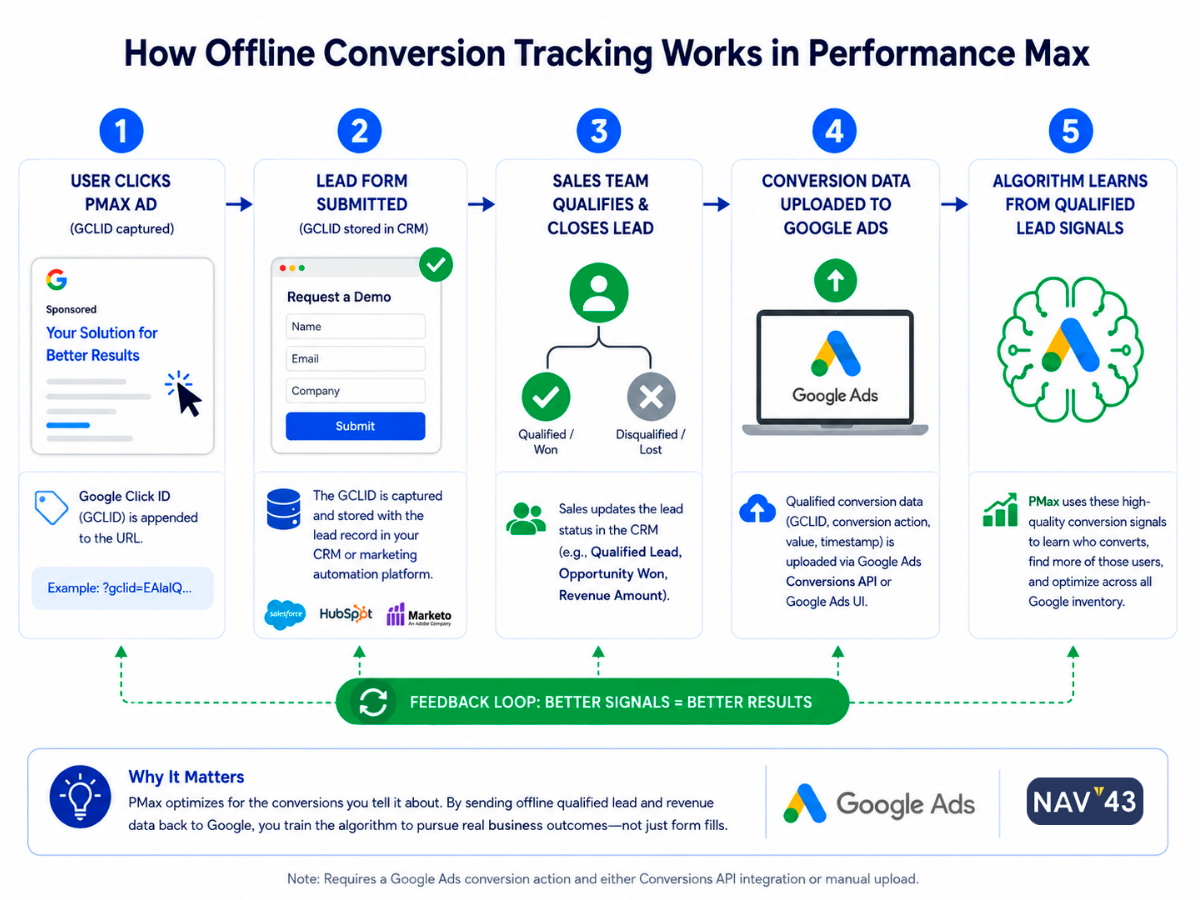
The concept is straightforward: you upload conversion data from your CRM, HubSpot, Salesforce, or Pipedrive back to Google Ads, telling Google which leads actually became valuable.
This creates a feedback loop. Google’s algorithm learns what a “good” lead looks like by identifying patterns among users who eventually qualify. It shifts bidding toward similar users and away from the cheap, low-quality form fills.
Google recommends at least 50 conversions in the first 30 days for Smart Bidding to optimize reliably (Google Ads Help, 2025). For lead gen, this means 50 qualified leads if you’re tracking them, not 50 form fills. This is the math that trips up most advertisers.
Timeline reality: PMax works 4-6 weeks longer to optimize for lead gen than for ecommerce, due to lower conversion volume and longer sales cycles. Offline tracking can accelerate this by giving Google cleaner signals earlier.
The NAV43 Offline Conversion Tracking Workflow
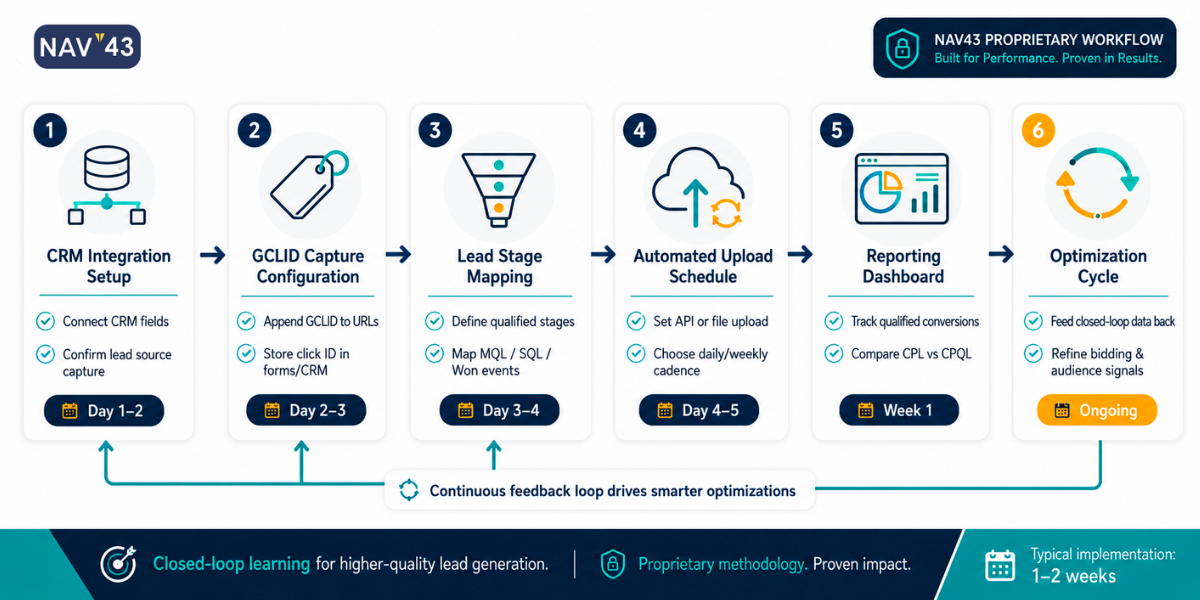
Offline Conversion Tracking Setup Checklist for Lead Gen PMax:
- □ Identify your CRM system (HubSpot, Salesforce, Pipedrive, etc.)
- □ Define your qualified conversion event (SQL, opportunity created, closed-won)
- □ Set up GCLID capture on all lead forms (required for attribution)
- □ Configure automated sync: HubSpot Operations Hub or Zapier to Google Ads Offline Conversions
- □ Create conversion action in Google Ads: “Qualified Lead” or “Sales Qualified Lead.”
- □ Set conversion window: 30-90 days (B2B sales cycles require longer windows)
- □ Assign conversion value: use actual deal values or average values by lead source
- □ Test the integration with a manual upload before automating
- □ Monitor in Google Ads: Conversions > Conversion actions > see imported conversions
- □ Wait 2-3 weeks before expecting meaningful algorithm learning
What If You Can’t Track Offline Conversions?
Reality check: Some advertisers can’t implement full CRM integration due to technical limitations or organizational constraints.
Workarounds exist:
- Multi-step forms that pre-qualify leads with industry, budget, and timeline questions
- Phone call tracking with qualifying questions built into the script
- Thank-you page variations for different form types, allowing you to assign different values
NAV43 position: If you absolutely cannot implement offline conversion tracking, consider whether PMax is the right channel. Traditional Search campaigns with manual bidding may give you more control over lead quality until your tracking infrastructure catches up.
Asset Group Architecture: The NAV43 Framework for Lead Generation
The Single-Intent Principle
Each asset group should represent one audience intent, one stage of the funnel, or one service line. This is the foundation of effective PMax lead gen architecture.
Why does this matter? When asset groups serve multiple intents, PMax optimizes for the cheapest conversion path, usually the lowest-intent audience. A B2B software company should not have one asset group for “enterprise decision makers researching solutions” and “small business owners looking for free tools.” Those are different conversion values, different sales cycles, and entirely different customer profiles.
Segmentation Strategy 1: By Sales Funnel Stage
Structure your asset groups around the buyer journey: Awareness → Consideration → Decision.
Awareness asset groups: Broader audience signals, educational content URLs, optimized for micro-conversions like content downloads or webinar signups. These build your remarketing pools and pixel data without expecting high-value leads immediately.
Consideration asset groups: Mid-funnel audiences (remarketing lists, competitor audiences), solution-focused landing pages. Optimized for higher-intent actions like demo requests or free trial signups.
Decision asset groups: High-intent signals (past converters who didn’t close, demo requesters), pricing, and contact pages. Optimized for qualified leads and closed deals through offline conversion values.
The benefit: you can allocate more budget to decision-stage groups while using awareness groups for pixel building without polluting your qualified lead metrics.
Segmentation Strategy 2: By Service Line or Persona
Structure your asset groups around what you sell or who you sell to.
Example: A marketing agency might have separate groups for “SEO services marketing directors,” “PPC services ecommerce managers,” and “HubSpot implementation ops managers.”
The benefit: messaging, landing pages, and conversion values can be tailored to each service line. Reporting shows which services PMax is winning for, informing budget allocation.
Caution: don’t over-segment. Each asset group needs sufficient conversion volume to learn. If you’re getting 5 leads per month per service line, consolidate.
Segmentation Strategy 3: By Conversion Value
Structure your asset groups around expected deal size.
Example: Enterprise leads (average deal $50k+) vs. SMB leads (average deal $5k). Assign different conversion values in offline tracking to allow PMax to prioritize higher-value opportunities.
This strategy works best with value-based bidding (Maximize Conversion Value) instead of Maximize Conversions. You’re telling Google to optimize for revenue, not volume.
| Strategy | Best For | # of Asset Groups | Conversion Tracking Approach |
|---|---|---|---|
| Funnel Stage | Long sales cycles, content-heavy funnels | 3-4 groups | Different conversion events per stage |
| Service Line | Multi-service businesses, diverse offerings | 2-5 groups | Same conversion event, different values |
| Persona | Multiple buyer types with distinct journeys | 2-4 groups | Same event, values by persona |
| Conversion Value | Enterprise + SMB mix | 2-3 groups | Value-based bidding essential |
Minimum Asset Requirements Per Group
Google’s requirements: 3 headlines (up to 15 words), 1 long headline (up to 5 words), 2 descriptions (up to 5 words), 1 image (up to 20 words). Videos, logos, and additional assets are optional but recommended.
NAV43 recommendation: max out headline and description slots, provide at least 5 distinct images, and upload at least one video, even a simple talking-head or animated explainer.
Video-enabled asset groups see 25-40% better performance (groas.ai / Internal Testing, 2026). Don’t skip this.
Quality principle: each asset should be distinct. Don’t just add punctuation variations. Create genuinely different messages that speak to different angles of the same audience intent.
Are Performance Max Ads Worth It for Lead Generation?
The Honest Answer
Are Performance Max ads worth it? For lead gen, the honest answer is: it depends on your setup.
Performance Max delivers an average 18% lift in conversions at a similar cost-per-action for advertisers using PMax alongside existing campaigns (Google, 2025). But this stat includes brand traffic and ecommerce results. Lead gen is different.
Critical context: An Adalysis study of 3,300 campaigns found Search campaigns typically had higher conversion rates when competing for the same terms as PMax. PMax captures more volume, but Search often captures better quality.
NAV43 position: PMax for lead gen is worth it IF you implement offline conversion tracking and proper asset group architecture. Without those, you’re likely paying for quantity over quality.
When PMax for Lead Gen Works
- High-volume conversion environments: you generate 50+ leads per month per campaign
- CRM integration in place: you can feed qualified lead data back to Google
- Sufficient budget: minimum viable is typically $50-100/day, not $20/day
- Long-term mindset: willing to wait 6-8 weeks for optimization
When Traditional Search Might Be Better
- Low conversion volume: fewer than 30 leads per month
- No CRM integration capability for offline conversion tracking
- Tight budgets under $50/day that can’t support the learning phase
- Need for immediate control over which search terms you appear for
- YMYL industries where lead quality is legally sensitive
The Hybrid Approach
NAV43 recommendation: run PMax alongside branded Search and high-intent exact-match Search campaigns. This captures the scale benefits of PMax while protecting your best terms.
Google now recommends Performance Max, Demand Gen, and AI Max for Search, working together. Budget allocation starting point: 50-60% to PMax, 20-30% to Search, 10-20% to Demand Gen. Adjust based on results.
Budget Reality Check: Is $20 a Day Good for Google Ads (and PMax)?
The Direct Answer
Is $20 a day good for Google Ads? For Performance Max lead generation, the honest answer is usually no.
The average cost per lead in Google Ads in 2025 is $70.11 (WordStream, 2025). At $20/day ($608/month), you’re looking at ~8-9 leads per month maximum. Google recommends a daily budget of at least 3x your target CPA, so if your target cost-per-lead is $50, that’s $150/day minimum.
The learning problem: PMax needs 50 conversions in 30 days for Smart Bidding to optimize reliably. At 8-9 leads/month, you’ll never reach learning stability. Your campaign stays in perpetual “learning limited” status, unable to optimize effectively.
Minimum Viable Budgets for PMax Lead Gen
Industry benchmarks suggest most experts recommend $50-100/day minimum for PMax. But B2B lead gen typically requires more.
NAV43 guidance by industry:
- B2B SaaS: $100-150/day minimum (high CPCs, long sales cycles)
- Professional services: $75-100/day minimum
- Local services: $50-75/day minimum
- High-volume lead gen (insurance, home services): $50/day can work with proper architecture
What to Do With a $20/Day Budget
Don’t run PMax. Run focused Search campaigns instead.
- Target 10-15 exact-match, high-intent keywords
- Use manual or Enhanced CPC bidding for control
- Build conversion volume with Search first, then migrate to PMax when you have 100+ conversions in your account
The Budget Math: If your target cost per qualified lead is $100 and you need 50 conversions for PMax to optimize (Google Ads Help, 2025), you need to spend $5,000 just to exit the learning phase. Plan accordingly.
Common Pitfalls: Why Most Lead Gen PMax Campaigns Fail
Pitfall 1: Optimizing for Form Fills Instead of Revenue
The mistake: setting “Submit Lead Form” as your primary conversion without offline tracking.
The result: PMax delivers a high volume of low-quality leads. The sales team wastes time on unqualified contacts. Cost-per-SQL spirals while cost-per-lead looks great in reporting.
The fix: implement offline conversion tracking. Optimize for SQLs or opportunities, not form fills. If you can’t track SQLs, at least assign conversion values based on lead source quality.
Pitfall 2: Single Asset Group for Everything
The mistake: one asset group containing all services, all audiences, all landing pages.
The result: PMax optimizes for the easiest conversion path. Usually, that’s the lowest-value service or the lowest-intent audience. You can’t see what’s working because everything is blended.
The fix: segment asset groups by funnel stage, service line, or conversion value. Start with 2-3 groups and expand as volume increases.
Pitfall 3: Insufficient Conversion Volume
The mistake: running PMax with fewer than 30 conversions per month per campaign.
The result: the algorithm never exits the learning phase. Performance fluctuates wildly. You can’t tell signal from noise.
The fix: consolidate. If you have multiple low-volume PMax campaigns, combine them. If volume is still insufficient, use Search campaigns until you build conversion history.
Pitfall 4: Ignoring the New Control Tools
The mistake: treating PMax as a “set it and forget it” channel.
The result: you’re running on autopilot while competitors use negative keywords, channel reporting, and search term insights to refine their campaigns.
The fix: Review search term insights weekly. Add negative keywords proactively. Check channel performance monthly and shift budget if certain placements underperform.
Pitfall 5: Unrealistic Budget Expectations
The mistake: expecting PMax to work with $500/month budgets.
The result: perpetual “learning limited” status. No optimization. Wasted spend.
The fix: set realistic minimums. If your budget doesn’t support PMax, run Search instead. There’s no shame in using the channel that fits your constraints.
Conclusion: The Asset Group Architecture Advantage
Performance Max for lead generation isn’t inherently good or bad. It’s a tool, and like any tool, results depend on how you use it. The advertisers succeeding with PMax aren’t just running campaigns. They’re architecting systems.
Key Takeaways:
- Asset group architecture matters more than asset quality. One intent per asset group. Don’t let PMax optimize for the cheapest conversion path.
- Offline conversion tracking is non-negotiable. Teaching Google what a qualified lead looks like is the single biggest lever for lead gen PMax success. Without it, you’re optimizing for form fills, not revenue.
- Budget minimums are real. $50-100/day minimum for most industries. If you can’t support the learning phase, use Search campaigns until you can.
- Use the new transparency tools. Negative keywords, search term insights, and channel reporting turn PMax from a black box into a manageable campaign type. Competitors who ignore these tools are flying blind.
- The hybrid approach wins. PMax, alongside branded Search and high-intent exact-match, protects your best terms while capturing scale.
Next Steps
If you’re running PMax for lead gen today, audit your setup against this framework:
- How many asset groups do you have, and what intent does each serve?
- Are you tracking offline conversions from your CRM?
- What’s your monthly conversion volume per campaign?
- Have you added negative keywords based on search term insights?
- Does your budget support the learning phase?
If you answered “no” or “I don’t know” to more than two of these, your PMax campaigns are likely underperforming their potential.
Ready to rebuild your Performance Max strategy with architecture that actually drives qualified leads? Get a free growth plan, and we’ll audit your current PMax setup, identify the structural gaps, and show you exactly how to fix them.
The advertisers who master asset group architecture and offline conversion tracking don’t just generate more leads. They generate better leads at a lower cost. And in lead gen, that’s the only metric that matters.
