PMax Lead Gen Checklist: The Complete Setup, Measurement & Exclusions Playbook for B2B Marketers
One B2B case study found that Performance Max delivered a 5% qualified lead rate compared to 25% for Search campaigns. The difference? CRM integration and offline conversion tracking. Without these, PMax optimizes for spam, not sales.
Here’s the uncomfortable truth: Performance Max is eating the Google Ads landscape. PMax adoption jumped from 60% of surveyed advertisers in 2024 to 71% in 2025, and it now accounts for 45% of all Google Ads conversions (Involve Digital, 2025). Over 1 million advertisers globally now run these campaigns (Google, 2025).
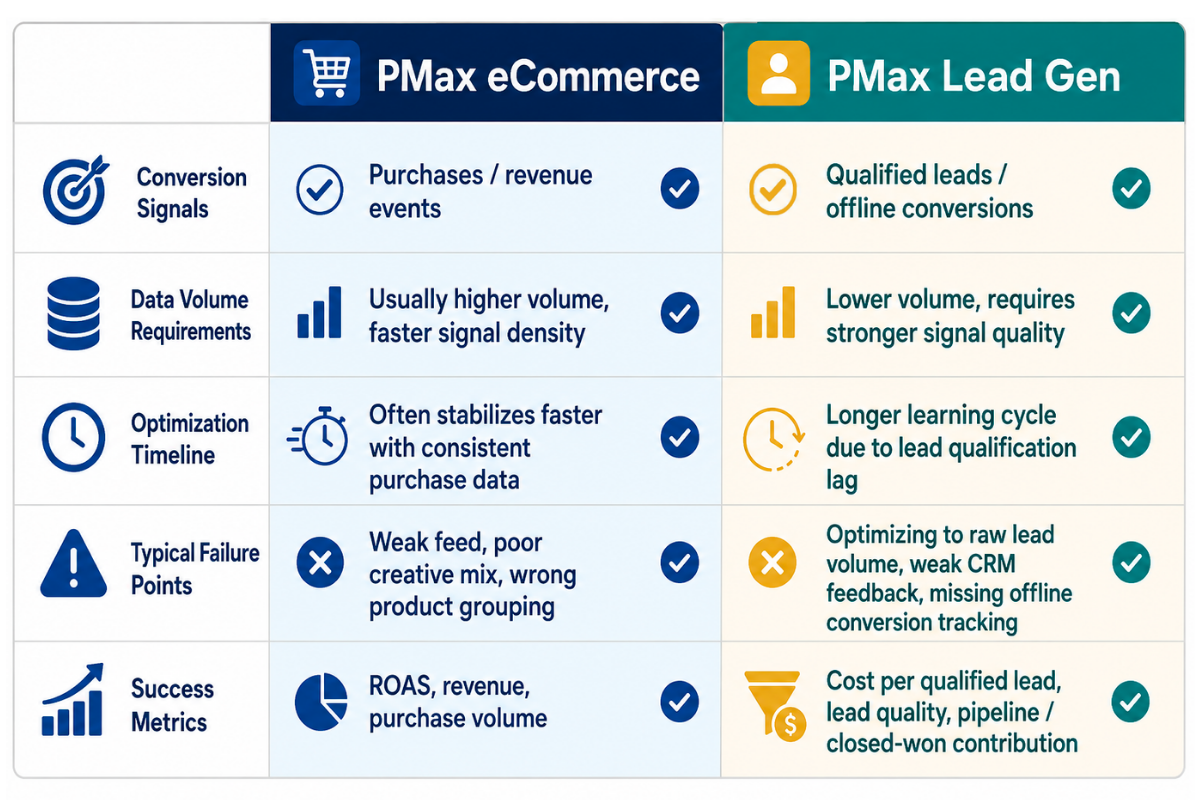
But here’s what those adoption numbers don’t tell you: PMax was built for ecommerce, where purchase signals are clear, and conversion volume is high. B2B lead generation has neither. Without specific configuration, the kind most advertisers skip, PMax optimizes for volume, not quality. It learns to get more of whatever converts fastest, which usually means low-intent form fills from people who will never buy.
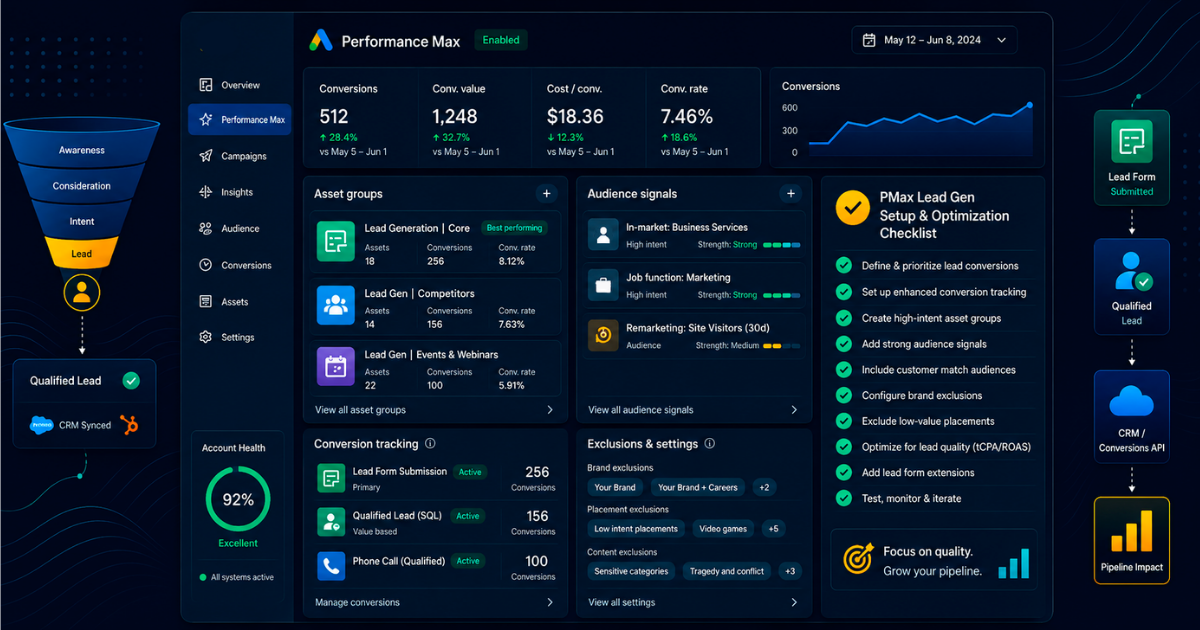
This is the exact checklist NAV43 uses with clients to make PMax work for lead generation. We’re covering three pillars: Setup (signals and structure that feed the algorithm correctly), Measurement (offline conversion tracking that teaches PMax what quality actually looks like), and Exclusions (protecting your budget from waste). Follow this playbook, and you’re positioning your campaigns to achieve the 30-50% higher ROAS that well-managed B2B PMax campaigns can deliver (GrowLeads.io, 2025).
One critical note before we dive in: PMax requires 4-6 weeks longer to optimize for lead gen compared to ecommerce due to lower conversion volume (Dataslayer.ai, 2025). Plan accordingly. This is a marathon setup, not a sprint.
Why PMax for Lead Gen Is Different (And Why Most Campaigns Fail)
The fundamental architecture problem is this: Performance Max was designed for e-commerce with high conversion volume and clear purchase signals. A sale is a sale. Revenue is revenue. The algorithm knows exactly what success looks like.
B2B lead gen has neither of these advantages. Your conversion volume is a fraction of what an e-commerce store sees. And a “conversion,” a form fill, tells Google absolutely nothing about whether that lead will ever become revenue. A spam submission and a $100K enterprise opportunity look identical to the algorithm.
This creates what I call the spam lead death spiral. Without quality feedback, PMax learns to pursue whatever converts fastest. Low-intent form fills convert faster than high-intent ones. The algorithm rewards speed, not quality. Your lead volume goes up, your sales team’s frustration goes up faster, and your actual pipeline goes nowhere.
Does PMax work for lead gen? Yes, but only with a specific configuration; most advertisers skip.
Google recommends at least 15 conversions per month for PMax optimization. Let’s do the math: if your average cost per lead is $40 and you need 15 conversions, that’s a minimum of $600/month just to give the algorithm enough data to learn. If your CPA is higher and you’re in B2B, you often need a proportionally larger budget.
Well-structured PMax campaigns can reduce cost per lead by 34% when optimized for sales-qualified leads rather than raw form fills (GrowLeads.io, 2025). That 34% improvement comes from one thing: offline conversion tracking. Without CRM feedback, PMax cannot distinguish a spam lead from a $100K opportunity. With it, the algorithm learns what actually matters.
The Data Feedback Loop PMax Actually Needs
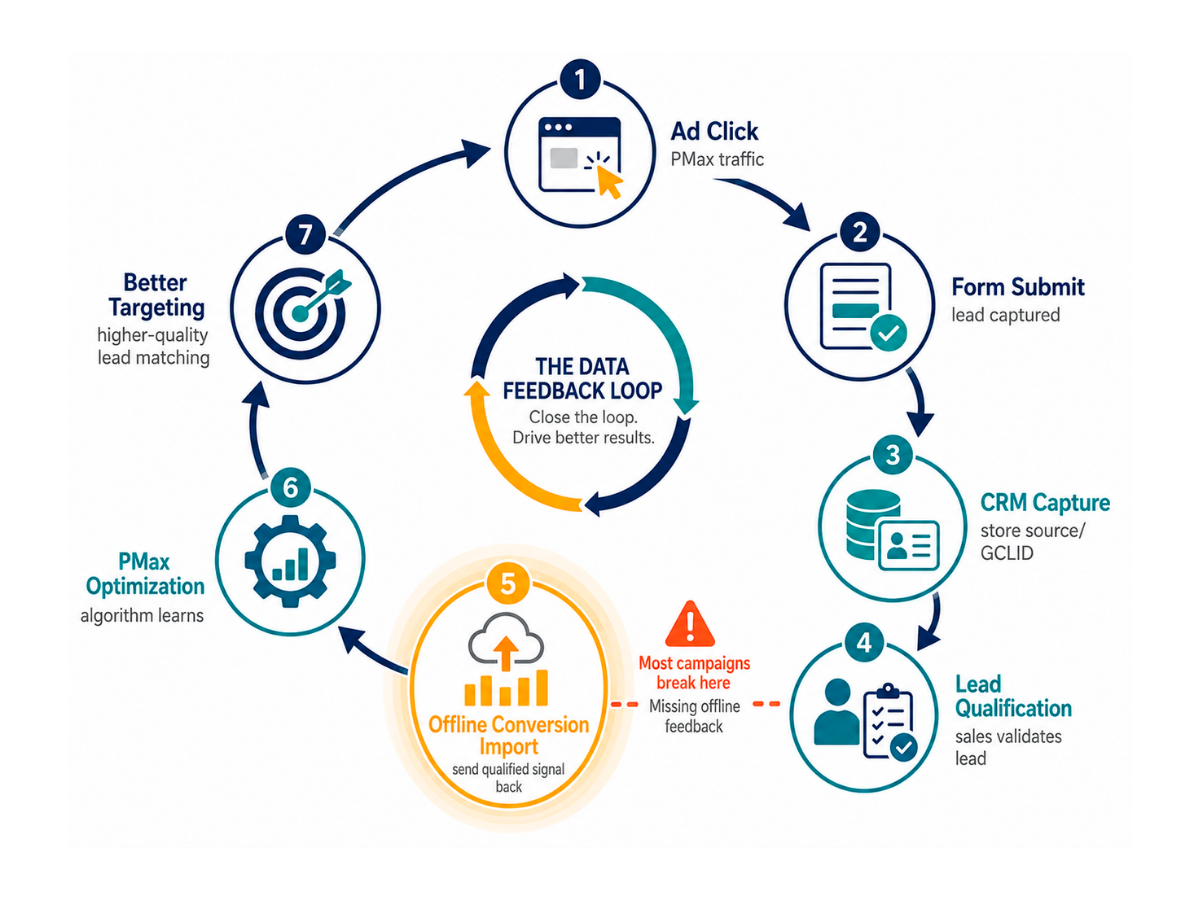
Here’s the flow that makes B2B PMax work:
Ad Click → Form Fill → CRM Entry → MQL Stage → SQL Stage → Closed Won → Data back to Google Ads
Every step in this loop matters. PMax’s AI optimizes toward whatever you tell it is valuable. If you only tell it “form fill,” that’s all it will optimize for. If you tell it “these specific leads became $50K opportunities,” it will find more people who look like those leads.
The challenge in 2026 is that privacy restrictions have created a 25-35% attribution gap, despite higher conversions (YeezyPay, 2026). More than a quarter of your conversion data never makes it back to Google through default tracking. Enhanced Conversions for Leads isn’t optional; it’s mandatory for accurate measurement.
This data feedback loop is the foundation of everything that follows in this checklist. Skip it, and nothing else will save your campaign.
Phase 1: Pre-Launch Setup Checklist
This is the foundation that must be right before spending a dollar. Every step here exists because I’ve seen campaigns fail when they skipped it. The 60-day failure pattern in PMax lead gen almost always traces back to something in this phase.
Conversion Tracking Configuration
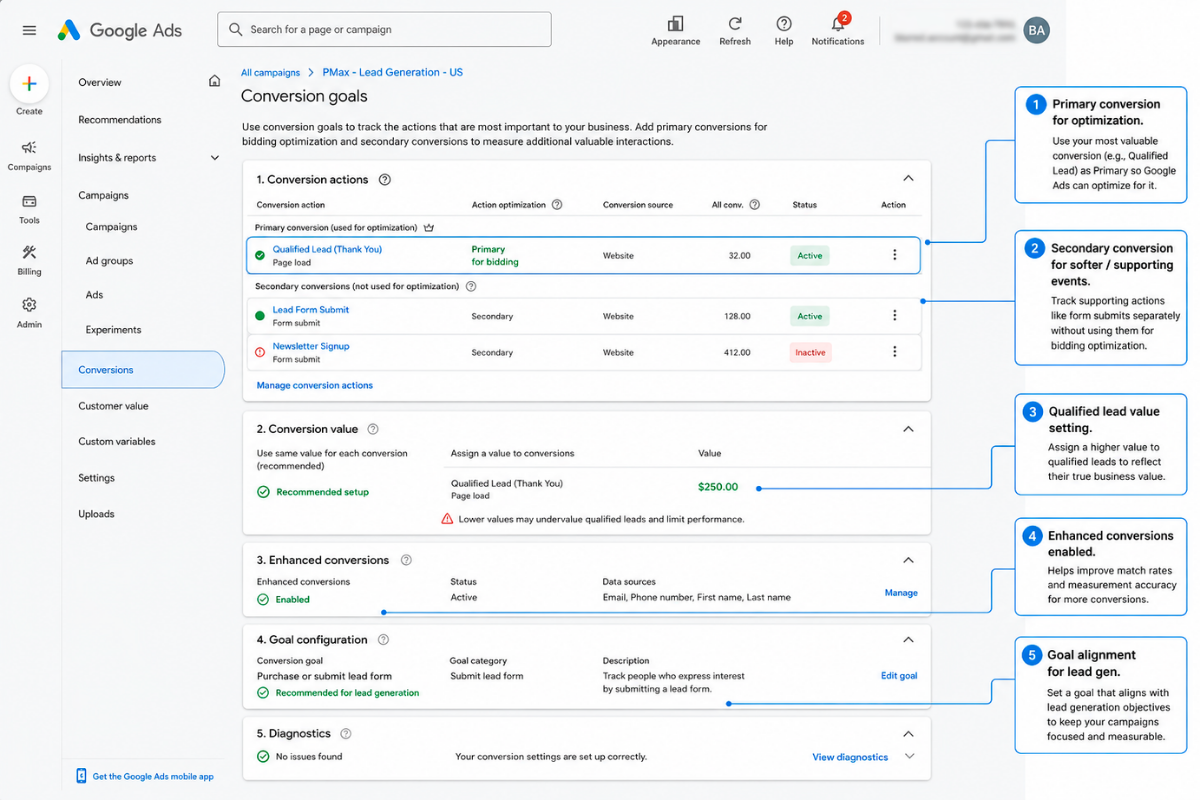
Your conversion value hierarchy is the single most important configuration decision. Here’s the framework we use with clients:
| Conversion Stage | Suggested Value | Why This Value |
|---|---|---|
| Form Fill | 1 | Baseline signal many won’t qualify |
| MQL (Marketing Qualified) | 10 | 10x more valuable than raw form fill |
| SQL (Sales Qualified) | 50 | Significant pipeline indicator |
| Closed Won | 100 (or actual revenue) | Ultimate success signal |
To configure this in Google Ads: Navigate to Settings → Conversions → Create conversion action → Import → CRM. Select your CRM platform and map your stages to conversion actions.
Enhanced Conversions for Leads is Google’s recommended upgrade path from basic offline conversion import. It uses first-party data, hashed email addresses from your forms, to match conversions even when cookies fail. In 2026’s privacy environment, this is non-negotiable.
Conversion windows for B2B need to be adjusted from the defaults. Standard campaigns use 30-day windows. B2B sales cycles are longer. Set your windows to:
– MQL conversions: 90 days
– SQL conversions: 90-180 days
– Closed Won: 180 days
The GCLID capture workflow is the technical bridge that makes offline conversion tracking possible:
- Add a hidden form field to capture the GCLID (Google Click ID) from the URL
- Configure your CRM to store the GCLID with each lead record
- Set up an export mechanism (manual upload, Zapier, or native integration) to send conversion data back to Google
Without the GCLID, Google cannot match your CRM data back to specific ad clicks. This is the lynch pin of the entire system.
Conversion Tracking Setup Checklist:
– [ ] Primary conversion action set to highest-value stage (SQL or Closed Won)
– [ ] Secondary conversions tracked but not used for bidding optimization
– [ ] Conversion window extended to 90+ days
– [ ] Enhanced Conversions for Leads enabled
– [ ] GCLID capture field added to all forms
– [ ] CRM configured to store GCLID with lead record
– [ ] Offline conversion import scheduled (weekly minimum)
– [ ] Conversion values assigned by stage
Audience Signals Configuration
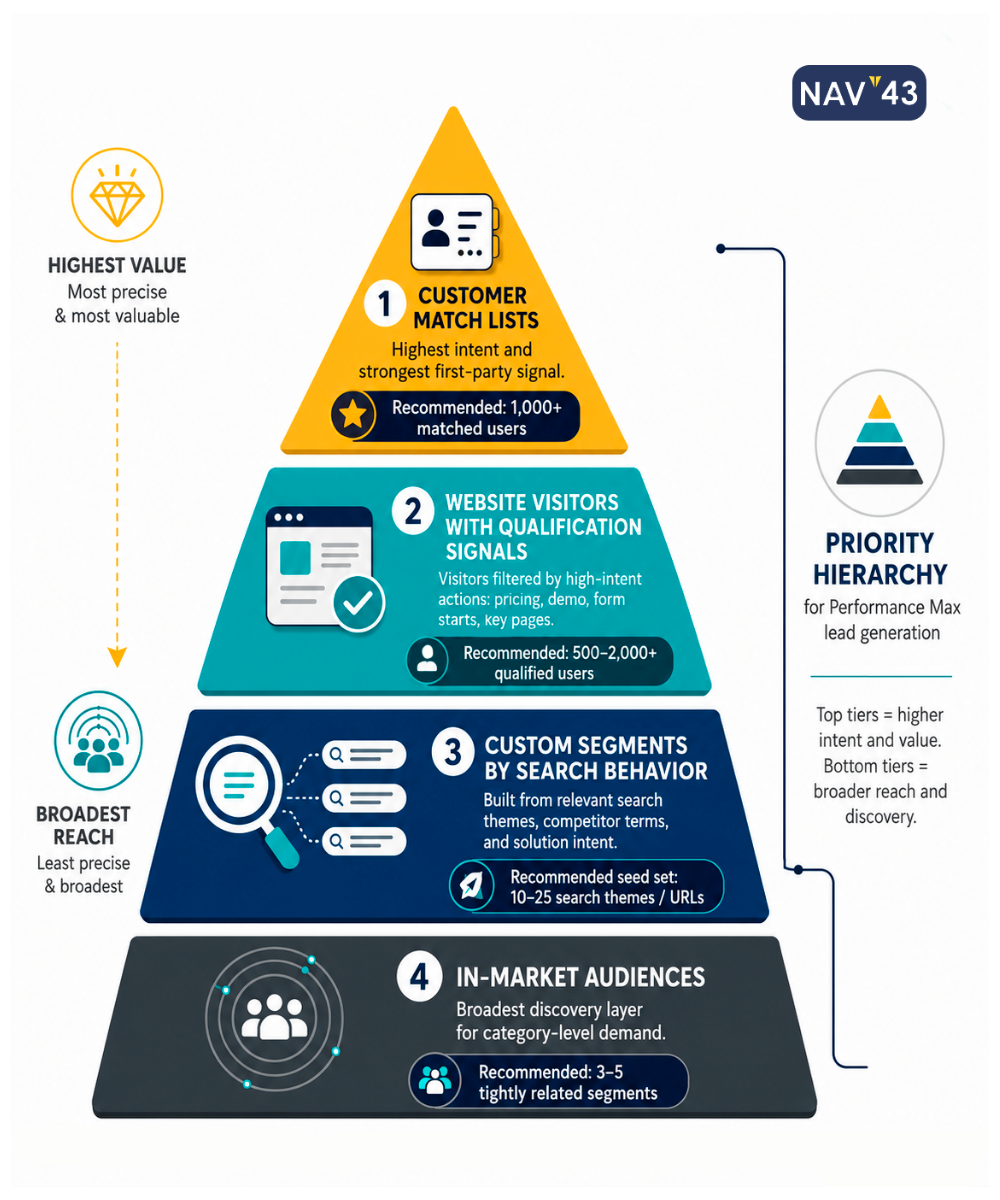
The 2025 Customer Match update changed the game for smaller B2B accounts. Google removed the minimum threshold of 1,000 users; your modest CRM list is now viable for audience signals. This matters because audience signals, while not hard targeting, significantly influence PMax’s initial learning phase.
Priority audience signals for B2B lead gen:
| Signal Type | Priority | Data Source |
|---|---|---|
| Customer Match Current customers | High | CRM export |
| Customer Match Past SQLs | High | CRM export |
| Customer Match Lost opportunities | Medium | CRM export |
| Website visitors High-intent pages | High | Google Analytics |
| YouTube engagers | Medium | YouTube analytics |
| First-party segments by vertical | Medium | CRM + enrichment |
Important distinction: audience signals are suggestions to PMax, not hard targeting. The algorithm will expand beyond them. But they matter enormously for initial learning because they tell PMax “people like this are valuable.”
Upload your strongest signals first. Current customers and past SQLs are gold; they represent exactly what a good lead looks like. Even a list of 200-500 matched users gives the algorithm a starting point.
Search Themes & Asset Groups
The 2025 “usefulness” indicator for search themes tells you whether Google considers your theme relevant enough to influence campaign targeting. Check this indicator when setting up themes. If Google shows low usefulness, your theme is too broad or misaligned.
Search theme strategy: Start with 3-5 high-intent themes per asset group, not broad categories. “Enterprise CRM software demo” beats “CRM software.” “IT security compliance audit” beats “cybersecurity.”
Asset group structure: Separate by product/service line, not by audience. PMax handles audience mixing internally, your job is to give it distinct messaging for distinct offerings. One asset group per major product or service category.
Asset requirements for each group:
– 5+ headlines (mix short and long)
– 5+ descriptions
– Images in all three ratios (square, landscape, portrait)
– At least one video (even a basic 15-second explainer)
The Gemini-powered AI creative generation that rolled out in late 2025 can auto-generate variations of assets. Use it for ideation, but don’t publish without human review. B2B messaging requires precision that AI still struggles with.
One of the most significant 2025 transparency updates: campaign-level negative keywords now support up to 10,000 keywords. This wasn’t possible before. Use it aggressively.
Phase 2: URL Exclusions Checklist (Protecting Your Budget)
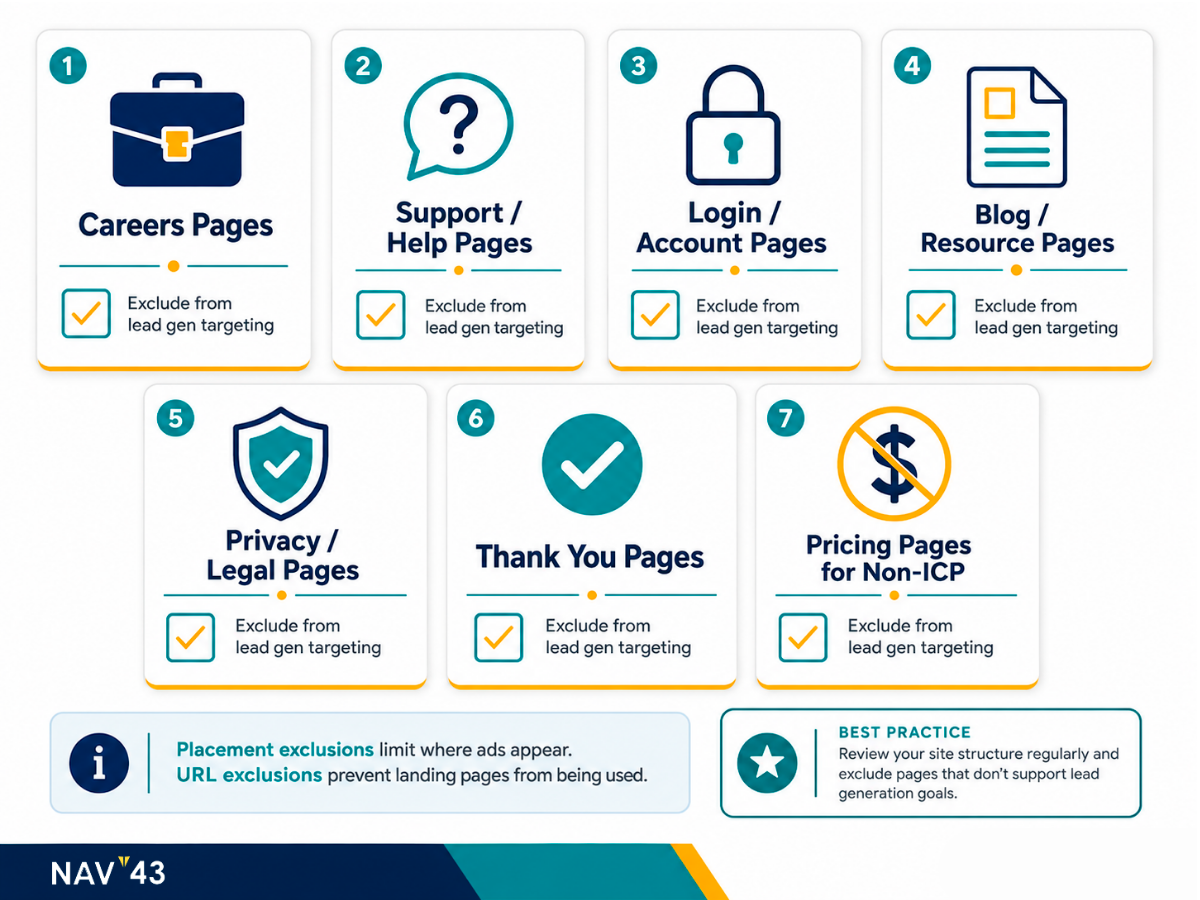
URL exclusions are the defensive layer that prevents wasted spend. By default, PMax will show ads for any page on your site. Many of those pages attract the wrong traffic entirely.
I was reviewing a client account last month in which 30% of their PMax spend drove traffic to their careers page. They were paying Google to attract job seekers, not customers. This is common and completely preventable.
Pages to Exclude (Complete Checklist)
Career and jobs pages attract job seekers, not customers. They’ll click, they might even fill out a form thinking it’s a job application, and they will never buy.
Blog posts and resource content are top-of-funnel. Visitors aren’t ready to convert. Sending paid traffic here burns budget on awareness when you’re optimizing for leads.
Privacy policy, terms of service, and legal pages have zero conversion intent. Anyone clicking these from an ad is confused.
Discontinued product or service pages generate leads for products or services you can’t deliver. Sales hates these leads.
Customer support and help center pages attract existing customers with problems, not prospects with budgets.
About us, team, and press pages are informational. They answer “who are you?” not “how do I buy?”
Login and account pages are for existing users only. You’re paying to acquire customers you already have.
Thank you, and confirmation pages exist post-conversion. There’s no value in sending new traffic here.
Complete URL Exclusions Checklist for B2B Lead Gen PMax:
– [ ] /careers/, /jobs/, /work-with-us/
– [ ] /blog/, /resources/, /news/, /insights/
– [ ] /privacy-policy/, /terms/, /legal/, /compliance/
– [ ] /support/, /help/, /faq/, /knowledge-base/
– [ ] /about/, /team/, /press/, /media/
– [ ] /login/, /account/, /dashboard/, /portal/
– [ ] /thank-you/, /confirmation/, /success/
– [ ] Any pages for discontinued offerings
– [ ] Any pages targeting existing customers only
Brand Exclusions & Negative Keywords
Here’s the elephant in the room: much of PMax’s reported success includes brand traffic that would convert on its own. Someone searches your company name, PMax shows them an ad, they click, and they convert. PMax takes credit. But that conversion was likely happening regardless.
Brand exclusions let you measure true incremental value. Exclude your brand terms and variations so PMax focuses on net-new demand generation rather than capturing existing demand.
The 2025 campaign-level negative keywords feature (up to 10,000 keywords) is a major control improvement. Use it. Here’s a starter negative keyword list for B2B:
Job-related: jobs, careers, salary, hiring, intern, internship, employment, apply
Information-seeking: free, template, PDF, download (unless these are your lead magnets), tutorial, how to
Review-focused: reviews (when followed by “employee”), Glassdoor, complaints
Low-intent: cheap, free trial (if you don’t offer one), comparison, vs, alternatives
Consider an account-level negative keyword list for cross-campaign exclusions. Certain terms should never trigger your ads, regardless of the campaign.
Phase 3: Measurement Framework for Lead Gen PMax
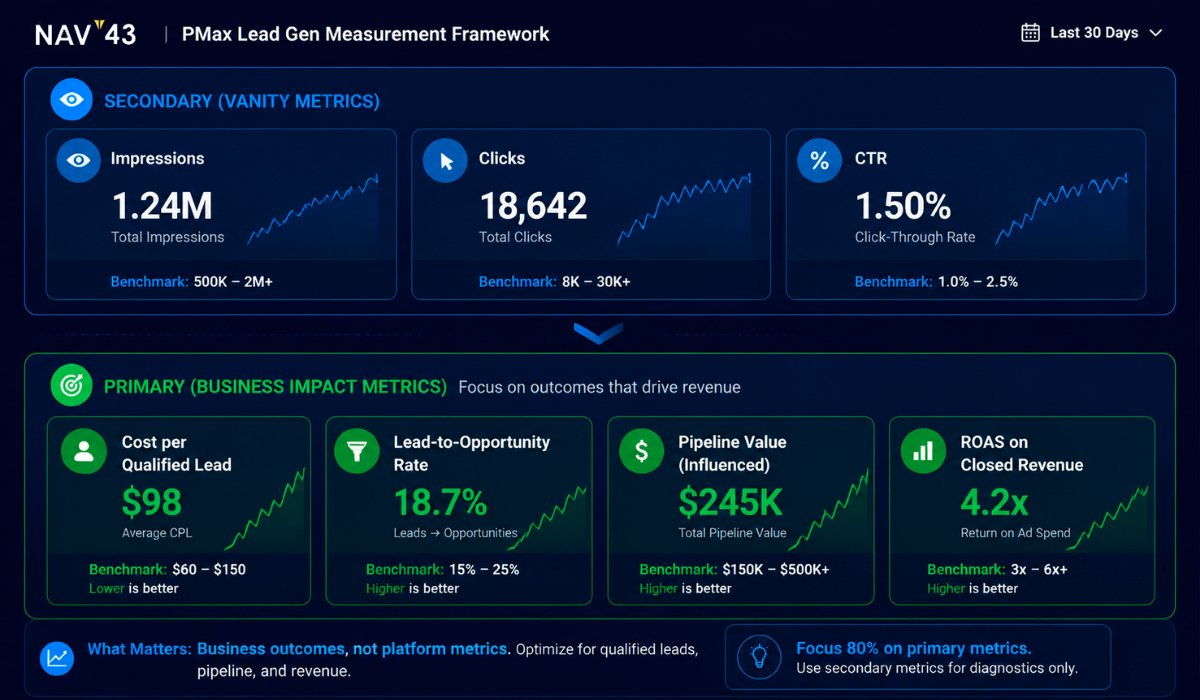
Standard PMax metrics mislead B2B marketers. Cost per conversion means nothing if conversions are spam. Conversion rate means nothing if most conversions never progress through your pipeline. You need a measurement framework that connects PMax to revenue.
The Metrics That Actually Matter
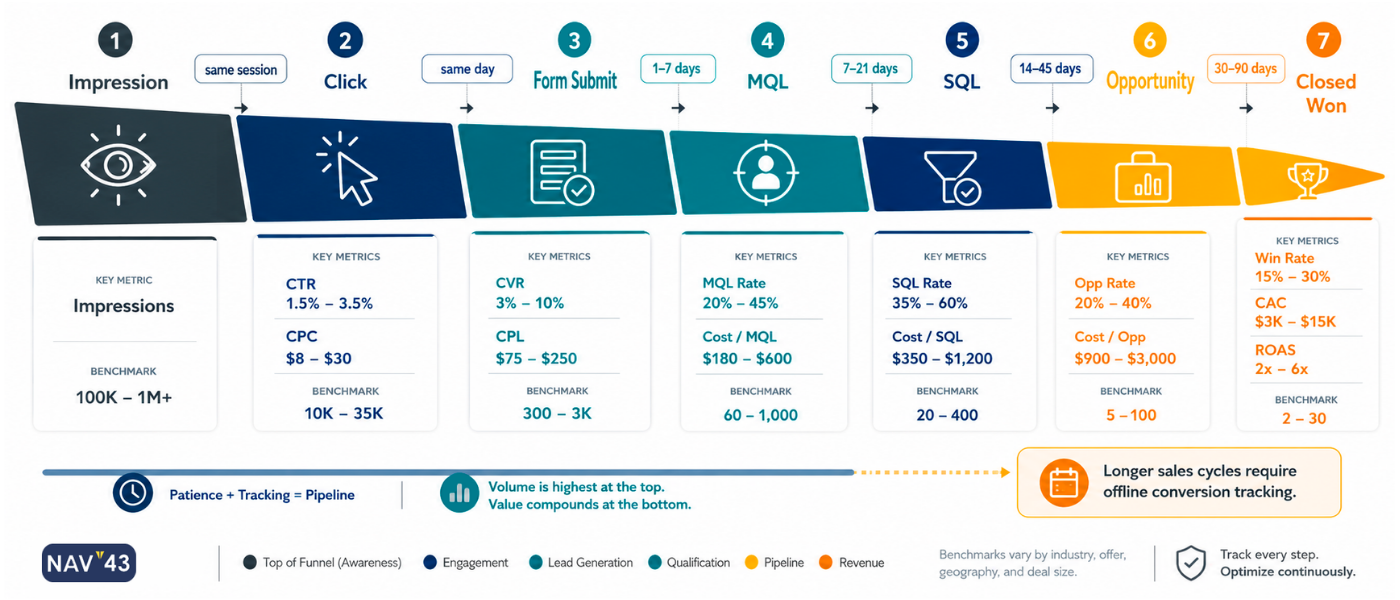
Primary KPI: Cost per SQL (or cost per qualified opportunity). This is the only metric that matters for optimization decisions. Everything else is noise or a leading indicator.
Secondary KPIs:
– Lead-to-SQL rate by campaign: Quality indicator. If PMax leads convert to SQL at 5% and Search leads convert at 25%, you know where your quality is coming from.
– Time-to-qualification: How long from lead to SQL? Faster qualification often indicates higher capture intent.
– Pipeline value generated: Sum of opportunity values attributed to PMax. The ultimate ROI indicator.
Vanity metrics to monitor but not optimize:
– Impressions (awareness indicator only)
– Clicks (traffic indicator only)
– Form fills (volume indicator only)
The 2025 transparency features matter here: full search terms reports, channel-level performance breakdowns, and asset-level data are now available. Use them. You can finally see where PMax is actually spending your money.
| Metric | Calculation | Benchmark | Why It Matters |
|---|---|---|---|
| Cost per SQL | PMax Spend ÷ SQLs Generated | Industry-specific | True efficiency measure |
| Lead-to-SQL Rate | SQLs ÷ Total Leads | 15-25% (B2B) | Quality indicator |
| Pipeline Value | Sum of opportunity values | 3-5x spend | ROI potential |
| Conversion Rate | Conversions ÷ Clicks | 7.52% average (WordStream, 2025) | Volume indicator |
| Qualified Lead Rate | SQLs ÷ Leads | >20% target | Optimization signal |
Offline Conversion Import Setup
The technical setup: Navigate to Google Ads → Tools → Conversions → Uploads → Schedule.
Data format requirements:
– GCLID (Google Click Identifier)
– Conversion name (matching your configured conversion action)
– Conversion time (ISO 8601 format preferred)
– Conversion value (mapped to your stage values)
Import frequency: Weekly minimum, daily preferred. Faster data means faster optimization. If you’re uploading monthly, you’re giving the algorithm stale information.
Common errors and fixes:
– Mismatched GCLIDs: Usually a form field capture issue. Verify your hidden field is actually capturing the GCLID
– Timestamp format issues: Google expects specific formats, ISO 8601 (YYYY-MM-DDTHH:MM:SS), which works reliably
– Duplicate uploads: Use unique conversion identifiers or implement deduplication logic
This is non-negotiable for B2B. Without offline conversion imports, you’re flying blind, asking the algorithm to find you revenue while only showing it from form submissions.
Budget Allocation: PMax vs Search (The Real Strategy)
Should you even use PMax for lead gen, or stick with Search? This is the question I get most often from B2B clients.
The expert consensus: 60-90% of the budget stays in Search, PMax is incremental reach. An Adalysis study found that search campaigns typically had higher conversion rates than PMax for the same search terms. This makes sense. Search is pure intent capture.
But PMax isn’t competing with Search for the same audience. Its strategic role is reaching audiences. Search can’t: Display, YouTube, Discovery, Gmail. People who haven’t searched yet but match your ideal customer profile.
Think of it this way: Search captures existing demand. PMax generates and captures additional demand across Google’s full ecosystem. They’re complementary, not competing.
The Phased Budget Approach
Phase 1 (Weeks 1-4): 80% Search, 20% PMax
Establish your Search baseline. Gather conversion data. Let PMax start learning from the small data set you’re feeding it. Don’t judge PMax performance yet it doesn’t have enough data.
Phase 2 (Weeks 5-8): 70% Search, 30% PMax
PMax begins learning from offline conversions (assuming you’ve uploaded them). This is where the algorithm starts to distinguish good leads from bad ones. Performance should stabilize.
Phase 3 (Weeks 9+): Adjust based on cost per SQL comparison
Compare the cost per SQL between Search and PMax. If PMax is competitive, increase allocation. If Search is dramatically more efficient, keep PMax as a supplemental reach play at 15-25% of the budget.
| Phase | Timeline | Search % | PMax % | Goal |
|---|---|---|---|---|
| Foundation | Weeks 1-4 | 80% | 20% | Establish baseline, gather data |
| Learning | Weeks 5-8 | 70% | 30% | PMax optimizes offline conversions |
| Optimization | Week 9+ | Variable | Variable | Allocate based on cost per SQL |
Is $20 a day good for Google Ads? It depends entirely on your CPA. At $20/day ($600/month), if your cost per lead is $40, you’re getting 15 conversions just meeting Google’s recommended minimum for optimization. If your CPA is $100, you’re getting 6 conversions, not enough data for PMax to learn effectively. Do the math for your specific situation.
Google’s stated 18% more conversions at a similar CPA benefit (Google, 2023) requires adequate conversion volume. Underfunded campaigns can’t achieve this.
PMax vs Demand Gen: When to Use Each
The difference between PMax and Demand Gen campaigns comes down to funnel position and control level.
Performance Max is conversion-focused. It optimizes across all Google placements (Search, Shopping, Display, YouTube, Discovery, Gmail) with minimal manual control. The algorithm decides where to show your ads based on conversion data.
Demand Gen is awareness and engagement-focused. It targets YouTube, Discover, and Gmail specifically, with more control over creative and audience targeting. It’s designed for top-of-funnel brand building.
The 2025 shift is from “either/or” to “both/and” strategy. The full-funnel approach uses Demand Gen to build awareness and warm audiences, then PMax to convert them.
| Factor | Performance Max | Demand Gen |
|---|---|---|
| Funnel Position | Middle/Bottom | Top/Middle |
| Placements | All Google properties | YouTube, Discover, Gmail |
| Control Level | Low (AI-driven) | Medium (audience targeting) |
| Creative Control | Asset-based | Full ad creative |
| Best For | Converting warm audiences | Building awareness |
| Optimization Goal | Conversions/Value | Engagement/Conversions |
| B2B Use Case | Retargeting, high-intent capture | Thought leadership, brand |
For most B2B lead gen, PMax is the priority. Demand Gen becomes relevant when you’re investing in brand awareness or have a mature content marketing operation driving top-of-funnel engagement.
Common Pitfalls (And How to Avoid Them)
These are the mistakes I see repeatedly in client audits. Every one of them is preventable.
Pitfall 1: Optimizing for Form Fills Instead of Revenue
This is the most common and most damaging mistake. You tell Google “optimize for conversions,” Google finds you lots of form fills, sales complaints about lead quality, and nobody connects the dots.
Symptoms: High lead volume, low lead quality, sales team frustration, a pipeline that doesn’t grow in proportion to lead volume.
Fix: Implement offline conversion tracking with the value hierarchy described earlier. Tell Google what leads actually became revenue. The algorithm will find more of those.
Pitfall 2: Insufficient Conversion Volume
PMax needs data to learn at least 15+ conversions per month. Without adequate volume, the algorithm can’t distinguish patterns. Performance stays erratic.
Symptoms: Wildly fluctuating results week to week, extended learning phases, targeting that seems random.
Fix: Either increase the budget to hit conversion-volume thresholds, or temporarily use broader conversion actions during learning (e.g., all form fills, then narrow to MQLs once you have volume). This isn’t ideal, but it’s better than starving the algorithm.
Pitfall 3: Missing URL Exclusions
Default PMax targets your entire site. Every page. Including the ones that attract entirely wrong traffic.
Symptoms: Leads from your careers page, support ticket submissions from ads, and blog readers who never return.
Fix: Implement the complete URL exclusion list before launch. Don’t wait to see the problem; prevent it.
Pitfall 4: No Brand Exclusions
PMax takes credit for brand traffic that would convert anyway. Your metrics look amazing. Your incremental growth is zero.
Symptoms: Fantastic PMax metrics combined with flat overall results, customer acquisition cost that doesn’t improve despite “efficient” PMax.
Fix: Exclude brand terms. Measure incremental lift only. Judge PMax on new customer acquisition, not existing demand capture.
Pitfall 5: Set-It-and-Forget-It Mindset
PMax requires 4-6 weeks longer to optimize for lead gen than for e-commerce. Early performance does not indicate long-term performance.
Symptoms: Campaign killed in week 3 because metrics looked bad, never given a chance to optimize with offline conversion data.
Fix: Commit to an 8-week minimum test with weekly optimization. Upload offline conversions weekly. Judge performance after the algorithm has learned from quality data.
The NAV43 PMax Lead Gen Launch Checklist
This comprehensive checklist summarizes everything we’ve covered. Print it, save it, reference it for every PMax lead gen campaign.
Pre-Launch (Week Before)
Conversion Tracking:
– [ ] Conversion tracking configured with value hierarchy (Form=1, MQL=10, SQL=50, Won=100)
– [ ] Enhanced Conversions for Leads enabled
– [ ] GCLID capture added to all forms
– [ ] CRM configured to store and export GCLID
– [ ] Offline conversion import tested with sample data
– [ ] Conversion windows extended to 90+ days
Audience & Targeting:
– [ ] Audience signals uploaded (Customer Match customers, SQLs, lost opportunities)
– [ ] Website visitor audiences created (high-intent pages)
– [ ] URL exclusions list implemented (careers, blog, support, legal, login)
– [ ] Brand exclusions configured
– [ ] Negative keyword list added (10,000 limit available)
Creative & Structure:
– [ ] Asset groups created (one per product/service line)
– [ ] Full asset coverage per group (5+ headlines, 5+ descriptions, images in all ratios, video)
– [ ] Search themes defined (3-5 high-intent themes per group)
– [ ] Search theme usefulness indicator checked
Launch Week
- [ ] Budget allocated (recommend 80% Search / 20% PMax initially)
- [ ] Bidding strategy set to Maximize Conversions (target CPA after 30+ conversions)
- [ ] Campaign launched and verified (ads showing, tracking firing)
- [ ] First offline conversion upload scheduled (within 7 days)
Post-Launch (Ongoing)
- [ ] Weekly offline conversion uploads (daily preferred)
- [ ] Weekly cost per SQL comparison (PMax vs Search)
- [ ] Search terms report review (bi-weekly)
- [ ] Asset performance review (monthly)
- [ ] Budget reallocation based on Phase 2/3 guidelines
Conclusion: Key Takeaways
Performance Max can work for B2B lead generation, but only with a specific configuration that most advertisers skip. The difference between 5% and 25% qualified lead rates isn’t luck. It’s architecture.
- Offline conversion tracking is non-negotiable. Without CRM feedback, PMax optimizes for spam. The GCLID capture workflow and conversion value hierarchy are the foundation of everything else.
- URL and brand exclusions protect your budget. Default PMax will advertise your careers page and take credit for brand traffic. Implement exclusions before launch, not after you’ve wasted spend.
- Budget allocation should favor Search. 60-90% of the budget is spent on Search campaigns. PMax is incremental reach, not a replacement for intent-based capture.
- Measurement must focus on the pipeline, not form fills. Cost per SQL is your primary KPI. Everything else is noise or a leading indicator.
- Give the algorithm time. 8-week minimum commitment with weekly offline conversion uploads. PMax requires 4-6 weeks longer than e-commerce to optimize.
Next Steps
Start with conversion tracking. This week, audit your current setup: Is GCLID captured on every form? Is it stored in your CRM? Do you have an export mechanism to Google Ads? If any of these are missing, that’s your first priority.
Then build your exclusion lists. Review every page on your site and ask: “Would I pay money to send a cold prospect here?” Be ruthless. Add every non-converting URL to your exclusions before spending another dollar on PMax.
If you’re unsure whether your PMax campaigns are configured correctly or whether they’re silently wasting budget on spam leads, get a free growth plan from NAV43. We’ll audit your current setup and show you exactly where the opportunities are.
The advertisers who master PMax for lead gen gain a significant competitive advantage. The ones who run it with default settings just subsidize Google’s revenue while their sales team wonders why lead quality keeps declining. The choice is straightforward, and the checklist is in your hands.
