Search vs Performance Max for Lead Gen: Which Should You Scale First?
Search vs Performance Max for Lead Gen: Which Should You Scale First?
In a study of 3,300+ non-retail Performance Max campaigns, Search campaigns had higher conversion rates 84% of the time when both campaign types were eligible for the same search terms (Adalysis, 2024-2025). Let that sink in. Despite the narrative that Performance Max is the future of Google Ads, the data tell a different story for lead-generation businesses.
Here’s the uncomfortable reality: over 1 million advertisers now use Performance Max globally (Google, 2025), and 82% run it alongside other campaign types (Optmyzr, 2025). Yet most don’t know which to prioritize or how to allocate budget between the two. The result? Wasted spend, low-quality leads, and algorithms optimizing for the wrong outcomes.
The stakes couldn’t be higher. The average cost per lead in Google Ads is now $70.11 (WordStream, 2025). When you’re paying that much per conversion, misallocating budget between Search and PMax isn’t a minor optimization issue. It’s a revenue leak that compounds every month you ignore it.
By the end of this article, you’ll have a clear framework for deciding which campaign type to scale first, how to allocate budget based on your business maturity, and how to avoid what I call the “feedback loop of doom” that tanks PMax lead quality for B2B advertisers.
What This Article Covers and Why It Matters
We’ll break this down systematically. First, we’ll examine how Search and Performance Max campaigns actually work, including where they overlap and compete. Then we’ll dive into head-to-head performance data specific to lead generation, not the e-commerce metrics that dominate most discussions. From there, I’ll share the exact budget allocation framework we use with clients at NAV43, including minimum thresholds before scaling PMax.
The CRM integration section might be the most important part of this article. Without it, everything else fails. We’ll cover exactly how to set up offline conversion tracking so your algorithms optimize for revenue, not just form fills.
Finally, we’ll address the September 2026 AI Max migration and what it means for your Search vs PMax strategy going forward.
This isn’t theoretical. We’ve run both campaign types across B2B lead gen clients, and I’ll share exactly what we’ve learned about scaling order. Most content on this topic says “run both” and calls it a day. That’s not helpful. I’m going to give you specific percentages, thresholds, and a decision tree for your situation.
The Core Difference: Search vs Performance Max Campaigns
How Google Search Campaigns Work
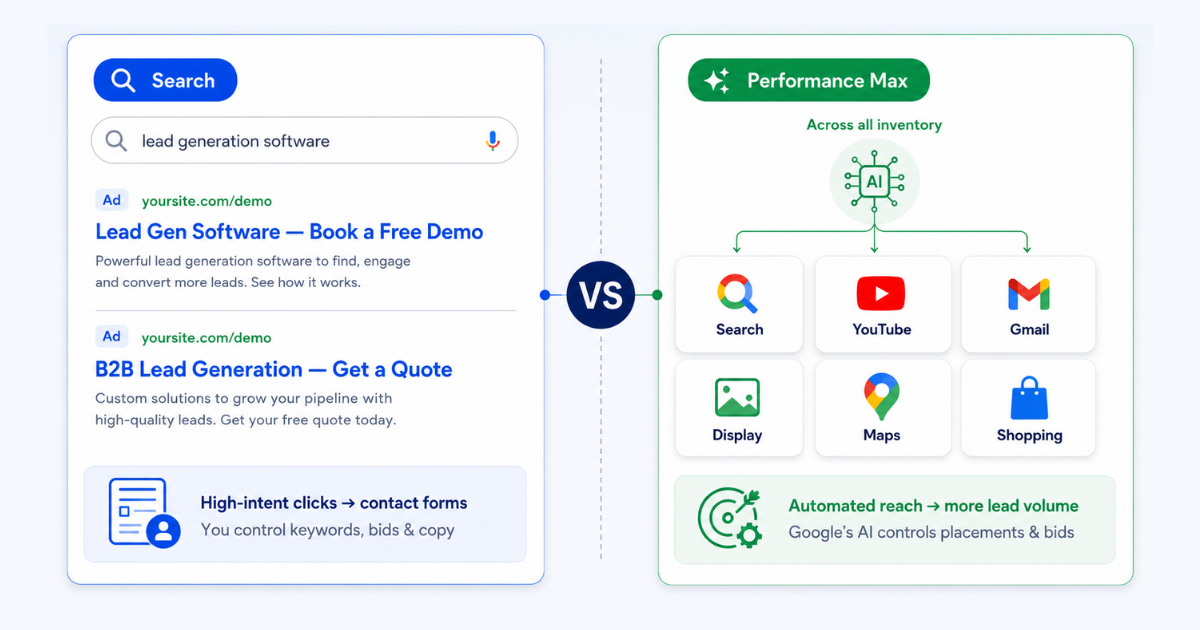
Search campaigns operate on keyword-based targeting. You select exact, phrase, or broad match keywords and control precisely which searches trigger your ads. This gives you granular control over intent, meaning you can bid aggressively on high-commercial-intent queries and exclude informational searches that waste budget.
Bid strategies range from fully manual CPC to automated options like Target CPA or Maximize Conversions, but the key distinction is that automation happens on keywords you’ve selected. Your ads appear only on Google Search (and Search Partners if enabled), keeping your spend focused on users actively searching for solutions.
The transparency is significant. You see exactly which search terms triggered clicks and conversions. When a lead comes through, you can trace it back to the specific query that drove it. This visibility makes optimization straightforward: double down on what works, cut what doesn’t.
How Performance Max Campaigns Work
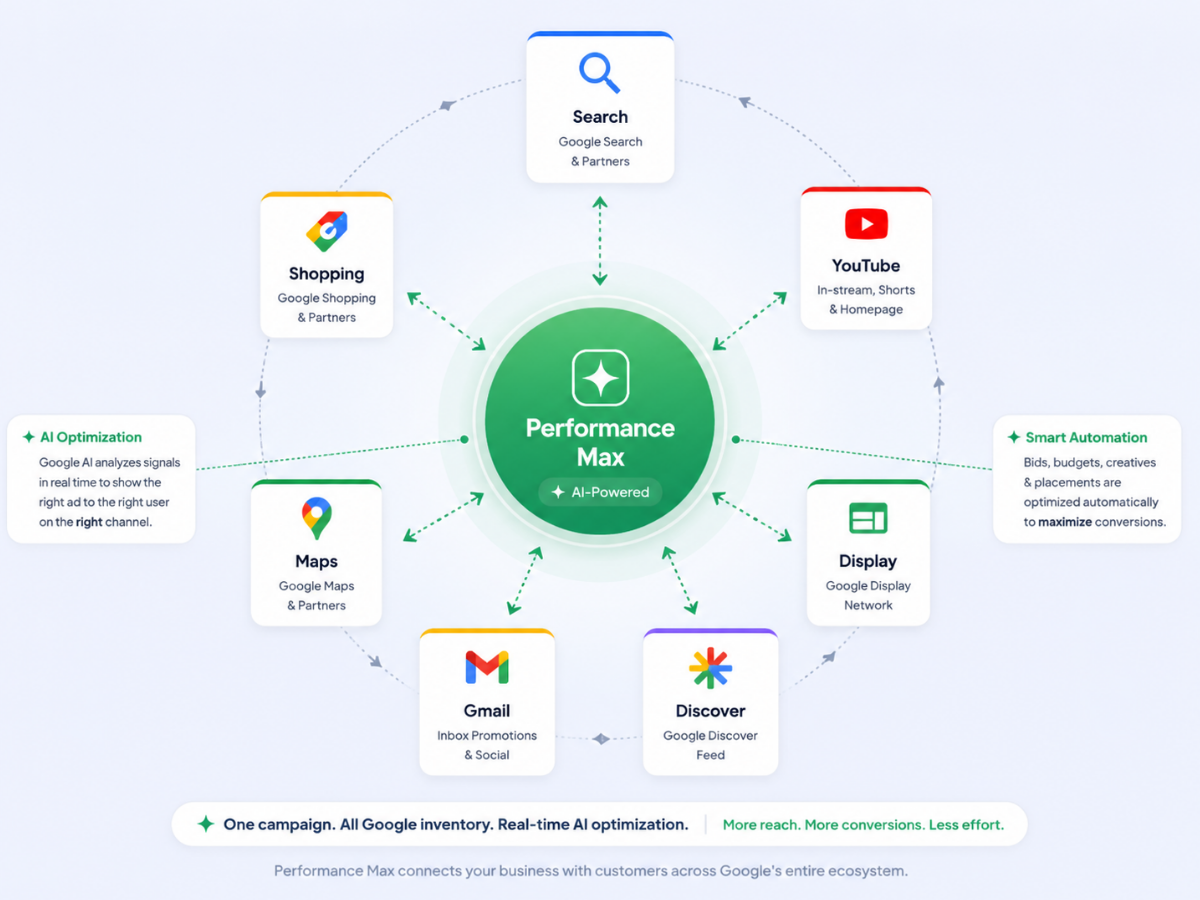
Performance Max flips this model entirely. Instead of choosing keywords, you set a conversion goal, provide creative assets, and Google’s AI decides where, when, and to whom to show your ads. The campaign serves across Search, YouTube, Display, Discover, Gmail, and Maps, all from a single campaign.
Historically, PMax offered no negative keyword capability, a major pain point for lead gen advertisers. As of January 2025, you can now add up to 10,000 negative keywords per campaign (Google, 2025) at the campaign level, which helps, but control remains limited compared to Search.
The “black box” reputation persists, though reporting has improved. The November 2025 update added channel performance reporting showing impressions, clicks, conversions, and cost by channel. You can now see how much of your PMax spend goes to Search, Display, and YouTube, a crucial transparency improvement.
Here’s the critical insight: 91.45% of accounts have keyword overlap between Search and PMax campaigns (Optmyzr, 2025). Your campaigns are competing for the same queries, whether you realize it or not.
Does Performance Max Include Search?
Yes. PMax campaigns can and do serve ads on Google Search. This is the source of cannibalization concerns: your Search campaigns and PMax campaigns bid against each other for the same users.
Google’s official position is that PMax is “additive,” meaning it finds incremental conversions you wouldn’t have captured otherwise. But the Adalysis data paints a different picture. Search wins on conversion rate 84% of the time when both campaign types are eligible for the same terms.
The implication: PMax’s Search placements often capture brand queries and lower-funnel terms that would have converted anyway, potentially at lower cost through dedicated Search campaigns.
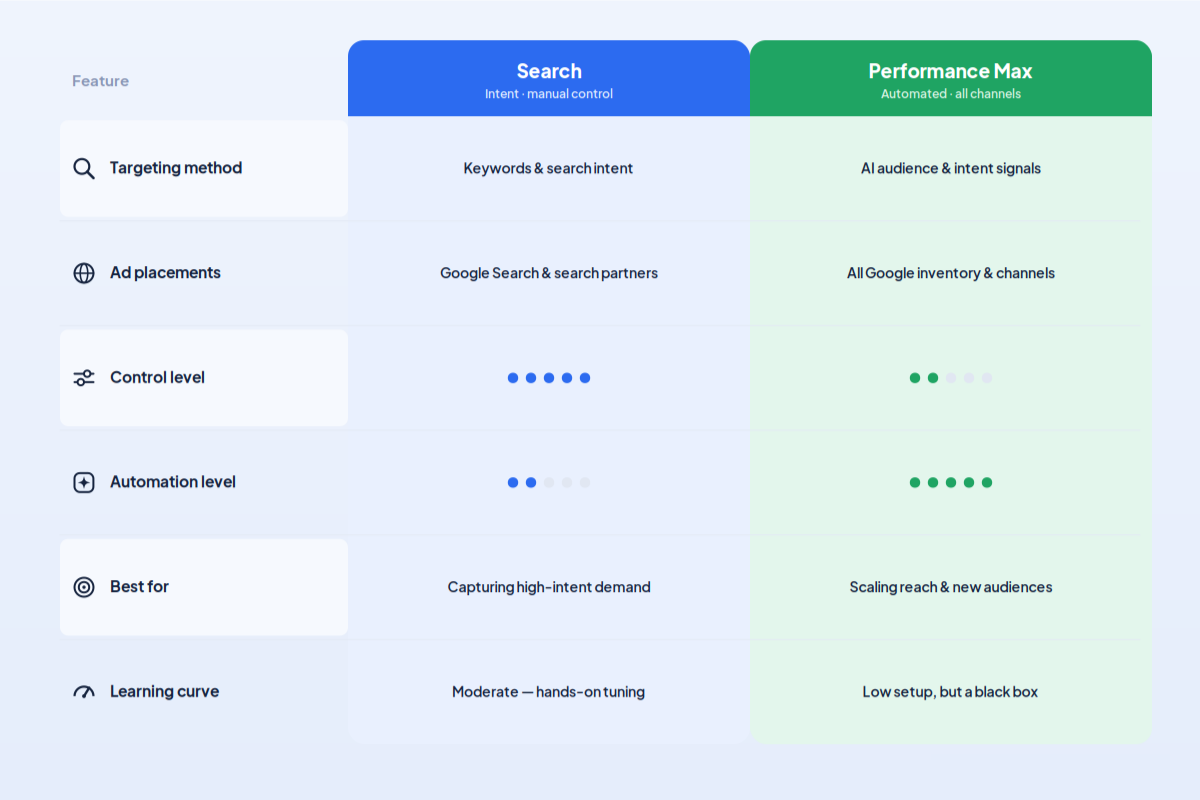
| Feature | Search Campaigns | Performance Max |
|---|---|---|
| Targeting method | Keyword-based | Goal-based AI |
| Channels | Search only | Search, YouTube, Display, Discover, Gmail, Maps |
| Keyword control | Full control | Limited (brand exclusions, 10K negatives) |
| Negative keywords | Unlimited | Up to 10,000 campaign-level (Google, 2025) |
| Bid strategies | Manual or automated on chosen keywords | Automated across all inventory |
| Transparency | Full search term visibility | Channel-level reporting (as of Nov 2025) |
| Creative control | Full control over ad copy | Asset-based, Google assembles combinations |
| Best for | High-intent capture, granular optimization | Broad reach, cross-channel awareness |
Head-to-Head: Performance Data for Lead Gen
What the Data Actually Shows
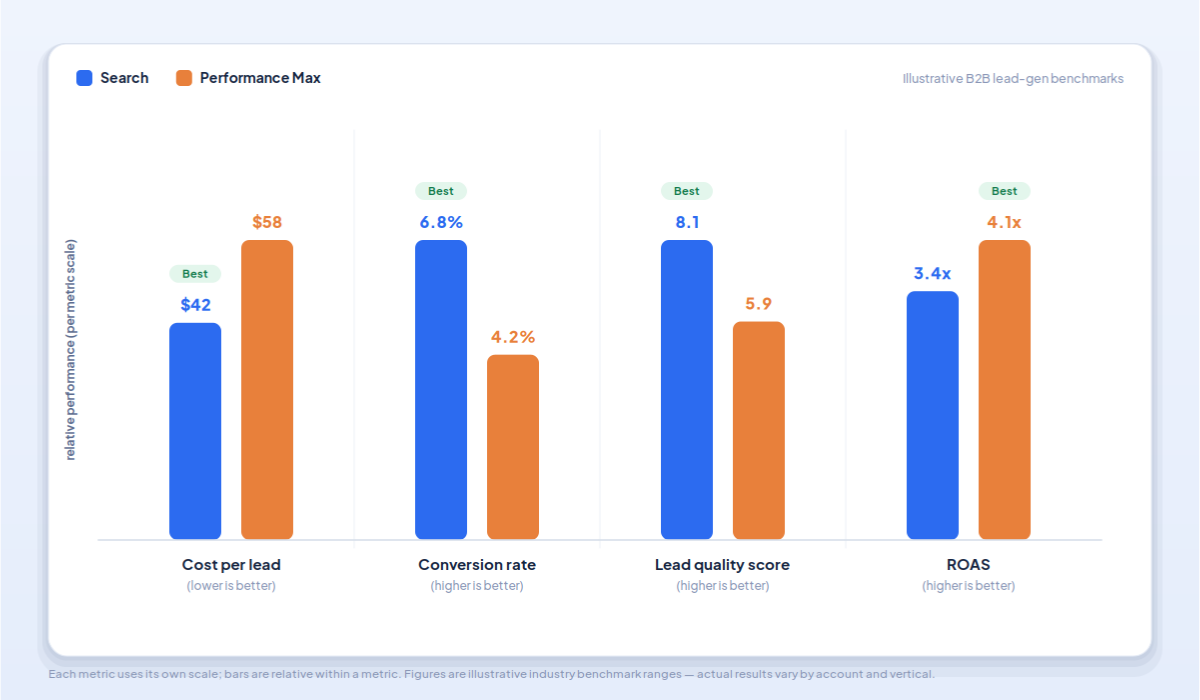
The Adalysis study of 3,300+ non-retail campaigns found that Search campaigns had higher conversion rates 84% of the time when both were eligible for the same search terms (Adalysis, 2024-2025). This isn’t a marginal difference. It’s a decisive advantage for Search in lead generation contexts.
The distinction between lead gen and e-commerce matters enormously. B2B and lead gen benchmarks show a 2.8% conversion rate at $94 CPA, while e-commerce achieves 5.9% conversion rate at $51 CPA (WordStream, 2025). PMax was designed for e-commerce, where purchase signals are immediate and unambiguous.
The Smarter Ecommerce 2025 report, which analyzed 4,000+ campaigns, found PMax achieving 95-116% of target ROAS (Smarter Ecommerce, 2025). Impressive, but this data skews heavily toward retail. The lead gen reality is messier.
Why Lead Gen Results Differ from E-Commerce
E-commerce has one massive advantage: immediate, trackable conversions. When someone buys a product, the algorithm gets a clean signal. It knows exactly what worked.
Lead gen operates differently. The conversion you track, typically a form fill, isn’t the outcome you care about. What matters is whether that lead becomes a qualified opportunity and eventually a customer. B2B sales cycles run 30 to 180 days. Without CRM integration feeding downstream data back to Google, PMax optimizes for form fills rather than revenue.
This creates what I call the feedback loop of doom. The algorithm learns to generate more leads that look like your previous leads. If those previous leads were low quality, you’re training Google to find more low-quality leads at scale. The more budget you add, the worse your lead quality becomes.
The Feedback Loop of Doom
Here’s how it works: PMax generates leads. You don’t import quality signals from your CRM. The algorithm sees “50 conversions this month” and optimizes for more of the same. But if only 3 of those 50 became SQLs and zero closed, your true cost-per-customer is infinite. The algorithm doesn’t know this. It keeps finding more leads that match the profile of your junk leads. More budget means more junk at scale.
The Lead Quality Problem
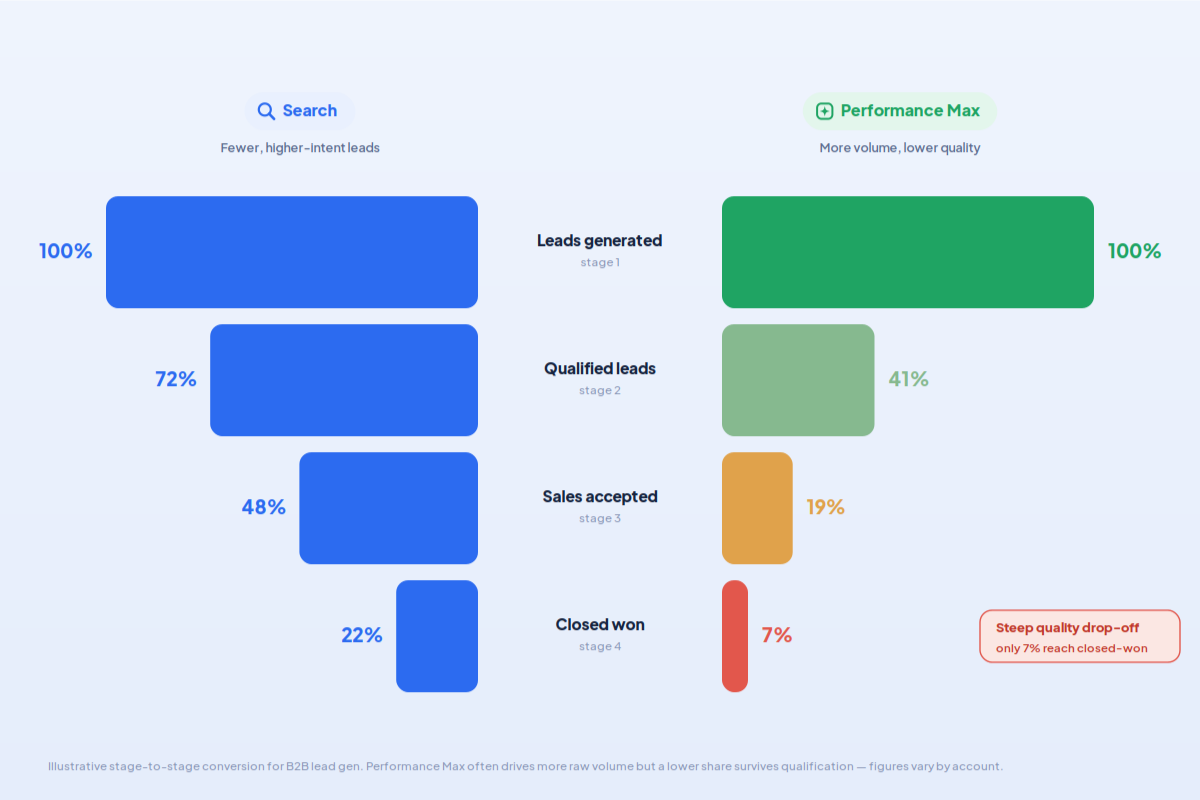
Most PMax “success” metrics measure conversions, not qualified leads or revenue. Google’s internal data, claiming 7% more conversions with AI Max (Google, 2026), includes brand traffic inflation. When you strip out brand queries, the performance advantage shrinks or disappears entirely for lead gen.
The real question isn’t “which campaign type gets more conversions?” It’s “which campaign type generates more revenue?”
To answer that question, you need lead scoring and CRM integration. According to recent data, 61% of B2B teams now use AI for lead scoring, up from 23% in 2024 (Digital Applied, 2026). If you’re not in that 61%, you’re flying blind on PMax performance.
The Budget Allocation Framework: Where to Put Your Money
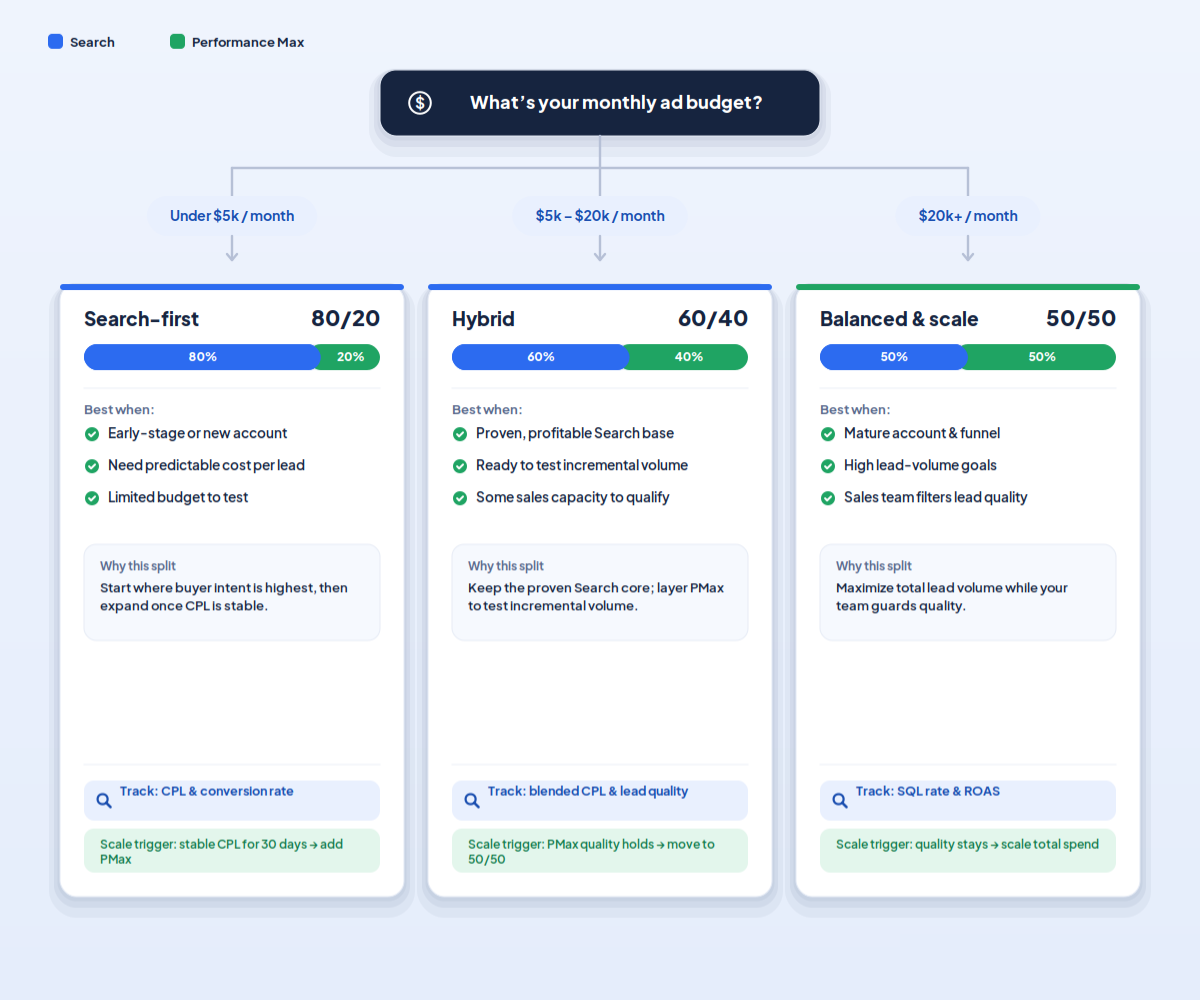
The NAV43 Lead Gen Budget Framework
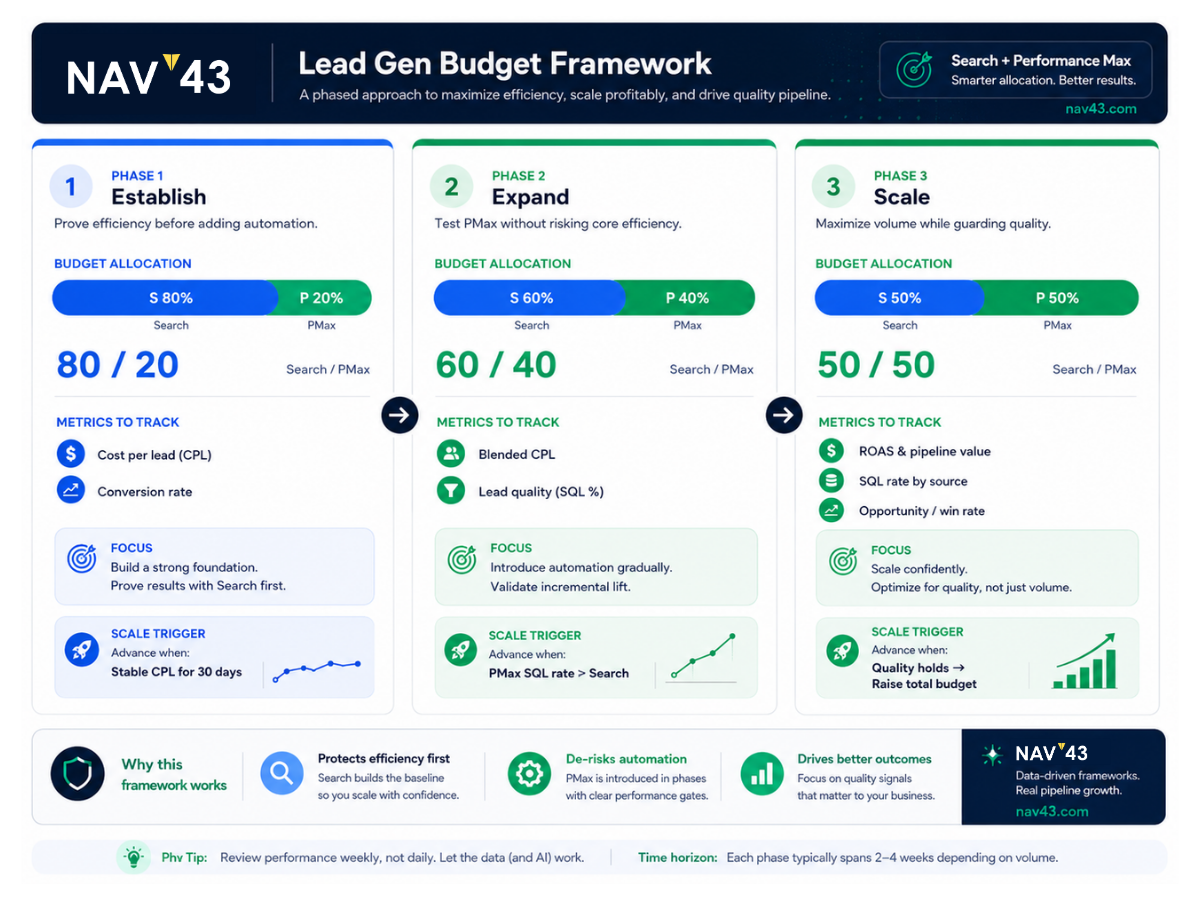
Based on our work with B2B and lead gen clients, here’s the budget allocation framework we recommend:
Phase 1: Building Foundation (80% Search / 20% PMax)
Prioritize Search to establish baseline conversion data and identify high-intent keywords. Your Search campaigns should be profitable and generating consistent leads before PMax gets a meaningful budget. The 20% PMax allocation lets you test the channel and gather early learning data without risking core performance.
Phase 2: Scaling with Data (70% Search / 30% PMax)
Once you have 50+ conversions per month and CRM integration is live, expand PMax. You’re now feeding the algorithm downstream signals, so it can start optimizing for lead quality rather than just volume. Monitor cost-per-SQL closely during this phase.
Phase 3: Full Optimization (50-60% Search / 40-50% PMax)
When offline conversion tracking is mature, and PMax is hitting SQL targets comparable to Search, you can approach parity. This phase typically takes 6+ months to reach, assuming clean data and a consistent budget.
The key principle: Search first, PMax second. Not because PMax is bad, but because you need clean data before the algorithm can optimize correctly.
Minimum Thresholds Before Scaling PMax
Don’t scale PMax prematurely. These thresholds should be met first:
Conversion volume: Minimum of 30-50 conversions per month in your Search campaigns before PMax has enough signal to optimize effectively. Below this, the algorithm is guessing.
CRM integration: Offline conversion tracking must be live and feeding data back to Google Ads. This is non-negotiable for lead gen. We’ll cover the setup in the next section.
Sales cycle alignment: If your sales cycle exceeds 90 days, you need a lead scoring system to provide interim conversion signals. Otherwise, the feedback loop is too slow for effective optimization.
Budget floor: PMax needs a minimum of $100-150 per day to gather enough data across channels. Below this threshold, results are unreliable and learning periods extend indefinitely.
Industry adjustment: B2B SaaS with $800-$2,500 cost-per-SQL needs higher volume or longer learning periods than businesses with $200 cost-per-SQL.
When to Flip the Ratio
Consider increasing PMax budget beyond 50% only if:
- PMax SQL conversion rate matches or exceeds Search after 90 days of clean data
- PMax cost-per-SQL is within 20% of Search with higher volume
- Your creative assets (especially video) are strong, and YouTube/Display are contributing meaningfully to the pipeline
Never flip based solely on form fills. Only revenue metrics justify reallocation of the budget toward PMax.
Pre-PMax Launch Checklist for Lead Gen
Before launching or scaling Performance Max for lead generation, confirm:
- ☐ GCLID capture is active on all form submissions
- ☐ CRM integration with Google Ads is configured and tested
- ☐ At least one downstream conversion stage (MQL or SQL) is being imported
- ☐ Search campaigns generating 50+ conversions/month
- ☐ Negative keyword list prepared (brand terms, competitors, irrelevant queries)
- ☐ High-quality image assets ready (not stock photos)
- ☐ Video assets available or Display/YouTube excluded
- ☐ Daily budget of $100+ allocated
- ☐ 90-day test commitment agreed with stakeholders
- ☐ Baseline cost-per-SQL from Search documented for comparison
The CRM Integration Imperative
Why This Is Non-Negotiable for Lead Gen PMax
I’ve reviewed dozens of lead gen PMax setups, and the single most common failure point is missing CRM integration. Without offline conversion data, PMax optimizes for the wrong thing. Always.
Google’s algorithm needs downstream signals: MQL, SQL, opportunity, and closed-won. The more conversion stages you feed back, the better PMax understands which lead profiles actually generate revenue.
This is the single biggest differentiator between PMax success and failure in B2B. You can have perfect creative assets, aggressive budgets, and smart negative keyword strategies. Without CRM integration, none of it matters.
We’ve seen clients running PMax for months, celebrating “low CPL,” only to discover that none of those leads ever closed. The leads were cheap because they were worthless. The algorithm found people who fill out forms, not people who become customers.
How to Set Up Offline Conversion Tracking
Here’s the step-by-step process:
Step 1: Ensure your CRM, whether HubSpot, Salesforce, or another platform, captures the GCLID on every lead. This click identifier is how Google connects the dot between the ad click and the eventual outcome. If you’re using HubSpot, our guide to syncing LinkedIn leads to HubSpot covers GCLID capture principles that apply to Google Ads as well.
Step 2: Define conversion stages that map to your sales process. Common stages include Lead, MQL, SQL, Opportunity, and Closed-Won. Each stage should have a clear definition and a CRM field.
Step 3: Configure Google Ads conversion imports. You can do this via direct integration (HubSpot and Salesforce both offer this), through Zapier workflows, or via manual CSV upload. Direct integration is preferred for accuracy and timeliness.
Step 4: Assign values to each conversion stage. Even if the values are estimated, this allows PMax to optimize for value rather than volume. A closed-won deal worth $50,000 should weigh more heavily than an MQL worth $500 in expected value.
Step 5: Set up a regular import cadence. Daily is ideal. Weekly is the minimum. Longer gaps create stale data that hampers optimization.
We configure HubSpot clients to import SQL conversions to Google Ads weekly. Within 60 days, PMax cost-per-SQL typically drops 20-30% as the algorithm learns what quality looks like. For more on HubSpot automation setup, see our HubSpot automations guide.
The Data Lag Problem
B2B sales cycles mean conversions happen weeks or months after the click. This creates a data lag that confuses optimization.
The solution: use lead scores or MQL status as proxies for conversions, with lower values. A lead that scores 80+ in your lead scoring model might be worth $200 in conversion value, even before sales qualify them. This accelerates the feedback loop.
For teams with sophisticated ops, predictive lead scoring (used by 61% of B2B teams in 2026) (Digital Applied, 2026) further accelerates signals. Google’s enhanced conversions and consent mode also help close attribution gaps, especially in privacy-restricted environments.
The Minimum Viable CRM Integration
Don’t have the resources for a full multi-stage setup? Here’s the bare minimum:
- GCLID captured on every form submission
- One downstream conversion stage (recommend SQL) imported to Google Ads
- Weekly import cadence
This isn’t ideal, but it’s vastly better than nothing. With just SQL data, PMax can start learning which lead profiles actually matter.
The Decision Tree: Search First or PMax First?
Start with Search First If:
You should prioritize Search campaigns if:
- You have fewer than 50 conversions per month currently
- Your CRM integration is not yet live or reliable
- Your sales cycle exceeds 60 days without lead scoring in place
- You need granular control over which queries trigger ads
- Your budget is under $5,000 per month
- You’re in a highly regulated industry where ad placement matters (financial services, healthcare, legal)
In these scenarios, Search gives you the control and transparency you need to build a foundation. Rushing into PMax creates the feedback loop of doom we discussed earlier.
Consider PMax First (or Parity) If:
PMax can take priority or reach parity if:
- You already have 100+ conversions per month with clean CRM data
- Offline conversion tracking is mature and feeding back SQL/revenue data
- You have strong video and image creative assets ready
- Your target audience is broad and benefits from multi-channel exposure
- You’re comfortable with less query-level control in exchange for reach
- Your Search campaigns have plateaued, and you need incremental volume
Even in these scenarios, I recommend maintaining a Search allocation of at least 40-50%. Search remains your control, your insight engine, and your highest-intent channel.
The Hybrid Approach: Running Both Effectively
Since 82% of advertisers run both campaign types, the real question is how to run them together without cannibalization destroying your results.
Use Search as your control. Never pause the search entirely while testing PMax. You need a baseline to compare against.
Apply negative keywords aggressively in PMax. Use your full 10,000 allowance. Port your entire Search campaign negative keyword list to PMax, then add brand terms and competitor names unless you’re intentionally bidding on them.
Monitor overlap actively. Use Auction Insights and Search Terms reports to identify where PMax and Search compete. If PMax is winning auctions, Search would have won at a lower cost, adjusted budgets, or added negatives.
Split test systematically. Give PMax 90 days of clean data before judging performance. Early results are noise, not signal. The learning phase is real.
| Scenario | Recommendation | Budget Split | Timeline |
|---|---|---|---|
| New to Google Ads | Search only until 50+ conversions/month | 100% Search | 3-6 months |
| Scaling existing Search | Add PMax with CRM integration | 80% Search / 20% PMax | 3 months before re-evaluation |
| Mature lead gen program | Balanced approach with full offline tracking | 50-60% Search / 40-50% PMax | Ongoing optimization |
| E-commerce (for contrast) | PMax priority with Shopping campaigns | 30% Search / 70% PMax | 1-2 months optimization |
What About AI Max for Search? The September 2026 Factor
The Upcoming Migration
Starting September 2026, Dynamic Search Ads will be replaced by AI Max for Search. This signals Google’s clear direction: Search campaigns will become more automated, whether you like it or not.
AI Max combines broad match, smart bidding, and AI-generated ad copy into a unified system. Google’s internal data show that AI Max campaigns achieve 7% more conversions at similar CPA/ROAS when using the full feature suite (Google, 2026).
This migration matters for the Search vs PMax debate because the “control gap” between the two campaign types will narrow significantly.
How This Changes the Calculus
Search won’t stay manually controlled forever. AI Max is the bridge between today’s keyword-based Search campaigns and fully automated systems like PMax.
For lead gen advertisers, this means:
- The arguments for Search based on “control” will weaken over time
- CRM integration becomes even more critical as all campaign types rely more heavily on automation
- Creative asset quality matters more as AI assembles ad variations
- Your optimization skills shift from keyword selection to signal quality and audience definition
What to Do Now
Run AI Max experiments on non-critical campaigns to learn the interface before forced migration. Understanding how AI Max behaves helps you prepare for the transition.
Build strong creative asset libraries. Both Search (via AI Max) and PMax will need robust text, image, and video assets. Start building these now rather than scrambling in September.
Double down on CRM integration. As automation increases across all campaign types, the quality of your conversion signals becomes the primary lever you control. Make this investment now.
Document your current Search campaign structure for reference post-migration. You’ll want to know what worked before the transition so you can evaluate AI Max performance against a clear baseline.
For more on the evolution of AI-driven advertising, our Google AI Max for Search guide covers the technical details.
Common Pitfalls: What Most Advertisers Get Wrong
Pitfall #1: Running PMax Without Offline Conversion Tracking
This is the most common and most damaging mistake. Every week, I see accounts where PMax has been running for months without CRM integration.
Symptom: High form fill volume, terrible lead quality. Sales complains about junk leads. Marketing points to low CPL as proof of success.
Fix: Do not launch PMax for lead gen without CRM integration. Period. If you can’t set it up, don’t run PMax.
Pitfall #2: Judging PMax on 30-Day Results
PMax needs at least 60-90 days with a consistent budget to optimize properly. The learning phase is real, and early results are unreliable.
Symptom: Frequent pausing and restarting, constant budget changes, declaring PMax “doesn’t work” after three weeks.
Fix: Commit to 90 days before making scaling decisions. Set expectations with stakeholders upfront.
Pitfall #3: Ignoring the Negative Keywords Update
Many advertisers still operate as if PMax has no negative keyword capability. As of January 2025, you can add 10,000 campaign-level negatives.
Symptom: PMax serving on irrelevant queries, wasting budget on informational searches, or competitor terms you don’t want.
Fix: Port your Search campaign negative keyword list to PMax immediately. Add brand terms if you have separate brand campaigns.
Pitfall #4: Not Monitoring Cannibalization
With 91.45% of accounts showing keyword overlap between Search and PMax (Optmyzr, 2025), cannibalization is the norm, not the exception.
Symptom: PMax conversion volume looks great, but total account conversions stay flat. You’re paying more for the same leads.
Fix: Regular Auction Insights review. Aggressive negative keyword management. Compare total account performance, not just individual campaign metrics.
Pitfall #5: Weak Creative Assets
PMax needs strong images and video, not just text ads. Many B2B advertisers launch with stock photos and wonder why Display and YouTube underperform.
Symptom: Low engagement rates on Display/YouTube placements. High spend on Search within PMax (because that’s where your assets work).
Fix: Invest in custom creative or exclude channels where your assets are weak. You can’t exclude Search from PMax, but you can temporarily exclude other channels.
Pitfall #6: Scaling PMax Before Search Is Optimized
If your Search campaigns aren’t profitable, PMax won’t fix the problem. PMax amplifies what’s working. It doesn’t create demand from nothing.
Symptom: Search CPA above target. Decision to “try PMax,” hoping AI will magically fix things. PMax CPA is even worse.
Fix: Get Search to target CPA/ROAS first. Fix your landing pages, your offer, your targeting. Then expand to PMax.
Conclusion and Next Steps
Key Takeaways
- Scale Search first (70-80% of budget) before expanding PMax for most lead gen businesses. The data support this approach: Search outperforms PMax in conversion rate on overlapping queries 84% of the time (Adalysis, 2024-2025).
- PMax can work for lead gen, but only with proper CRM integration and offline conversion tracking. Without it, you’re training the algorithm to find junk leads at scale.
- The “run both” strategy is standard, with 82% of advertisers doing so (Optmyzr, 2025), but budget allocation and cannibalization management determine whether this works or wastes money.
- Minimum thresholds matter: 50+ conversions/month, CRM integration live, $100+/day budget before PMax scaling.
- AI Max for Search (September 2026) will blur the lines between Search and PMax. Start preparing now by building creative assets and perfecting your CRM integration.
Your Action Plan
This week: Audit your CRM integration. Is GCLID being captured on every lead? Are downstream conversions being imported to Google Ads? If not, fix this before anything else.
This month: Review your Search vs PMax budget split against the NAV43 framework. If you’re running 50/50 without mature offline tracking, shift the budget back to Search.
This quarter: Set up a 90-day PMax test with proper offline conversion tracking. Measure cost-per-SQL, not just cost-per-lead. Document results for comparison.
Get a Second Opinion
Not sure if your PMax campaigns are optimized for lead quality or just volume? We’ve run this analysis for dozens of B2B clients and found budget waste ranging from 20% to 60%.
NAV43 offers a free Google Ads audit for lead gen businesses. We’ll review your Search and PMax setup, evaluate your CRM integration, and tell you exactly where budget is being wasted.
Stop guessing which campaign type deserves your budget. Start building a data-driven allocation strategy that actually drives revenue.
