When Not to Use Performance Max for Lead Generation: The Decision Framework Most Advertisers Are Missing
When Not to Use Performance Max for Lead Generation: The Decision Framework Most Advertisers Are Missing
I was reviewing a B2B client’s Google Ads account last month that perfectly illustrated a pattern we see constantly. Their Performance Max campaign was delivering leads at $45 each, a number that looked great on paper. The problem? When we matched those leads to their CRM, 68% never responded to a single sales email. PMax had learned to optimize for form fills, not customers.
This is the reality that gets buried beneath the headline statistics. Google reports that advertisers who adopt Performance Max see an average increase of 27% in conversions at a similar CPA (Google, 2025). What they don’t emphasize: that data comes predominantly from e-commerce campaigns where purchase = revenue. Lead generation is a fundamentally different game.
Here’s a stat that should give every B2B marketer pause: A large-scale study by Adalysis covering 3,300 campaigns found that when both Performance Max and Search campaigns were eligible for the same search terms, Search campaigns typically had higher conversion rates (Adalysis, 2025). The algorithm that’s supposed to outperform humans often doesn’t, at least not for lead gen.
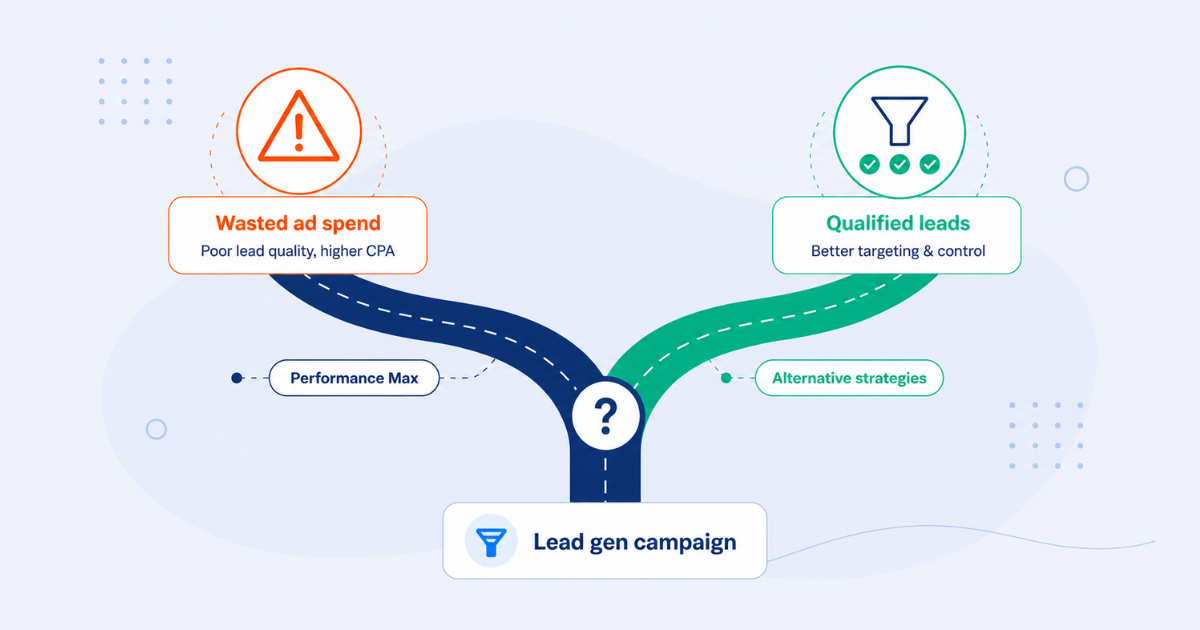
This isn’t an anti-PMax article. Performance Max can work brilliantly for lead generation, but only under specific conditions. When those conditions aren’t met, you’re burning budget while your algorithm learns to find spam. The decision framework most advertisers are missing isn’t about optimization tactics. It’s about knowing when not to use Performance Max in the first place.
In this guide, we’ll cover the five scenarios where PMax consistently fails for lead generation, the minimum thresholds you need before launching, and when to use Demand Gen or Search campaigns instead. If you’re evaluating PMax for your lead gen efforts, this framework will save you months of wasted budget and pipeline damage.
Why Performance Max Works Differently for Lead Generation Than E-Commerce
The Fundamental Attribution Problem
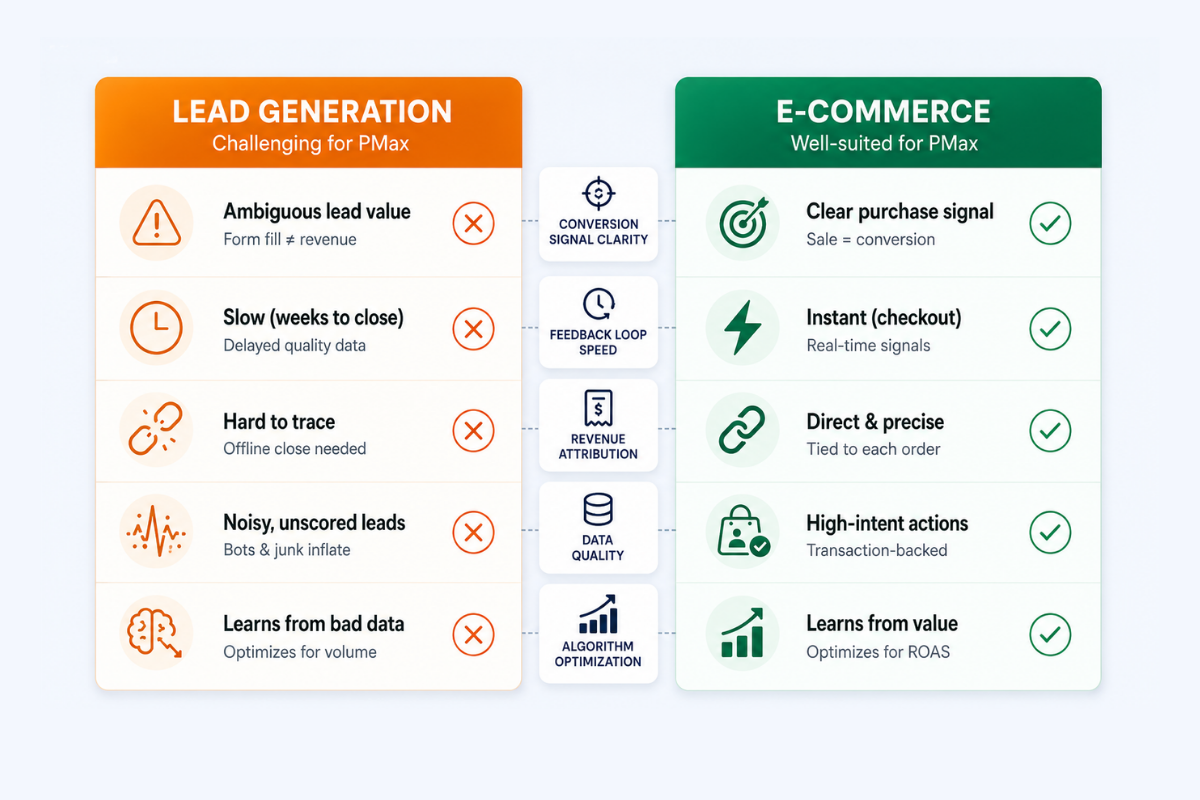
The core difference between e-commerce and lead generation PMax is brutally simple: e-commerce has immediate, clear conversion signals. A purchase equals revenue. The algorithm knows exactly what success looks like.
Lead generation has delayed, fuzzy signals. A form fill does not equal revenue. It might not even equal a real person. Without offline conversion tracking, Performance Max only sees form submissions it cannot distinguish between a qualified SQL and a bot submission or a competitor researching your pricing.
Performance Max requires 4-6 weeks longer to optimize for lead generation compared to e-commerce due to lower conversion volume (Dataslayer, 2025-2026). That’s not a minor delay. It’s an extended period where the algorithm is guessing, and you’re paying for its education.
The algorithm optimizes ruthlessly for what you tell it to optimize for. If you’re only tracking form fills, you’ll get more form fills. Lead quality is invisible to the machine unless you feed it downstream signals.
The “Feedback Loop of Doom” Explained
When PMax optimizes for low-quality conversions, it identifies more audiences that produce them. This reinforces the pattern, creating what we call the Feedback Loop of Doom.
Here’s how it works in practice: A bot fills out your form. Google counts this as a conversion. The algorithm identifies patterns: maybe these “users” browse certain sites, have specific device profiles, or exhibit specific behaviors. PMax finds similar “users.” More bots fill out forms. Your CPA looks great. Your pipeline dies.
Without enhanced conversions in 2026, attribution is 25-35% incomplete due to privacy restrictions (YeezyPay, 2026). This isn’t a minor data gap. It means PMax is making optimization decisions with a quarter to a third of the picture missing.
This is why offline conversion tracking isn’t optional for lead gen; it’s the difference between PMax working and PMax actively harming your business. When you import offline data showing which leads became customers, PMax can finally distinguish signal from noise. Without it, the machine is blind.
The Feedback Loop of Doom: Warning Signs
– Form conversion volume increasing but sales calls decreasing
– CPA dropping while pipeline value stays flat or declines
– Unusual geographic distribution of leads (leads from regions you don’t serve)
– Spike in form fills outside business hours
– Email bounce rates on new leads exceeding 15%
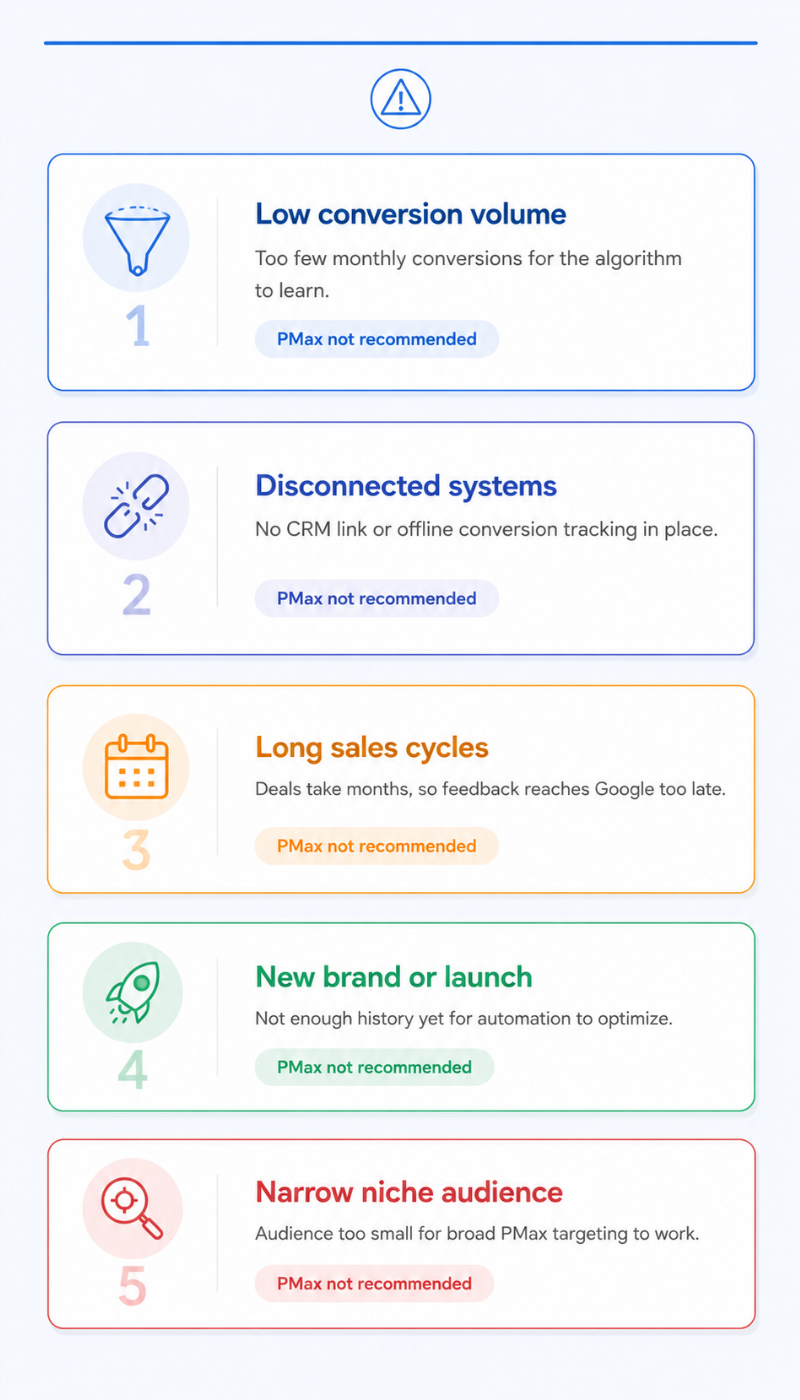
The Five Scenarios Where Performance Max Fails for Lead Generation
Scenario 1: Insufficient Conversion Volume
Google recommends at least 15 conversions in the last 30 days for Performance Max optimization for lead gen; the industry standard is 30+ conversions monthly (Google Ads / YeezyPay, 2025-2026). This isn’t arbitrary; it’s a statistical reality.
PMax’s machine learning needs statistical significance to find patterns. Below 30 monthly conversions, the algorithm is essentially guessing. It’s making optimization decisions based on sample sizes too small to be meaningful.
Do the math: If you’re getting 20 leads per month from all sources combined, PMax doesn’t have enough signal to learn. You’re paying for its education, and class is going to last a very long time.
Consider a niche B2B software company targeting CFOs at manufacturing firms with a $50K ACV product. Their entire addressable search volume might be 500 searches per month. PMax cannot learn effectively in this environment, the data simply isn’t there to optimize against.
Alternative: Standard Search campaigns with manual bidding give you control when volume is low. You make the optimization decisions instead of waiting for an algorithm that lacks sufficient data.
Scenario 2: No CRM Integration or Offline Conversion Tracking

This is the single most common failure mode we see at NAV43. Clients launch Performance Max for lead generation without connecting the algorithm to downstream outcomes, then wonder why their pipeline quality deteriorates.
A B2B advertiser reported their PMax campaign ran at 58% lower cost per qualified lead than comparable Search campaigns, but only when using offline conversion tracking (Freak.Marketing case study, 2025). Without that tracking, PMax was producing volume, not quality.
The technical reality: Proper offline conversion tracking requires CRM automation through HubSpot or similar platforms, GCLID capture on every form submission, and a data pipeline back to Google Ads. Many smaller businesses lack this infrastructure.
Without offline tracking, you cannot tell PMax which leads became customers. You’re flying blind, and the algorithm is flying with you.
Our position is clear: If you don’t have offline conversion tracking today and can’t implement it within 30 days, do not launch PMax for lead generation. You’ll spend the budget teaching an algorithm to find spam.
Scenario 3: Long B2B Sales Cycles Without Micro-Conversion Strategy
PMax’s attribution window has limits. If your average deal takes 90-180 days to close, the algorithm loses the signal. By the time a lead becomes a customer, the campaign that generated it may have changed targeting, budget, or creative multiple times. Attribution becomes meaningless.
The solution is micro-conversions demo booked, proposal sent, and SQL stage reached. But these require sophisticated CRM tracking with properly configured lifecycle stages.
Consider enterprise SaaS with 6-month sales cycles. When a deal closes in June, the PMax campaign that generated the initial form fill in January may have been completely restructured. The algorithm cannot learn from signals that arrive after the learning context has changed.
Without value-based bidding on pipeline stages, PMax optimizes for top-of-funnel volume. Volume that may not correlate with revenue at all.
Alternative: Configure value imports for pipeline stages. Assign $50 to an MQL, $200 to an SQL, and $500 to an opportunity. Give the algorithm intermediate signals it can actually use within its attribution window.
Scenario 4: New Market Entry or Brand Launch Phase
PMax assumes you have existing conversion data to learn from. New markets have no historical signal.
Google’s “Power Pack” strategy, introduced in May 2025, explicitly positions PMax as complementary to Search rather than standalone. You need to search for data first. Google launched campaign-level negative keywords and channel reporting in January 2025, but you still need existing data to know what to exclude.
The bootstrap problem is real: You need conversions to train PMax, but you’re hoping PMax will generate them. This circular dependency kills new market campaigns.
Alternative: Run Search campaigns for 60-90 days. Build conversion data. Understand which keywords convert, which audiences engage, and what the typical customer journey looks like. Then layer in PMax with real intelligence to work from.
Scenario 5: Small, Niche, or Highly Regulated Audiences
Healthcare lead generation with restrictive tracking (HIPAA), financial services with compliance requirements, or hyper-niche B2B with fewer than 1,000 potential customers globally, these scenarios break PMax’s core value proposition.
PMax spreads the budget across all Google inventory: Search, Display, YouTube, Discovery, Gmail. For niche audiences, most of that inventory is waste. For retail and e-commerce PMax campaigns, approximately 90% of the budget goes to Shopping and Search placements (SEO Design Chicago, 2025). For lead gen without Shopping, more budget flows to Display and YouTube, where B2B targeting is fundamentally weaker.
When your customer base is small enough to be listed by name, PMax’s broad reach becomes a liability rather than an asset. You’re paying to show ads to millions of people when your actual market is thousands.
Alternative: Account-Based Marketing approaches, LinkedIn Ads with precise targeting, or highly targeted Search campaigns with exact match keywords give you the control these scenarios demand.
| Scenario | Warning Signs | Alternative Approach |
|---|---|---|
| Insufficient volume | <30 conversions/month | Standard Search with manual bidding |
| No CRM integration | Can’t track leads to revenue | Implement offline tracking first, or use Search |
| Long sales cycles | >60 days to close, no micro-conversions | Value-based bidding on pipeline stages |
| New market entry | <90 days of conversion history | Search-first strategy for 60-90 days |
| Niche/regulated | <1,000 potential customers, compliance restrictions | LinkedIn Ads, ABM, exact-match Search |
The Minimum Thresholds for Performance Max Lead Generation Success
The Data Requirements You Can’t Skip
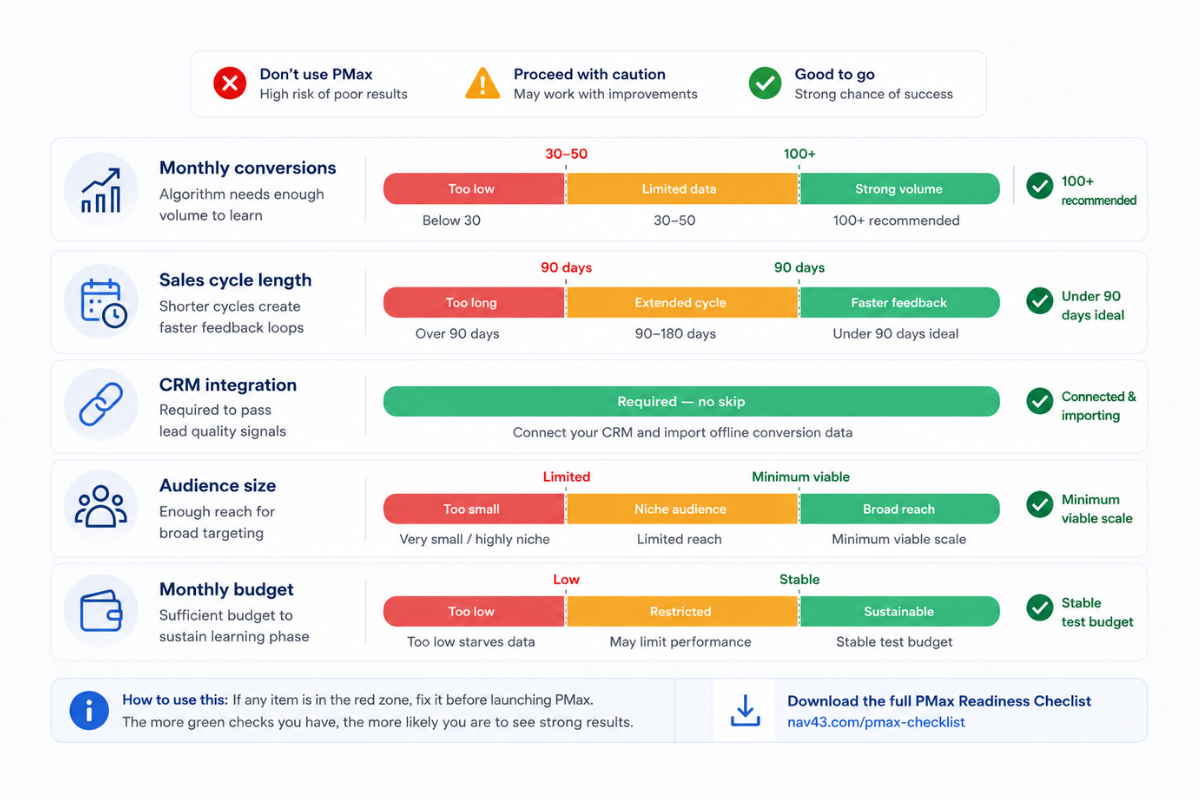
Before launching Performance Max for lead generation, verify each of these requirements:
- At least 30 conversions per month, form fills at minimum, offline conversions preferred
- 4-6 weeks of offline conversion data before PMax can meaningfully optimize for lead quality
- Enhanced conversions implemented and verified. This is non-negotiable in 2026’s privacy environment
- CRM integration capturing GCLID on every lead record
- Value import for at least one downstream conversion action: MQL, SQL, or closed-won
Missing any single item on this list means PMax will operate with incomplete information. Incomplete information leads to incomplete optimization, which leads to wasted budget.
The Budget Reality Check
Average Performance Max CPC is $0.68 compared to Google Ads overall average of $0.85 (SEO Design Chicago, 2025). That efficiency sounds appealing until you realize it’s meaningless if conversions are low-quality.
The Performance Max conversion rate is 1.83%, close to Google Ads’ average of 1.96% (Groas.ai, 2025). At a CPC of $0.68, you need approximately 1,700 clicks to generate 30 conversions. That’s roughly $1,150 per month minimum just to hit the learning threshold.
Here’s the rule of thumb: If your target CPA is $100, you need a $3,000+ monthly budget to generate 30+ conversions for learning (Google Ads / YeezyPay 2025-2026). Below-threshold budgets mean PMax never exits the learning phase. You’re paying for perpetual experimentation with no stable optimization.
The Organizational Readiness Audit
Technology requirements are one part of the equation. Organizational readiness is equally important:
- Does your sales team disposition leads in CRM within 48 hours?
- Can you export conversion value data back to Google Ads weekly?
- Do you have clear definitions for MQL, SQL, and Opportunity stages?
- Is someone accountable for monitoring lead quality trends (not just volume)?
If your sales team takes a week to disposition leads, your offline conversion data is stale by the time it reaches Google. If no one monitors quality trends, the Feedback Loop of Doom operates undetected.
Performance Max Lead Gen Readiness Checklist
– □ 30+ conversions per month from existing campaigns
– □ CRM (HubSpot, Salesforce, etc.) capturing GCLID on all form submissions
– □ Offline conversion tracking implemented and tested
– □ Enhanced conversions verified in Google Ads
– □ Value-based bidding configured for pipeline stages (not just form fills)
– □ 4-6 weeks of historical offline conversion data
– □ Minimum $3,000/month budget (adjust based on your CPA targets) (Google Ads / YeezyPay 2025-2026)
– □ Sales team dispositioning leads within 48 hours
– □ Weekly data sync between CRM and Google Ads
– □ Clear MQL/SQL definitions agreed across marketing and sales
When to Use Demand Gen Instead of Performance Max
The Control vs. Reach Tradeoff
Google introduced the “Power Pack” strategy in May 2025: combining Performance Max, Demand Gen, and AI Max for full-funnel marketing. This signals something important: these campaign types are complementary, not competing.
Demand Gen offers granular audience targeting and creative controls that PMax intentionally removes. For lead generation where you know exactly who you’re targeting, Demand Gen’s precision often beats PMax’s reach.
The tradeoff is simple: PMax maximizes reach at the cost of control. Demand Gen maximizes control at the cost of reach. For B2B lead generation, control usually matters more.
Ideal Demand Gen Scenarios for Lead Generation
Brand awareness phase: When prospects don’t know you yet and you need controlled messaging, Demand Gen lets you craft that narrative. PMax would spread your message unpredictably across inventory you may not want.
Video-centric strategy: When your product requires explanation and YouTube pre-roll is central to your funnel, Demand Gen offers dedicated video placements with targeted audiences.
Top-of-funnel focus: When you’re optimizing for engagement metrics before conversion video views, site engagement, and content consumption, Demand Gen provides cleaner measurement.
Remarketing emphasis: When you want a dedicated creative and bidding strategy for site visitors, Demand Gen keeps this audience separate from prospecting. PMax combines all audiences, making it harder to isolate remarketing performance.
Consider a B2B SaaS launching a new product category. Demand Gen lets you control the narrative with specific audiences’ decision-makers at companies using competitive solutions, for example. PMax would spread the budget unpredictably, showing ads to whoever the algorithm thinks might convert.
When to Layer PMax on Top of Demand Gen
The most effective approach for many B2B advertisers combines both:
- Use Demand Gen to build awareness and initial engagement with controlled audiences
- Use Search to capture high-intent demand
- Layer PMax only when you have sufficient conversion volume and offline tracking
- Treat PMax as incremental reach, not a foundational strategy
Many experts recommend allocating 60-90% of the budget to Search, with PMax for incremental conversions only after Search hits impression share limits. Demand Gen fits into the awareness phase, before users actively search.
When Search Campaigns Should Be Your Primary Lead Gen Strategy
The Case for Search-First
The Adalysis study covering 3,300 campaigns found Search campaigns typically had higher conversion rates than PMax when both were eligible for the same search terms (Adalysis, 2025). This finding challenges the narrative that automation always wins.
Search captures high-intent demand. PMax captures a broader reach. For lead generation, intent usually beats reach.
Here’s the expert consensus we apply at NAV43: Allocate 60-90% of the budget to Search, with PMax for incremental conversions only after Search hits impression share limits. This approach maximizes efficiency where efficiency matters most, then expands reach only when the high-intent market is fully captured.
For more context on how to balance campaign types, our Google Ads PPC management guide covers the strategic foundations.
When Search Alone is Enough
You don’t need Performance Max if:
- Your Search impression share is below 80%. You’re leaving high-intent demand on the table
- You have fewer than 50 conversions per month across all campaigns. Insufficient data for PMax learning
- Your sales cycle exceeds 90 days without micro-conversion tracking. Attribution breaks down
- Compliance restrictions limit audience targeting options. Regulated industries need control
- You’re in a niche industry with well-defined keyword sets. Search captures the entire addressable market
In these scenarios, Search isn’t just sufficient, it’s preferable. PMax adds complexity without adding value.
The Search-to-PMax Graduation Path
If you’re considering PMax for lead generation, follow this phased approach:
Phase 1 (Months 1-3): Search campaigns only. Build conversion data. Understand what keywords drive quality leads, not just volume.
Phase 2 (Month 4): Implement offline conversion tracking. Validate data quality by comparing Google’s reported conversions against CRM records.
Phase 3 (Months 5-6): Launch PMax with 20-30% of the budget as an experiment. Keep Search running at full capacity. Measure PMax against the Search baseline.
Phase 4 (Month 7+): Scale PMax only if qualified lead metrics improve. If the cost per qualified lead is higher in PMax, reduce its budget. Don’t let volume metrics distract from pipeline metrics.
This graduated approach prevents the common mistake of shifting budget to PMax before you have the data infrastructure to support it.
The NAV43 Decision Framework: Should You Use Performance Max for Lead Generation?
The Three-Gate Test
We’ve developed a simple framework for clients evaluating Performance Max for lead generation. Three gates, all must pass.
Gate 1: Data Foundation
Do you have 30+ conversions per month and offline conversion tracking? If no, stop here. PMax cannot learn effectively without this foundation.
Gate 2: Sales Alignment
Does your CRM disposition leads within 48 hours, and can you import conversion values weekly? If no, stop here. Your data pipeline isn’t ready.
Gate 3: Strategic Fit
Is Search at 80%+ impression share, and do you have the budget to maintain Search while adding PMax? If no, stop here. You’re not yet at the point where PMax adds value.
Only proceed if you pass all three gates. Partial compliance means partial results or worse.
The Budget Allocation Formula
Based on Search impression share, here’s how to allocate budget:
| Search Impression Share | Search Allocation | PMax Allocation |
|---|---|---|
| Below 70% | 100% | 0% |
| 70-85% | 80% | 20% |
| 85-95% | 60% | 40% |
| Above 95% | 50% | 50% + consider Demand Gen for awareness |
This formula ensures you maximize high-intent Search demand before expanding to PMax’s broader reach.
What Success Looks Like (and How Long It Takes)
Performance Max requires 4-6 weeks to exit the learning phase for lead gen. Don’t evaluate before 6 weeks of stable data. Early results are noise, not signal.
The success metric isn’t cost per form fill. It’s the cost per qualified lead. If PMax shows a lower CPA but a higher cost per qualified lead, it’s underperforming regardless of surface metrics.
The B2B advertiser case study showed a 58% lower cost per qualified lead, but this was achieved only after proper implementation of offline tracking and sufficient conversion volume. The methodology matters as much as the outcome.
The NAV43 PMax Decision Framework for Lead Generation
GATE 1: DATA FOUNDATION
– 30+ conversions/month? □ Yes □ No
– Offline conversion tracking live? □ Yes □ No
– → Both must be Yes to proceed
GATE 2: SALES ALIGNMENT
– CRM lead disposition <48 hours? □ Yes □ No
– Weekly conversion value import? □ Yes □ No
– → Both must be Yes to proceed
GATE 3: STRATEGIC FIT
– Search impression share >80%? □ Yes □ No
– Budget supports Search + PMax? □ Yes □ No
– → Both must be Yes to proceed
RESULT: Pass all 3 gates = Consider PMax. Fail any gate = Not yet ready.
Common Pitfalls: What We See Go Wrong
Pitfall 1: Launching PMax Before Search is Maximized
Most common mistake: Adding PMax when the search impression share is 50%. This means you’re cannibalizing cheaper, higher-intent traffic. Users who would have clicked your Search ad now see your PMax ad on Display or YouTube instead. Same user, lower intent context, worse conversion rate.
The fix: Maximize Search first. Review your technical SEO foundation to ensure organic and paid work together. PMax is for incremental reach beyond what Search can capture, not a replacement for high-intent capture.
Pitfall 2: Tracking Form Fills Without Quality Signals
Without enhanced conversions in 2026, attribution is 25-35% incomplete (YeezyPay, 2026). Form fills are meaningless if you can’t tell Google which ones became customers.
We see this constantly: Marketing reports a 30% improvement in lead volume. Sales reports no change in pipeline. The disconnect is invisible to the algorithm.
The fix: Don’t launch PMax until offline tracking is verified and data is actively being imported. Test the pipeline: submit a test lead, verify GCLID capture, and confirm the conversion appears in Google Ads within 48 hours.
Pitfall 3: Insufficient Budget for Learning Phase
At $0.68 average CPC and 1.83% conversion rate, you need approximately 1,700 clicks to generate 30 conversions. That’s roughly $1,150 per month just to hit the threshold.
But that’s the minimum threshold. Comfortable learning requires a 2-3x threshold, meaning a $2,500-3,500 monthly budget for stable optimization. Campaigns running at bare minimum learning requirements never fully stabilize.
The fix: If you can’t afford an adequate budget for PMax learning, don’t launch PMax. Concentrate the budget on Search campaigns where you control the optimization decisions.
Pitfall 4: Ignoring the Answers to “When Should I Use Performance Max?”
Google’s official guidance positions Performance Max for advertisers who want to “access all of Google’s inventory from a single campaign” and drive “incremental conversions” (Google Ads Help). The emphasis on “incremental” is key. PMax adds to existing strategies, not replaces them.
Yet advertisers routinely launch PMax as their primary or only campaign type, ignoring the guidance that it’s designed as complementary reach.
The fix: Treat Google’s guidance literally. Are Performance Max ads worth it? Yes, when used for incremental reach after Search is maximized and tracking is robust. Not as a standalone solution.
Pitfall 5: Failing to Monitor Lead Quality Over Time
The Feedback Loop of Doom operates silently. Month 1 leads are decent. Month 2 shows an improving CPA. By Month 3, the algorithm has fully optimized for low-quality patterns, and the pipeline is collapsing. No one connected the dots because no one was watching lead quality trends.
The fix: Weekly quality reviews. Compare Google-reported conversions against CRM-tracked qualified leads. If the ratio deteriorates over time, the algorithm is learning the wrong patterns.
Key Takeaways
- Performance Max requires specific conditions to work for lead generation. Without 30+ monthly conversions, offline tracking, and CRM integration, PMax will optimize for volume, not quality, creating the Feedback Loop of Doom.
- Search campaigns outperform PMax on the same search terms according to the Adalysis study of 3,300 campaigns. Maximize Search before adding PMax.
- The Three-Gate Test protects your pipeline. Pass all three gates (data foundation, sales alignment, strategic fit) before launching PMax for lead gen.
- Budget allocation should follow Search impression share. Don’t add PMax until Search is at 80%+ impression share; otherwise, you’re cannibalizing higher-intent traffic.
- Demand Gen provides control when PMax provides chaos. For brand awareness, video-centric strategies, and regulated industries, Demand Gen’s targeting precision beats PMax’s broad reach.
Next Steps
If you’re running Performance Max for lead generation today, audit your setup against the Three-Gate Test. Check that your offline conversion tracking is working properly and that data is flowing weekly. Review lead quality trends, is the pipeline keeping pace with form volume?
If you’re considering launching PMax for lead gen, start with the Readiness Checklist. Any unchecked box represents a gap that will cost you budget and pipeline quality.
For teams lacking robust CRM automation, build that foundation first. PMax cannot succeed without downstream signals. The algorithm is only as smart as the data you feed it.
Ready to audit your lead generation strategy? Get a Free Growth Plan from NAV43. We’ll analyze your current campaign structure, identify gaps in your tracking infrastructure, and recommend whether PMax, Search, or Demand Gen is the right fit for your specific situation.
Stop guessing. Start deciding with data.
