Every LinkedIn Ads Targeting Option Explained (With Real-World Use-Cases
Last updated: May 2026. LinkedIn ad targeting options give B2B marketers access to over 20 distinct audience filters – from job title and company size to AI-powered Predictive Audiences. According to LinkedIn’s 2024 Marketing Solutions data, campaigns using layered targeting combinations achieve up to 30% higher conversion rates than single-attribute approaches (LinkedIn Marketing Solutions, 2024). With Lookalike Audiences officially deprecated in February 2024 and Predictive Audiences now the standard, understanding which levers to pull has never been more critical.
If you’re running B2B campaigns, LinkedIn’s recent targeting overhaul for ads management might have you scratching your head. The difference between precision and waste often comes down to understanding which targeting combinations work for specific business objectives.
By the end of this guide, you’ll know every dial you can turn, when to turn it, and get a swipe file of targeting recipes that have consistently delivered results for our clients.
What Are LinkedIn Ad Targeting Options?
LinkedIn ad targeting options are the audience filters and segmentation tools available within LinkedIn Campaign Manager that let advertisers reach specific professional audiences. These options fall into three core categories:
- Audience Attributes: Profile-based filters including job title, seniority, company industry, skills, and demographics
- Matched Audiences: First-party data like website visitors, contact lists, and CRM segments
- AI Expansion Layers: Predictive Audiences and Audience Expansion for intelligent scaling
- Boolean Logic: AND, OR, and EXCLUDE operators to refine targeting precision
LinkedIn reports that 80% of B2B leads generated through social media come from their platform (LinkedIn Business, 2024), making mastery of these targeting options essential for any serious B2B marketer.
The Targeting Framework at a Glance
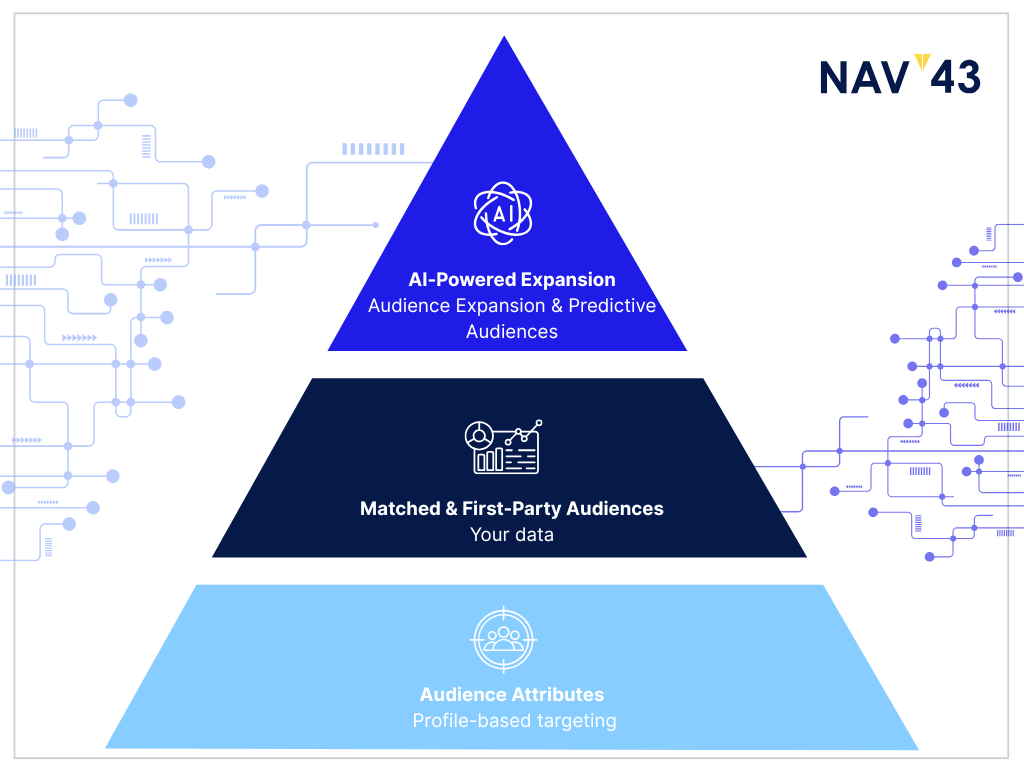
LinkedIn’s targeting ecosystem rests on three core pillars:
- Audience Attributes (profile-based targeting)
- Matched & First-Party Audiences (your data)
- AI-Powered Expansion Layers (Audience Expansion & Predictive Audiences)
These work together to create a comprehensive targeting approach that can be fine-tuned for virtually any B2B campaign objective, from targeted ABM initiatives to broader awareness plays. Understanding these pillars and following best practices can significantly enhance the effectiveness of your LinkedIn ad campaigns. For context on how LinkedIn compares to other paid channels, see our guide on Google Demand Gen vs Performance Max for B2B brands.
Audience Attributes: Profile-Based Targeting Options
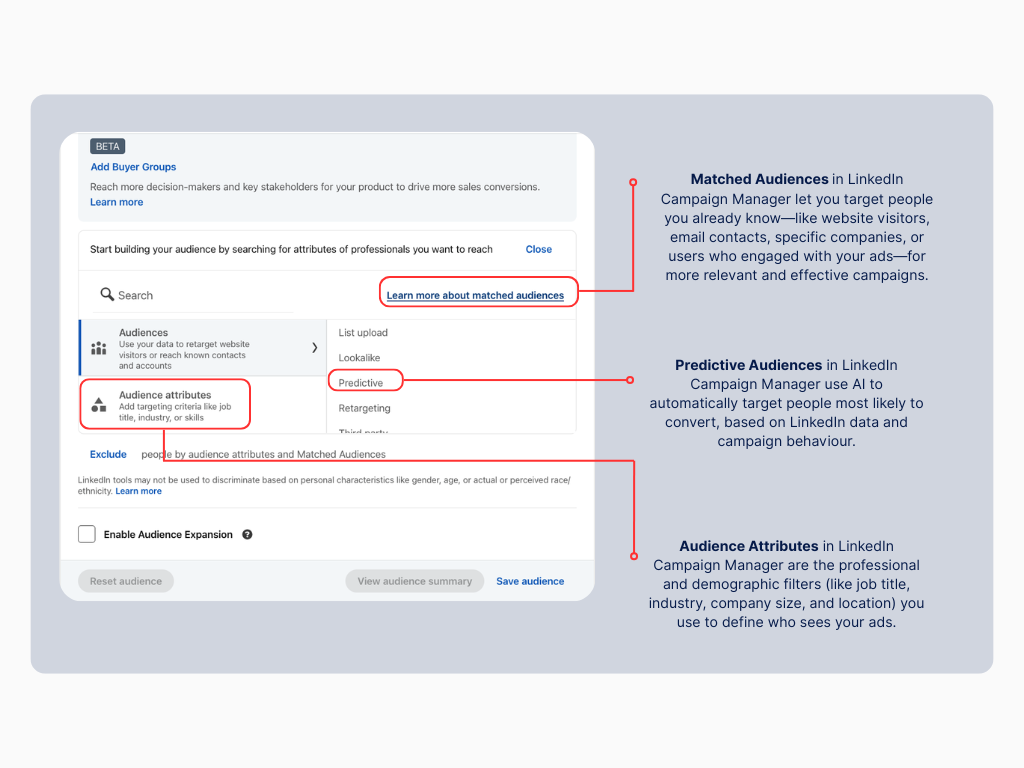
LinkedIn’s profile-based targeting options leverage the professional information users voluntarily share on their profiles. With over 1 billion members globally as of 2025 (LinkedIn About, 2025), this represents the largest professional dataset available for B2B advertising. Let’s break down each attribute and how to use them effectively.
Location Targeting
Definition: Targets members based on their profile location and recent activity signals. This includes targeting based on recent location data, which can be particularly useful for businesses aiming to engage potential clients who have recently visited specific cities or regions.
Minimum Audience Size: Required for all campaigns
Use Case: When planning a cross-border SaaS roadshow, targeting specific cities like Toronto and Boston simultaneously with location-specific messaging and event details typically yields higher registration rates compared to generic geographic approaches.
Language
Definition: Filters members based on their chosen LinkedIn interface language.
Minimum Audience Size: 300 members
Use Case: For multilingual markets like Canada, serving French creative to Quebec prospects while maintaining English messaging elsewhere can improve engagement rates substantially, according to LinkedIn’s internal case studies.
Company Targeting
Definition: Leverages data from over 67 million company pages (LinkedIn, 2025) to filter by size, industry, name, and growth signals. This includes targeting by company industry, which allows advertisers to reach decision-makers within specific sectors.
Minimum Audience Size: 300 members
Use Case: For enterprise SaaS campaigns, targeted ABM approaches to Fortune 100 FinTech companies create opportunities for hyper-relevant messaging that addresses specific industry pain points. Check out our LinkedIn Ads Benchmarks for FinTech for industry-specific performance data.
Job Experience
Definition: Filters based on parsed job history, including title, function, seniority, and years of experience. This includes targeting by job seniority, which helps in reaching users within a company’s hierarchy based on their rank or level of influence.
Minimum Audience Size: 300 members
Use Case: When promoting advanced analytics tools, targeting “VP Growth” and “Director of Analytics” roles with at least 10 years of experience ensures reaching decision-makers with budget authority.
Education
Definition: Targets based on degree type, field of study, and school.
Minimum Audience Size: 300 members
Use Case: For professional development programs, we target STEM master’s graduates who are likely seeking to enhance their technical qualifications.
Demographics
Definition: Includes age and gender as reported or inferred by LinkedIn. This includes targeting by member age and member gender, which are crucial demographic options for audience segmentation.
Minimum Audience Size: 300 members
Use Case: Primarily used for audience research rather than optimization. Demographic breakdowns help refine understanding of who responds to specific messaging types.
Interests & Traits
Definition: Groups members based on content engagement and activity patterns. This includes targeting based on product interests, which can help in reaching specific decision-makers within established groups.
Minimum Audience Size: 300 members
Use Case: For AI tool promotions, targeting the “Artificial Intelligence” interest cluster has consistently outperformed broader technology targeting, according to LinkedIn’s 2024 Benchmark Report.
Groups
Definition: Targets members of specific LinkedIn Groups.
Minimum Audience Size: 300 members
Use Case: For revenue operations tools, sending Message Ads to members of “RevOps & RevGenius” groups typically yields higher conversion rates versus standard job function targeting, according to case studies presented at LinkedIn Marketing Labs.
Matched & First-Party Audiences: Leverage Your Data
First-party data often represents your most valuable targeting asset. LinkedIn offers several ways to activate this data. Effective audience creation is crucial for leveraging first-party data to its fullest potential.
Website Retargeting
Definition: Pixel-based audience building that segments visitors by URL patterns and timeframes, ensuring you reach users who are already engaged with your content.
Best For: Mid-funnel nurturing campaigns
Example: SaaS companies often show case study videos to pricing page visitors, which Social Media Examiner reports can increase demo requests by up to 40% compared to cold targeting.
Engagement Retargeting
Definition: Captures users who’ve interacted with your content through video views, Lead Gen Form opens, or ad clicks, allowing you to re-engage them effectively.
Best For: Warm audience nurturing
Example: LinkedIn’s own marketing team found that users who watched more than 75% of product demo videos and then received follow-up ads with customer testimonials converted at a significantly higher rate. For more on video strategy, see our LinkedIn Video Ads Benchmarks guide.
Contact List Uploads
Definition: Target existing contacts by uploading CSV files or syncing with HubSpot.
Best For: Account-based marketing and customer upsells
Example: HubSpot’s case studies show that segmenting existing users to promote premium features often results in 3x higher ROI on ad spend compared to cold acquisition campaigns. Learn how to connect these systems in our LinkedIn and HubSpot integration guide.
Company List Uploads
Definition: Target specific organizations by uploading company names or domains.
Best For: Account-based marketing at scale
Example: According to DemandGen Report (2024), enterprise software companies targeting their top prospect companies with tailored messaging achieve significantly higher engagement than using industry targeting alone.
Additionally, targeting company connections can help optimize B2B marketing efforts by narrowing down the audience to relevant decision-makers.
CRM Segments via Conversions API
Definition: Dynamically push segments from your CRM based on lifecycle stage or behavior.
Best For: Pipeline acceleration
Example: Leading CRM providers report that targeting “opportunity” stage prospects with ROI calculators can contribute to shorter sales cycles for enterprise deals.
Predictive Audiences (2025)
Definition: AI-powered audience expansion that builds propensity models from seed lists. This replaced Lookalike Audiences in February 2024.
Best For: Finding net-new prospects similar to your best customers
Example: Early adopters in the LinkedIn Marketing Partner program report that using seed lists of enterprise customers who converted quickly can create Predictive Audiences that deliver similar-quality leads at competitive acquisition costs.
AI & Expansion Layers: Scale With Intelligence
LinkedIn has invested heavily in AI-powered targeting features to help advertisers expand reach while maintaining relevance. These features allow for audience-based targeting, ensuring that your ads reach the most relevant users.
Audience Expansion
Definition: Automatically includes members “similar” to your selected targeting attributes.
When to Use: Enable for awareness campaigns and disable for precise ABM initiatives.
Pro Tip: Marketing experts find that enabling Audience Expansion works best when you’ve already built a highly targeted core audience that might be too small for sufficient delivery.
Predictive Audiences vs. Old Lookalikes
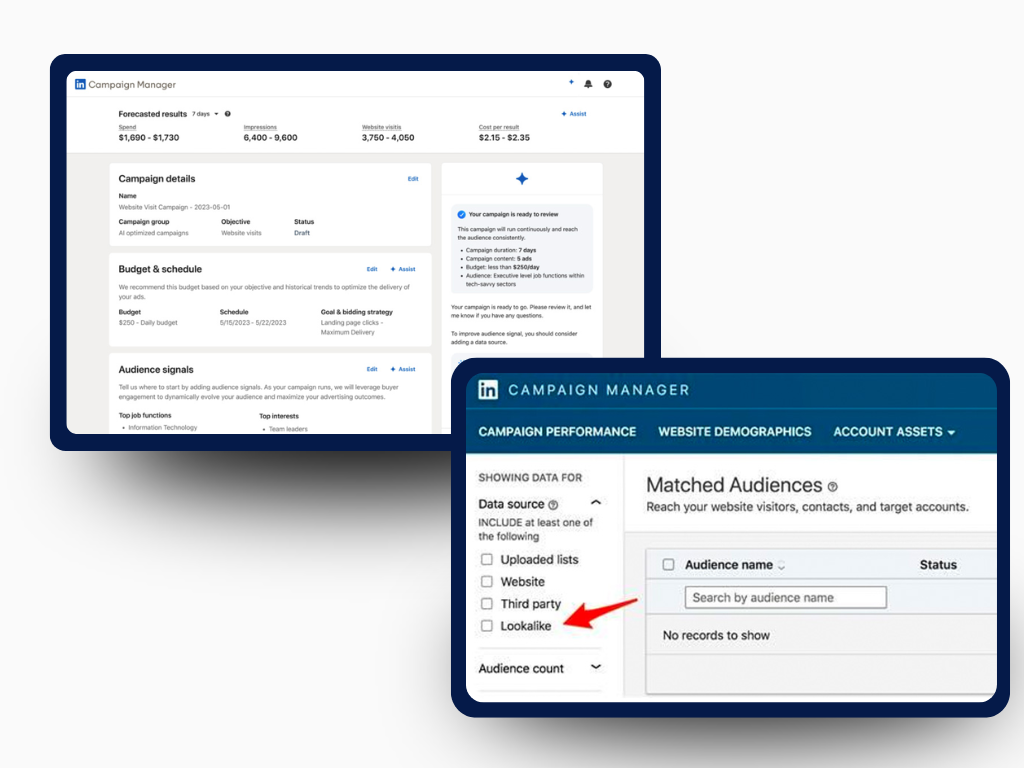
Predictive Audiences represents a significant upgrade over the deprecated Lookalike Audiences:
| Feature | Predictive (2025) | Lookalike (legacy) |
| Source data | AI model using seed list + on-platform engagement | Seed list demographics only |
| Size control | Manual percentage slider | Fixed at 1x seed size |
| Performance monitoring | Detailed breakdown reporting | Limited visibility |
| Availability | All B2B campaign objectives | Deprecated February 2024 |
Key Insight: According to DXI’s LinkedIn Ads Benchmark Report (2024), Predictive Audiences have delivered up to 30% higher quality leads (measured by sales qualification rate) compared to the old Lookalike Audiences, while maintaining similar CPLs.
Combining Options: Boolean Logic 101
Mastering LinkedIn targeting means understanding how to combine options effectively. This target-based approach ensures that your campaigns reach the appropriate audience for better engagement and efficiency.
AND Logic (Narrows Audience)
Combining attributes with AND logic creates a more precise audience where members must match all conditions.
Example: Targeting Technology Industry AND Director-level Seniority AND Marketing Function creates a highly qualified but smaller audience.
OR Logic (Expands Audience)
Using OR logic between similar attributes creates a broader pool while maintaining relevance.
Example: Targeting “CMO” OR “VP Marketing” OR “Head of Marketing” job titles captures the same decision-maker level across different organizational structures.
EXCLUDE Logic (Refines Audience)
Strategic exclusions can improve campaign efficiency:
- Exclude competitors to prevent wasted impressions
- Exclude employees unless running internal campaigns
- Exclude previous converters for acquisition campaigns
Pro Tip: When working with multiple audiences, use the audience preview tool to estimate potential overlap and adjust accordingly.
“Targeting Recipes” Gallery
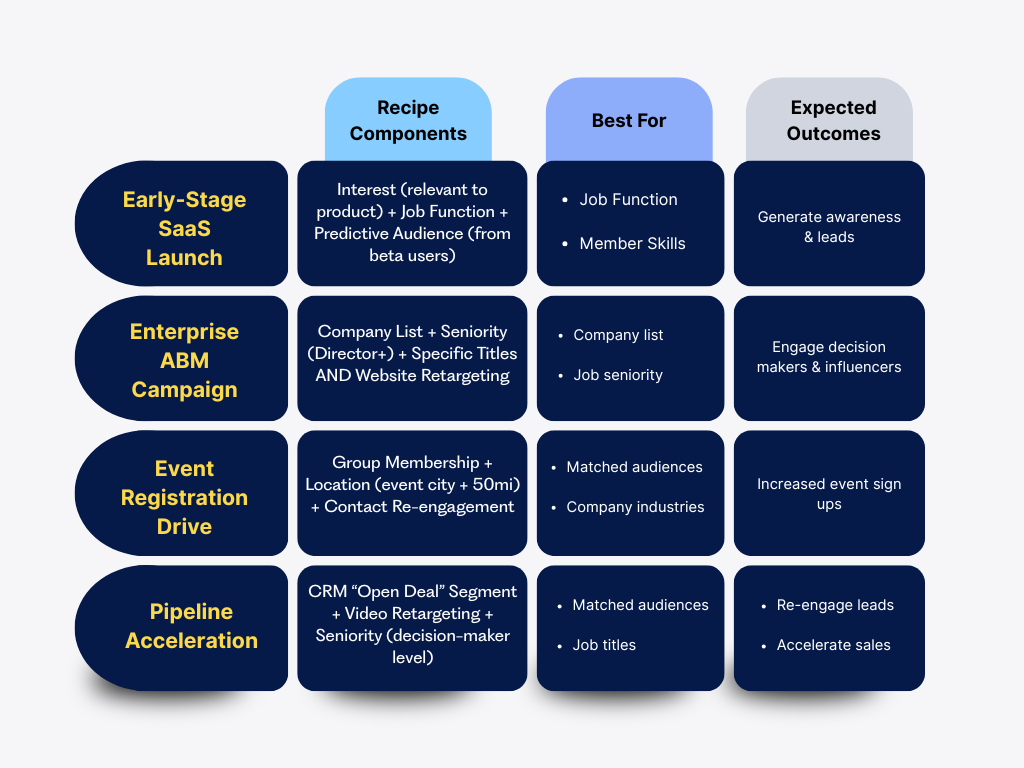
These proven combinations deliver consistent results for specific campaign objectives:
Early-Stage SaaS Launch
Recipe: Interest (relevant to product) + Job Function + Predictive Audience (from beta users)
Why It Works: This combination balances interest-based targeting with functional relevance, then scales through AI-driven expansion.
Success Story: LinkedIn’s Advertising Solutions team documented a case where a marketing automation company used this approach and achieved CTRs well above the platform benchmark, generating significant qualified leads in their launch month.
Enterprise ABM Campaign
Recipe: Company List + Seniority (Director+) + Specific Titles AND Website Retargeting
Why It Works: Creates a precise target at key accounts while capturing both cold prospects and those already showing interest.
Success Story: According to case studies presented at B2B Marketing Exchange (2024), this approach has helped enterprise software companies generate qualified opportunities at target accounts within a single quarter, with a significant portion of conversions coming from the retargeting segment.
Event Registration Drive
Recipe: Group Membership + Location (event city + 50mi) + Contact Re-engagement
Why It Works: Combines location relevance with demonstrated interest and past engagement.
Success Story: Event marketing platform Bizzabo reported that tech conferences using this targeting approach consistently fill a higher percentage of available seats at a lower cost-per-registration compared to broader targeting methods.
Pipeline Acceleration
Recipe: CRM “Open Deal” Segment + Video Retargeting + Seniority (decision-maker level)
Why It Works: Focuses resources on prospects actively in the sales process while ensuring content reaches decision-makers.
Success Story: Forrester’s research on B2B buying cycles (2024) indicates that targeted LinkedIn campaigns can contribute to reduced sales cycle lengths for enterprise deals, with significant influence on pipeline acceleration.
Measurement & Optimization
Beyond setup, ongoing optimization is crucial for LinkedIn campaign success. For benchmarks specific to your industry, check our 2025 LinkedIn Ads Benchmarks for SaaS & Tech Marketers.
Performance Monitoring
Break out performance metrics by attribute in Campaign Manager to identify which segments are driving results.
Benchmark: Aim for CTR of 0.55% or higher for layered audiences. If you’re seeing below 0.4%, consider revising your targeting or creative approach.
Creative Rotation
Fatigue hits faster in professional networks. Rotate creative assets every 2-3 weeks to maintain Relevance Score.
Pro Tip: LinkedIn’s own research shows performance improvements of up to 35% by implementing systematic creative rotation calendars for long-running campaigns (LinkedIn Marketing Solutions, 2024).
Budget Allocation
Allocate at least 70% of budget to your proven targeting combinations, but reserve 30% for testing new approaches.
Putting It All Together
LinkedIn’s targeting ecosystem offers over 20 different dials to turn, but success doesn’t come from using all of them simultaneously. Strategic combinations aligned with specific campaign objectives consistently outperform scattered approaches.
According to LinkedIn’s own research, the most successful advertisers start with a clear understanding of their ideal customer profile, translate that into a targeted combination of attributes, and then use data to refine and optimize over time.
Ready to take your LinkedIn targeting to the next level? Book a targeting strategy call with our team to discuss your specific needs. By mastering LinkedIn advertising, you can significantly enhance your marketing efforts and achieve your business objectives.
-
LinkedIn deprecated Lookalike Audiences in February 2024. Use Predictive Audiences instead for similar functionality with improved performance.
-
Aim for at least 300 members for Matched Audiences and a minimum of 50,000 for Predictive Audience seed lists to ensure sufficient reach.
-
Yes, members may overlap between your core targeting and expansion. Check the Breakdown › Delivery report to understand the contribution of each segment.
-
Upload your company domain as a list in the Exclusions section of your campaign setup.
-
Not currently. Predictive Audiences replace all other attribute targeting when selected. Generally speaking, understanding the nuances of LinkedIn's targeting options can help you troubleshoot common issues more effectively.
